Seleccionar una organización
How to deploy an application to CloudHub using Connected App functionality
Fecha de publicación: Jul 18, 2025
Tarea
GOAL
With the Connected Apps feature, developers can delegate access to applications that use APIs to interact with Anypoint Platform programmatically. While some might use the Connected Apps feature to build CI/CD pipelines, others can productize additional third-party use-cases on top of Anypoint Platform. This functionality was supported as a part of Mule Maven Plugin 3.4.0.
Pasos
- About connected apps refer to documentation
- https://docs.mulesoft.com/access-management/connected-apps-overview
- https://docs.mulesoft.com/access-management/connected-apps-developers#create-an-app
- https://docs.mulesoft.com/release-notes/mule-maven-plugin/mule-maven-plugin-3.4.0-release-notes#features-and-functionality
- Deployment documentation https://docs.mulesoft.com/mule-runtime/4.3/deploy-to-cloudhub
- Connected apps can be used solely for authentication and can be used for automation / Jenkins / CICD/ maven deployment
- Create a connected app by using below article
- Creating connected app and getting the bearer token example
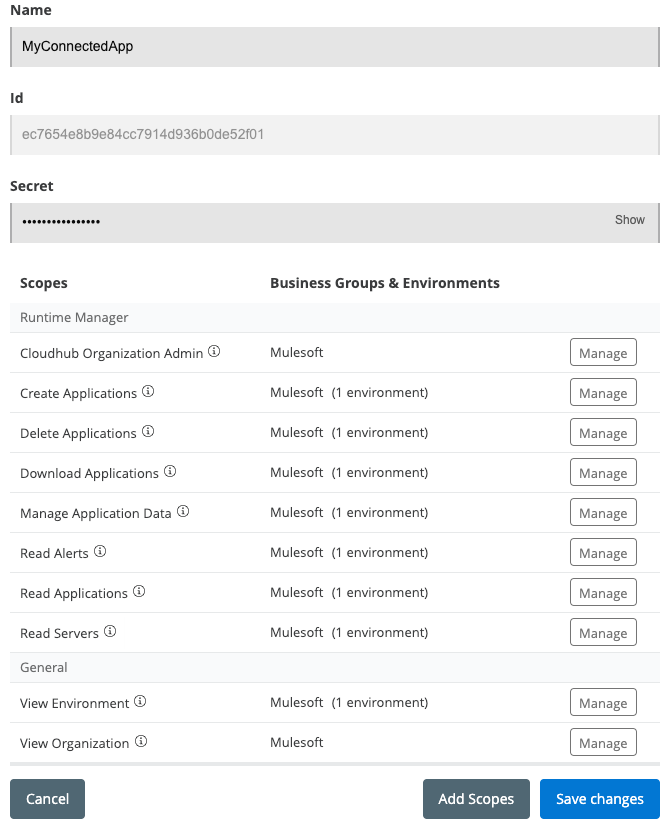
- You need to add all the scopes listed in the below screenshot which includes Cloudhub Organization Admin, Read Servers, View Environment and View Organization permissions as seen below.
- Update your Mule application
- Make changes to your application pom.xml by following this doc for authentication method "Connected Apps".
<mule.maven.plugin.version>3.5.4</mule.maven.plugin.version>
...
<plugins>
    <plugin>
        <groupId>org.mule.tools.maven</groupId>
        <artifactId>mule-maven-plugin</artifactId>
        <version>${mule.maven.plugin.version}</version>
        <extensions>true</extensions>
        <configuration>
            <cloudHubDeployment>
                <uri>https://anypoint.mulesoft.com</uri>
                <muleVersion>${app.runtime}</muleVersion>
                <businessGroup>PATH_TO_BG</businessGroup>
                <applicationName>APP_NAME</applicationName>
                <environment>ENVIRONMENT</environment>
                <region>REGION</region>
                <workers>1</workers>
                <workerType>MICRO</workerType>
                <properties>
                    <key>value</key>
                </properties>
                <connectedAppClientId>CONN_APP_CLIENT_ID</connectedAppClientId>
                <connectedAppClientSecret>CONN_APP_CLIENT_SECRET</connectedAppClientSecret>
                <connectedAppGrantType>client_credentials</connectedAppGrantType>
                <objectStoreV2>true</objectStoreV2>
            </cloudHubDeployment>
        </configuration>
    </plugin>
    ...
</plugins>
...
- Get the client_id and client_secret values from the connected app you created earlier.
- As mentioned in the deployment documentation, go to the project folder in terminal prompt and run the mvn command to deploy.
mvn clean package deploy -DmuleDeploy
Número del artículo de conocimiento
001115971
¿Resolvió este artículo su problema?
¡Háganos saber cómo podemos mejorar!
