Vælg en organisation
Mule OAuth 2.0 Provider for Mule 4
Udgivelsesdato: Sep 16, 2025
Opgave
GOAL
The goal of this article is to provide a sample Mule OAuth Provider application and also explain the steps on how to use Anypoint Platform Client application credentials (Client Id/Secret) to generate the token against the Mule OAuth provider Module.
This is applicable for Mule 4.x runtime at the time of writing.
Prerequisites:
- Understand how OAuth Dance works.
- Understand what is Mule OAuth Provider module.
Trin
Step-1
Download the attached working sample app below and import it into Studio 7.8+ and Mule 4.3.0.
Step-2
In the "mule-oauth-provider.xml" file, you will notice the below OAuth Provider configuration
<!--  OAuth2 Configuration -->

	<oauth2-provider:config name="OAuth2_Provider_Config" doc:name="OAuth2 Provider Config"
                      doc:id="be1ac703-cca1-4401-998c-daf8a23d9081"
                      listenerConfig="HTTP_Listener_config"
                      clientStore="client-os"
                      supportedGrantTypes="CLIENT_CREDENTIALS"
                      providerName="DU-OAuth2Provider"
                      resourceOwnerSecurityProvider="resourceOwnerSecurityProvider"
                      clientSecurityProvider="clientSecurityProvider">

		<oauth2-provider:token-config tokenStore="token-os" >
			<oauth2-provider:refresh-token-strategy >
				<oauth2-provider:multiple-refresh-tokens />
			</oauth2-provider:refresh-token-strategy>
		</oauth2-provider:token-config>

	</oauth2-provider:config>
In the above OAuth Provider configuration, there are 2 Object stores referred
- client-os, this object store is used to store the Client credentials (Id/Secret)
- token-os, this object store is used to store the tokens generated for a Client.
<!--  Object store for storing tokens -->

	<os:object-store name="token-os" doc:name="Object store" doc:id="41420e17-f3e8-4c83-83f2-fefe8d3f50b4"
                     entryTtl="86400" expirationIntervalUnit="HOURS"/>

<!--  Object store for storing clients -->

	<os:object-store name="client-os" doc:name="Object store" doc:id="f3c359b8-6312-4fbb-b2b9-f10f9309bb73"
                     entryTtl="86400" expirationIntervalUnit="HOURS"/>
There are 2 ways clients can be managed to generate tokens within the Mule OAuth provider Module
- By implementing a logic using the "create-client" operation provided by the Mule OAuth Module, example as below, to create a client which returns the client_id/secret.
<flow name="mule-oauth-providerFlow" doc:id="ea870a7b-19c8-4139-966b-e70d09f31a78" >
<http:listener doc:name="Listener" doc:id="4d7a49ad-6473-4cfc-a922-45cdfbd8a98e" config-ref="HTTP_Listener_config" path="/createClient"/>
<logger level="INFO" doc:name="Logger" doc:id="10bba67a-3b6e-4e74-a977-f60c79651078" message='"Creating client with client Id - " + #[attributes.headers.client_id]'/>
<oauth2-provider:create-client doc:name="Create client" doc:id="c4525c04-2cc2-4d85-a832-f8639defcd01"
config-ref="OAuth2_Provider_Config"
clientId="#[attributes.headers.client_id]"
type="CONFIDENTIAL"
secret="#[attributes.headers.client_secret]"
clientName="#[attributes.headers.client_name]"
description='#[""]' principal='#[""]' redirectUris='#[["mulesoft.com"]]'
authorizedGrantTypes='#[["CLIENT_CREDENTIALS"]]'
failIfPresent="true"/>
<logger level="INFO" doc:name="Logger" doc:id="420c737c-7ce4-4659-be6e-93d3e79edef0" message=""Client created with client Id - " + #[attributes.headers.client_id]'"/>
<set-payload value="Client Created" doc:name="Set Payload" doc:id="0f972eb7-ce13-4c85-afe5-1483e8db127a" />
</flow>
- Another way is to reuse the Client Applications created in the Anypoint Platform for token generation.
To reuse the Anypoint Platform Client Application, the below steps need to be added to the OAuth Provider application (Sample app already contains the below)
a) Add the below Object Store Config
<os:config name="agwConfig" doc:name="ObjectStore Config" doc:id="03e6fb8a-946c-44b6-b4e5-b3acc26b4433">
     <agw-client-store:connection/>
</os:config>
b) Refer to the above "agwConfig" in "client-os" as below
<!--  Object store for storing clients -->

	<os:object-store name="client-os" doc:name="Object store" doc:id="f3c359b8-6312-4fbb-b2b9-f10f9309bb73"
                                   config-ref="agwConfig" entryTtl="86400" expirationIntervalUnit="HOURS"/>
c) Add the below dependency in pom.xml
<dependency>
    <groupId>com.mulesoft.anypoint</groupId>
    <artifactId>api-gateway-oauth2-client-store</artifactId>
    <version>1.0.1</version>
    <classifier>mule-plugin</classifier>
</dependency>
d) Add below schema location and namespace present in your Mule element
xmlns:agw-client-store="http://www.mulesoft.org/schema/mule/agw-client-store"

http://www.mulesoft.org/schema/mule/agw-client-store http://www.mulesoft.org/schema/mule/agw-client-store/current/mule-agw-client-store.xsd
The above 4 steps are needed for the application to build, so that it can use the Anypoint Platform Client Applications Id/secret for token generation.
Step-3
Deploy the application to Cloudhub and make sure to add the below property
anypoint.platform.client_id=master_org_client_id
anypoint.platform.client_secret=master_org_client_secret
Important: Master Org client_id and client_secret should be used to link our provider to our master org (Top of the tree).
Since the Client contracts are stored at the master org level, this is required so the client store can access the contact information.
Note: If you fail to provide the above information you might get errors as below
There was an error on the Mule Runtime while deploying the application mule-oauth-provider.
Error: NoSuchBeanDefinitionException: No qualifying bean of type 'com.mulesoft.mule.runtime.gw.api.client.ClientsRepository' available:
expected at least 1 bean which qualifies as autowire candidate. Dependency annotations: {@javax.inject.Inject()}
For On-Prem deployments, please make sure the below the properties are added in wrapper.conf
anypoint.platform.client_id=Business_Group_client_id
anypoint.platform.client_secret=Business_Group_client_secret
Please use Business Group client_id and client_secret to make sure the client app info can be fetched from Anypoint Platform.
Step-4
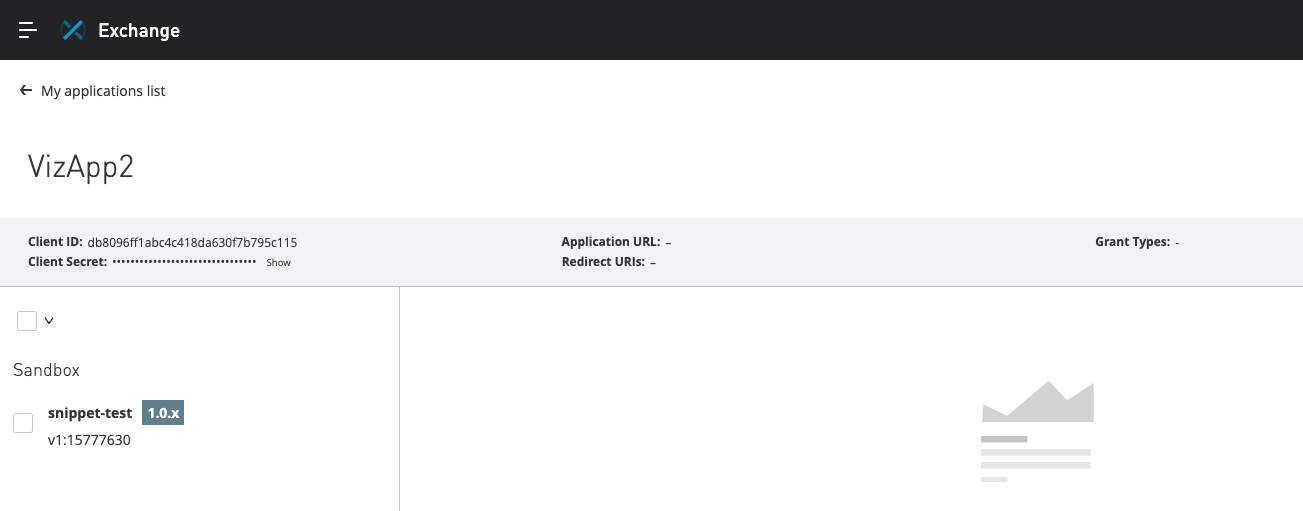
To re-use an existing Client application Id/Secret
From Exchange -> My Applications page, select a Client Application (For Example as below screenshot)
Using the Client Id/Secret from the above, call the below Curl command request to generate token
curl --location --request POST 'http://xxx-mule-oauth-provider.sg-s1.cloudhub.io/token' \
--header 'client_id: <CLIENT_ID>' \
--header 'client_secret: <CLIENT_SECRET>' \
--header 'grant_type: CLIENT_CREDENTIALS'
This should return a response like
{"access_token":"BXFy0_kAg_rf3XgTabj_87W0QE7VxkEyuUw-DLpA6nJ4Itxt4Ij8468 s4PLxgHHCM_y9MxUleqddfmOBsOngvQ","refresh_token":"11L0qWUlqfVcDp-iH-qB12 M2E8CbPrmOstdRdlXCUn3c8SiKo4Jy3YBScDxuYZrTMH7F1-09pT2-u2bAdRCxcg","scope ":"READ","token_type":"Bearer","expires_in":3600}
Then using the "access_token" above you can call the validate operation of Mule OAuth provider as below
curl --location --request GET 'http://xxx-mule-oauth-provider.sg-s1.cloudhub.io/validate' \
--header 'Authorization: Bearer BXFy0_kAg_rf3XgTabj_87W0QE7VxkEyuUw-DLpA6nJ4Itxt4Ij8468 s4PLxgHHCM_y9MxUleqddfmOBsOngvQ'
This should return a response like
{"expires_in":2440,"scope":"READ","client_id":"<CLIENT_ID>"}
Related Articles:
- Mule 4 OAuth 2.0 Provider and Client Application Guide
- Mule 3 - OAuth-Provider-and-Share-the-Access-Tokens-among-Fabric-Workers-in-Cloudhub
Other Info
- Only grant type supported by Mule OAuth Provider are documented in OAuth 2.0 Grant Types
Please note REFRESH_TOKEN grant type is not supported
OAuth 2.0 specifies the following grant type methods for requesting a token:

AUTHORIZATION_CODE

IMPLICIT

RESOURCE_OWNER_PASSWORD_CREDENTIALS

CLIENT_CREDENTIALS
Yderligere ressourcer
Java 17: link
Vidensartikelnummer
001115998
Løste denne artikel dit problem?
Giv os besked, så vi kan forbedre os!
