Organisation auswählen
Using Presigned URL to Upload Objects to S3 With Encryption
Veröffentlichungsdatum: Aug 1, 2025
Aufgabe
GOAL
Upload objects to S3 with encryption (AES256/KMS) using the created presigned URL.Schritte
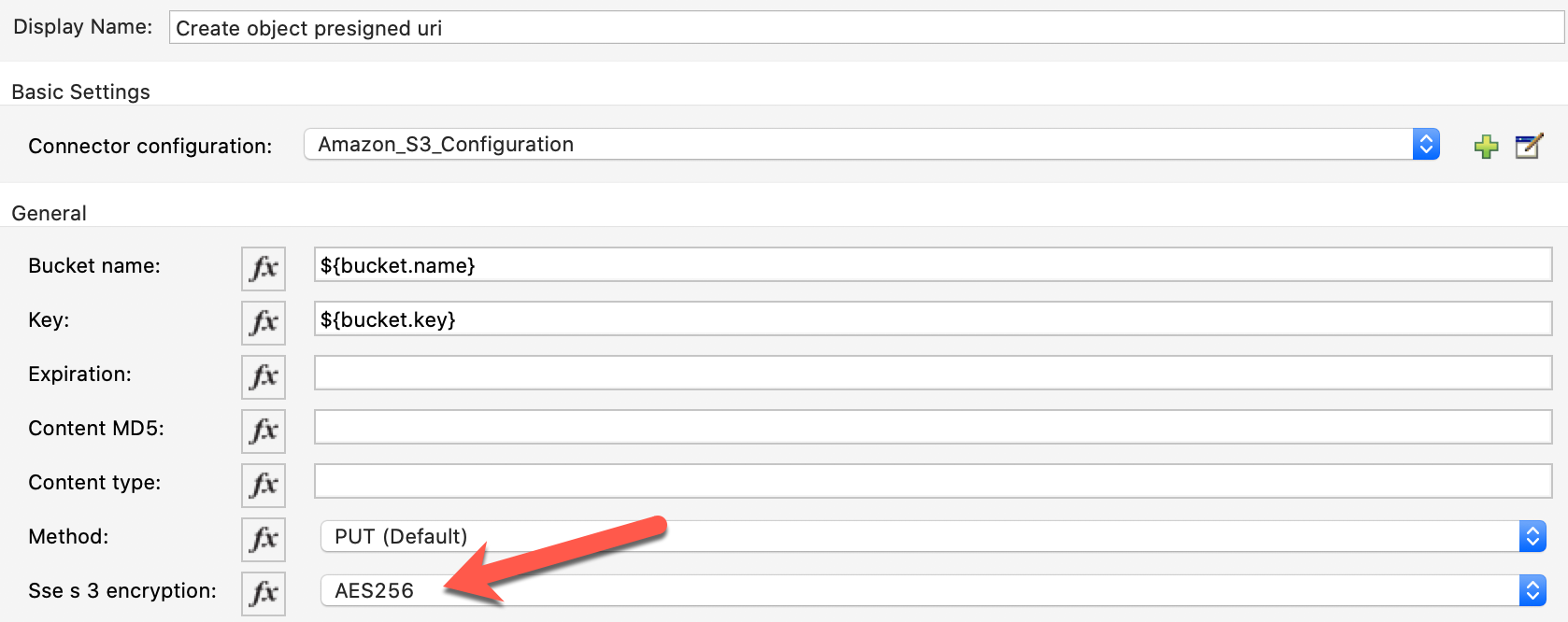
2. Deploy the Mule application and trigger it to retrieve the presigned URL.
Sample response for presigned URL:
https://ah-bucket-1.s3.ap-southeast-2.amazonaws.com/ah-bucket-test-2?X-Amz-Security-Token=...
3. To upload with no encryption, send a PUT request to the presigned URL.
> curl -L -X PUT <presigned_url> \
--data 'payload'
When using encryption, additional headers are required.
For AES256:
curl -L -X PUT <presigned_url> \
-H "x-amz-server-side-encryption: AES256" \
--data 'payload'
For KMS:
curl -L -X PUT <presigned_url> \
-H "x-amz-server-side-encryption: aws:kms" \
--data 'payload'
External Resources
Specifying the AWS Key Management Service in Amazon S3 Using the REST API
Nummer des Knowledge-Artikels
001116011
Konnten Sie Ihr Problem mithilfe dieses Artikels lösen?
Geben Sie uns Feedback, damit wir uns verbessern können.
