組織を選択
How to set networkaddress.cache.ttl and networkaddress.cache.negative.ttl in CloudHub environment
公開日: Aug 5, 2025
タスク
GOAL
Java runtime caches both of successful and unsuccessful DNS name lookups results. Each of the caches gets a time-to-live (TTL) setting controlling how long a DNS lookup result can be held in the cache.
According the Java Doc, the following security properties are configurable for the caching policy:
- networkaddress.cache.ttl - TTL setting for successful DNS name lookups (default 30s on CloudHub worker)
- networkaddress.cache.negative.ttl - TTL setting for unsuccessful DNS name lookups (default 10s on CloudHub worker)
The settings are stored in $JAVA_HOME/jre/lib/security/java.security, which can be modified in On-Premises environment. However it is hard to change the settings in CloudHub environment as a normal user doesn't have direct access to CloudHub workers.
Hence, this article is about how to adjust Java caching policy for DNS name lookups in CloudHub environment.
ステップ
- Please download the zip, extract the jar and pom files, and add the jar file to maven local repository by the command:
mvn install:install-file -Dfile=mulesoftsupport-tools-1.0-SNAPSHOT.jar -DpomFile=mulesoftsupport-tools-1.0-SNAPSHOT.pom
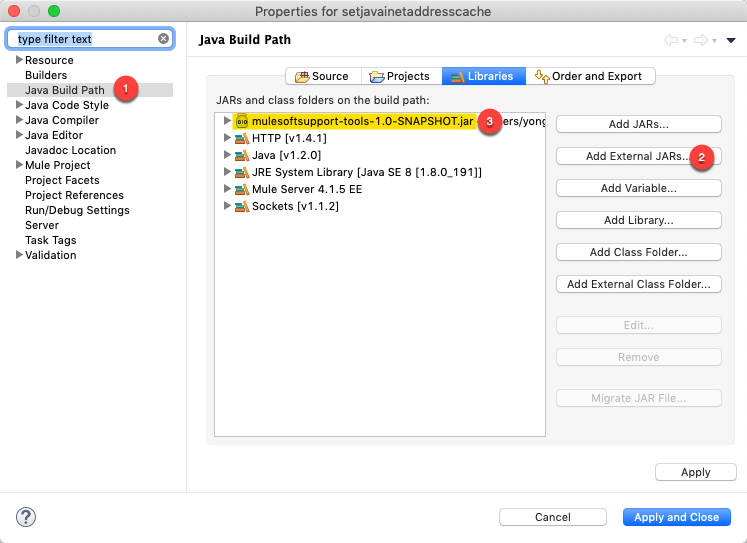
- For Mule 3 non-maven project, add mulesoftsupport-tools-1.0-SNAPSHOT.jar to the project Referenced Libraries
- For Mule 3 maven project or Mule 4 maven project, please add the following dependency to project pom.xml
<dependency>
	<groupId>com.mulesoftsupport.tools</groupId>
	<artifactId>mulesoftsupport-tools</artifactId>
	<version>1.0-SNAPSHOT</version>
</dependency>
- For Mule 3 project, add the following flow to the Mule application configuration. Please adjust parameters of setInetAddressCacheTTL method to expected networkaddress.cache.ttl and networkaddress.cache.negative.ttl values, for example, the follow script adjust the 2 values to 60s and 20s:
<flow name="setjavainetaddresscacheMule3Flow">
    <poll doc:name="Poll">
         <fixed-frequency-scheduler frequency="86400" timeUnit="SECONDS" startDelay="10"/>
         <logger message="Setting InetAddress Cache TTL - #[com.mulesoftsupport.tools.App.setInetAddressCacheTTL(60,20)]" level="INFO" doc:name="Setting InetAddress Cache TTL"/>
    </poll>
    <logger message="Result: networkaddress.cache.ttl = #[sun.net.InetAddressCachePolicy.get()]   networkaddress.cache.negative.ttl = #[sun.net.InetAddressCachePolicy.getNegative()]" level="INFO" doc:name="Print Result"/>
</flow>
Note: a deployable Mule 3 app is available in the zip file for test purpose - For Mule 4 project, add the following flow to the Mule application configuration. Please adjust parameters of setInetAddressCacheTTL method to expected networkaddress.cache.ttl and networkaddress.cache.negative.ttl values, for example, the follow script adjust the 2 values to 60s and 20s:
<flow name="setjavainetaddresscacheMule4Flow" doc:id="4d40099d-3be8-462a-92d4-59108fbb2096" >
	<scheduler doc:name="Scheduler" doc:id="25125c75-22c3-46e2-b5e9-24a7d4872698" >
		<scheduling-strategy >
			<fixed-frequency frequency="100" timeUnit="DAYS"/>
		</scheduling-strategy>
	</scheduler>
	<logger level="INFO" doc:name="Setting InetAddress Cache TTL" doc:id="c360ee8f-63c7-4c3d-9a13-4485e112088f" message='#[%dw 2.0
output application/java
---
"Setting InetAddress Cache TTL - " ++ java!com::mulesoftsupport::tools::App::setInetAddressCacheTTL(60, 20)]'/>
	<logger level="INFO" doc:name="Print Result" doc:id="026e7276-d2af-4496-a0f9-4152a6d51378" message='#[%dw 2.0
output application/json
---
"Result: networkaddress.cache.ttl=" ++ java!sun::net::InetAddressCachePolicy::get() ++ " networkaddress.cache.negative.ttl=" ++ java!sun::net::InetAddressCachePolicy::getNegative()]'/>
</flow>
Note: a deployable Mule 4 app is available in the zip file for test purpose - Redeploy the application to CloudHub
- The application will adjust networkaddress.cache.ttl and networkaddress.cache.negative.ttl settings after startup.
REFERENCE
DNS Resolution Cache In Mule Runtime And HTTP Connector
Disclaimer: the artifacts and source in the attached zip file are provided as reference for your own usage and they are not part of the official Mule product so their use will be considered as custom implementation made by the customer.
ナレッジ記事番号
001116017
この記事で問題は解決されましたか?
ご意見をお待ちしております。
