組織を選択
How to set custom transaction IDs in Mule 4 flow for Business Events
公開日: Mar 2, 2024
タスク
GOAL
To enable events tracking and use a custom ID for a given flow in Mule 4. As per the Mule-4-business-events there is only a check-box to enable this for a flow and no way to customise the ID used as was the case in Mule 3 Business Events.
ステップ
In order to set the transaction ID for Business events then you will need to utilise the new connector "Set Transaction ID" available in the palette, which will allow you to specify the value for the Transaction ID as was previously the case in the Flow configuration in Mule 3. There is no need to enable the default event tracking check-box on the flow when utilising this connector.
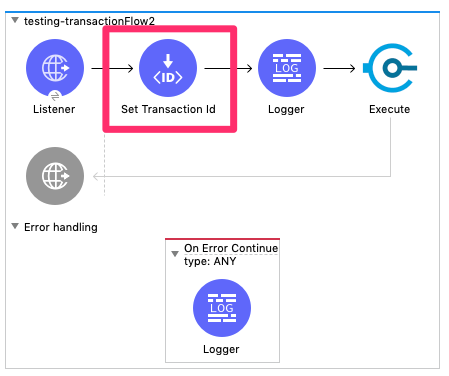
This is configured exactly as was the case with Mule 3, you may enter an expression to create a unique ID for each flow invocation or a static value as is required.
Do be aware that this connector should be placed near the start of the flow, otherwise if an exception is raised in the flow before this connector is triggered it may result in the transaction logging a default ID instead of the custom ID configured.
ナレッジ記事番号
001116036
この記事で問題は解決されましたか?
ご意見をお待ちしております。
