組織を選択
Microsoft OneDrive Connector | How to set "Item properties" parameter when using the Create Drive Item operation
公開日: Mar 2, 2024
ステップ
QUESTION
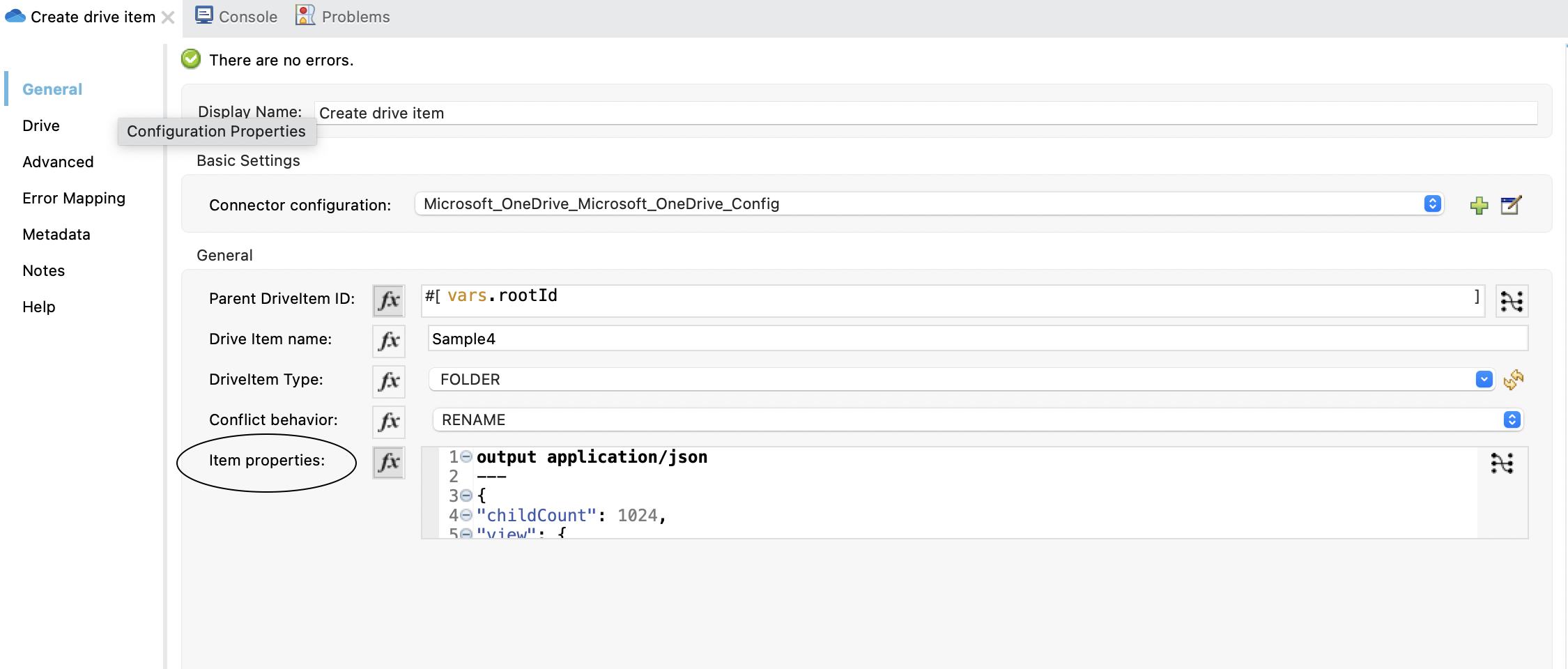
What is the significance of the "Item properties" Parameter in the "Create Drive Item" operation of Microsoft OneDrive Connector and How to pass the value?
https://docs.mulesoft.com/microsoft-onedrive-connector/1.1/microsoft-onedrive-connector-reference#parameters-6
ANSWER
Item properties parameter in the Create Drive Item operation is for a folder or file metadata settings described here:- for folders: https://learn.microsoft.com/en-us/graph/api/resources/folder?view=graph-rest-1.0
- for files: https://learn.microsoft.com/en-us/graph/api/resources/file?view=graph-rest-1.0
ADDITIONAL INFORMATION
So in the Anypoint studio the "Item properties" are of a map type, so they can be filled for example (in the case of folder type) with:output application/json
---
{
"childCount": 1024,
"view": { "@odata.type": "microsoft.graph.folderView" }
}
And the request to Microsoft OneDrive Graph API will be formed as below by the connector:For example:
{
"name":"New Folder",
"folder": {
"childCount": 1024,
"view":{"@odata.type":"microsoft.graph.folderView"}
},
"@microsoft.graph.conflictBehavior":"rename"
}
ナレッジ記事番号
001116105
この記事で問題は解決されましたか?
ご意見をお待ちしております。
