Sélectionner une organisation
How to find DEBUG package for Anypoint Connectors, Modules and Transports
Date de publication: Jul 18, 2025
Tâche
GOAL
This article talks about how to find the right package name and enable the DEBUG for Anypoint Connectors.Étapes
- Go through the below articles to see if the DEBUG package names are already listed for the Anypoint Connector that you are looking for.
Enable DEBUG Logging for Anypoint Connector/Module Packages in Mule 4
How to enable verbose logging for different Mule Modules in Mule 3
How to enable verbose logging for different Mule Modules in Mule 3
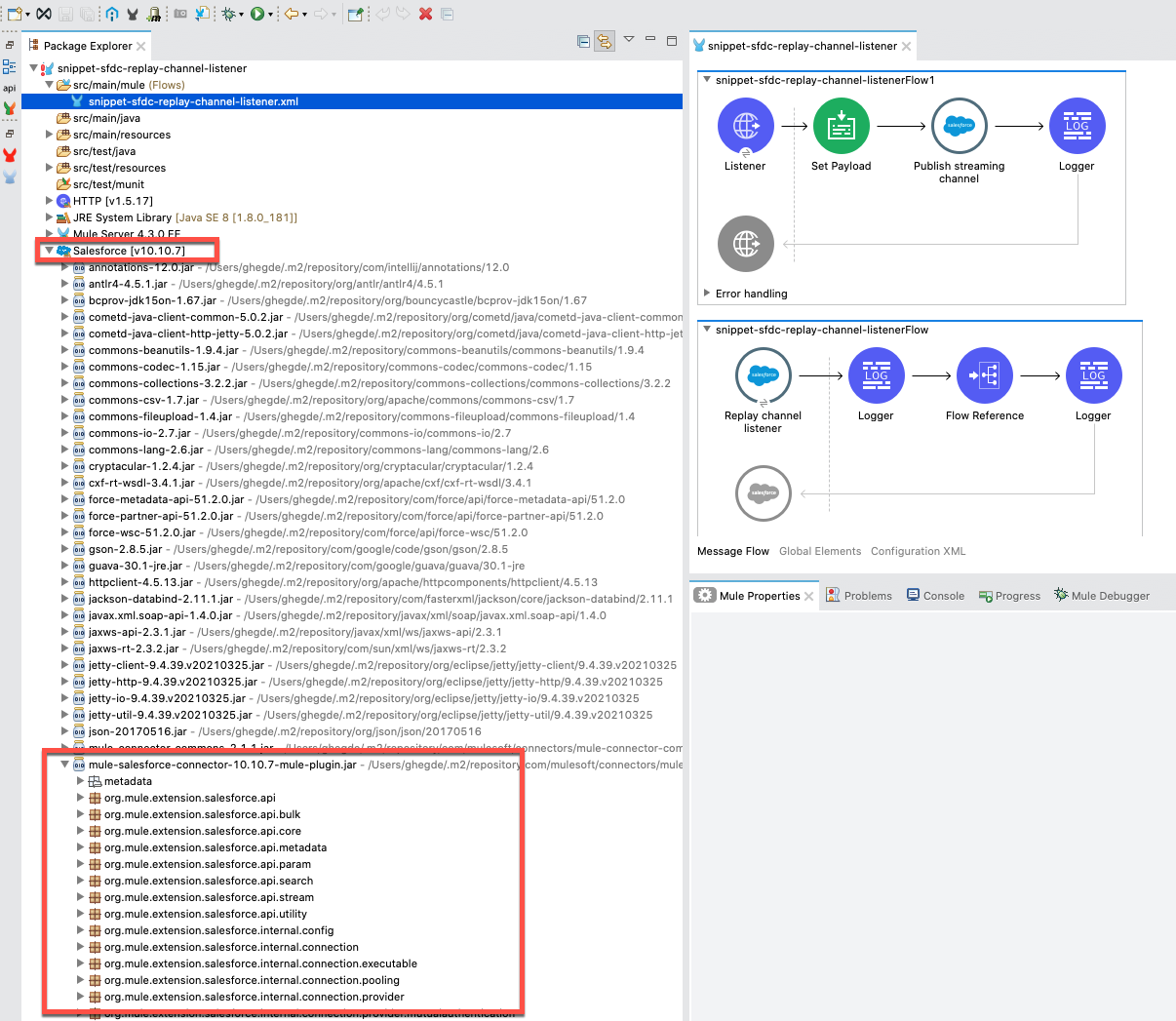
- If the DEBUG package name is not listed in the above articles, then please add the dependency to the project in Anypoint Studio and you will see the relevant jar files are downloaded to the project. Look for the jar file that looks like below, expand the jar to see the java package names.
“mule-<module name>-module-<version>-mule-plugin.jar” for mule 4 module
“mule-<connector name>-connector-<version>-mule-plugin.jar” for mule 4 connector
“mule-transport-<transport name>-<version>.jar” for mule 3 transports
“mule-module-<module/connector name>-<version>.jar” for mule 3 connector/module
Example:
The below screenshot shows the mule-salesforce-connector-10.10.7-mule-plugin.jar for the salesforce connector and its package name “org.mule.extension.salesforce” that can be used to enable DEBUG logs.
Note: There are some exceptions where this rule does not help identify the right DEBUG package. In such cases, please search for any dedicated knowledge articles available. If you need any further help, please contact MuleSoft Support.
Numéro d’article de la base de connaissances
001116183
Cet article a-t-il résolu votre problème ?
Dites-nous ce que nous pouvons améliorer !
