Выбрать организацию
Sample Mule Application To Bulk Download Raw Data in Anypoint Monitoring
Дата публикации: Jul 14, 2025
Задача
GOAL
When this article was created (April 2021), manually download every single log file is the only way to collect logs from Anypoint Platform Raw Data. However, the log files for the application are split into small file size and could have hundreds of files for short period. This article demonstrates a sample Mule application that has the capability to download a CloudHub application's log files by specifying a specific date.
Please note this application makes use of Monitoring Archive API
Docs
PREREQUISITE
1. Obtain environment id where the application is deployed. For detailed instructions, refer knowledge article "How to get the Environment ID"2. Obtain Anypoint Platform user's access token who has permission to download raw data. For detailed instructions, refer knowledge article "How to generate your Authorization Bearer token for Anypoint Platform"
3. Anypoint Studio 7.x with Mule Runtime 4.3.0 or higher version which is used to run the sample mule application
Действия
2. Imported into Anypoint Studio 7.x
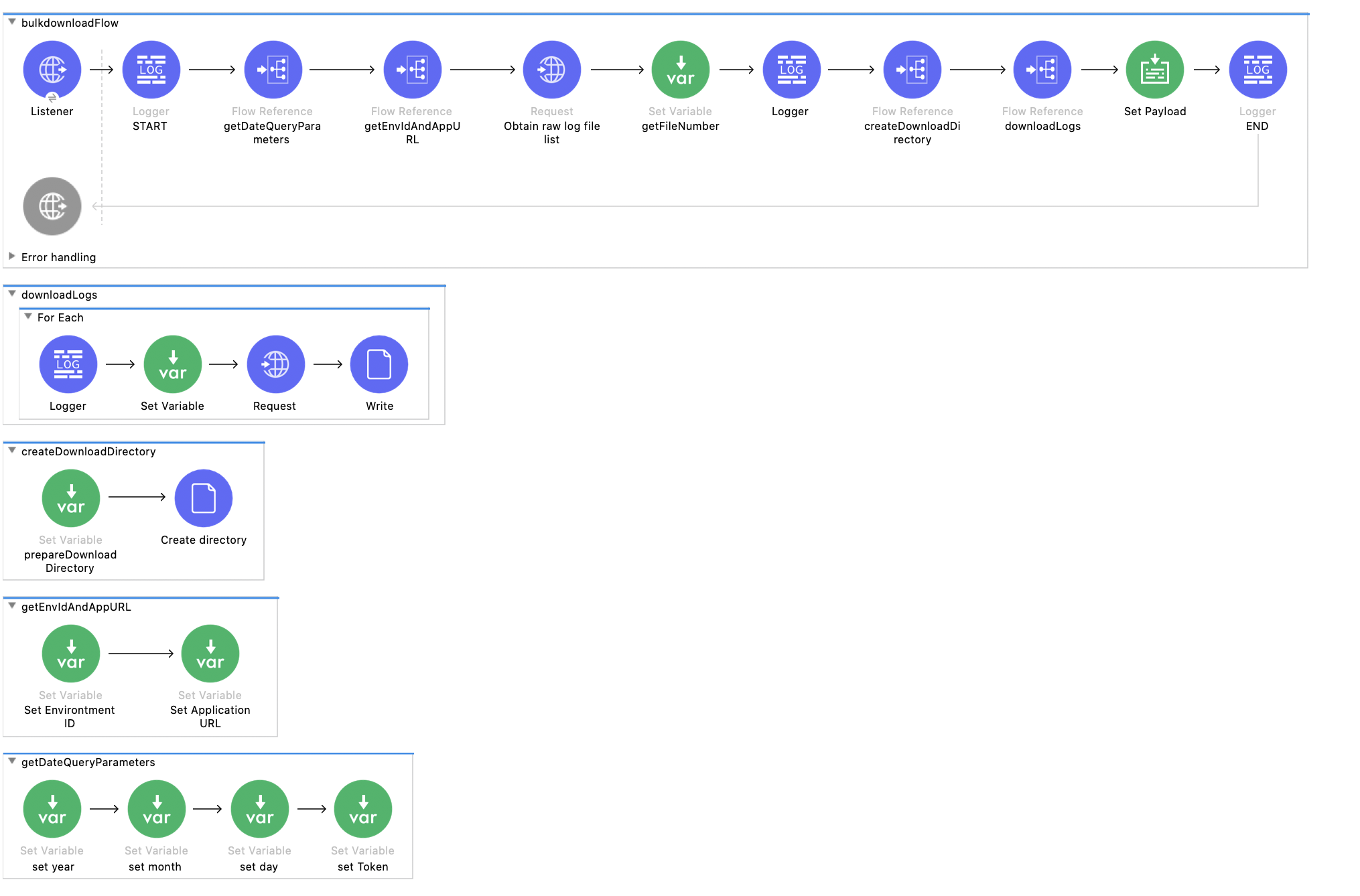
3. Check Mule application flow structure to understand how the bulk log download works
4. Run the application in the Anypoint Studio
5. Invoke the bulk download by sending curl request with required query parameters as the following
Query Parameters
- appURL: the application's URL showed in the Runtime Manager page which used to identify the application
- year : year part of date
- month : month in year. Valid value ranges from 01 to 12
- day : day in month. Valid value ranges from 01 to 31
- token : authorization token generated by prerequisite 2
- envID : environment id obtained by prerequisite 1 (not Organization ID, neither Business Unit ID)
curl "http://localhost:8081/download?envID=2abc2ce6-cce6-463b-afaa-a1979e3ffd29&appURL=helloworld-xjs-titanium.us-w2.cloudhub.io&year=2021&month=04&day=27&token=28297036-c7da-43c0-9a8c-15518baa5244"
6. Following log will be printed during the log download process to indicate begin and finish of the log download
INFO  yyyy-MM-dd hh:mm:ss,mmm [[MuleRuntime].uber.xx: [bulkdownload].bulkdownloadFlow.CPU_LITE @4ac81462] [processor: bulkdownloadFlow/processors/0; event: 42e2e320-a977-11eb-9669-acde48001122] org.mule.runtime.core.internal.processor.LoggerMessageProcessor: Start Raw Data Download
INFO  yyyy-MM-dd hh:mm:ss,mmm [[MuleRuntime].uber.xx: [bulkdownload].bulkdownloadFlow.BLOCKING @7ca4ce3a] [processor: bulkdownloadFlow/processors/9; event: 42e2e320-a977-11eb-9669-acde48001122] org.mule.runtime.core.internal.processor.LoggerMessageProcessor: End Raw Data Download
7. You can enable debug log by changing log4j2.xml log4j2 configuration file under /src/main/resources as the following
FROM
<AsyncLogger name="org.mule.runtime.core.internal.processor.LoggerMessageProcessor" level="INFO"/>
TO
<AsyncLogger name="org.mule.runtime.core.internal.processor.LoggerMessageProcessor" level="DEBUG"/>
8. When log download finished, the response of the request will contain the directory where log files are downloaded. The path is determined by application's working directory and timestamp which can avoid file duplication.
EXAMPLE
21 log file(s) downloaded in /Applications/7_AnypointStudio.app/Contents/Eclipse/plugins/org.mule.tooling.server.4.3.0.ee_7.3.5.202010151511/mule/./.mule/bulkdownload/2021430154525
NOTE
- The API used in the application to download logs may change at any time
- This application does not guarantee all logs will be downloaded as error handling is not in place and corner case is not considered
- This application does not have proper TLS context configured. It is not recommended to deploy this application anywhere except local to avoid data breaches and possible security issues.
- This application has the rate limits enforced by Monitoring Archive API.
Disclaimer: This example is provided as a reference for your own usage and is not to be considered a MuleSoft product. This example should be considered as a custom solution. The custom solution is not a Supported MuleSoft product.
Дополнительные ресурсы
Номер статьи базы знаний
001116258
Эта статья решила вашу проблему?
Оставьте свой отзыв, чтобы мы могли стать лучше!
