Organisation auswählen
Salesforce Connector: Retrieve Attachment From ContentVersion
Veröffentlichungsdatum: Aug 1, 2025
Aufgabe
GOAL
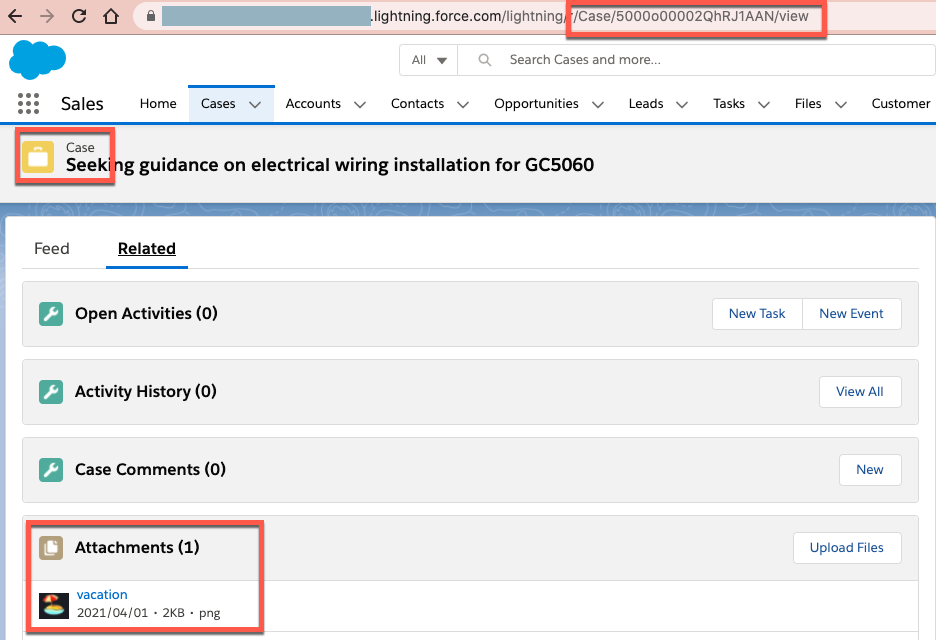
On Salesforce, I have an attachment file on a Case record.How can I save the Attachment file as a local file?
For example, there is a Case record(Id:5000o00002QhRJ1AAN can be seen in the URL), it has an Attachment file "vacation.png".
Schritte
The ContentVersion object has a field FirstPublishLocationId, which is the ID of the location. In this case, it is the Case record Id.
To understand the object structure, you can perform SOQL something like below. The 5000o00002QhRJ1AAN is the Case record Id.
SELECT FirstPublishLocationId,PathOnClient,VersionData FROM ContentVersion WHERE FirstPublishLocationId = '5000o00002QhRJ1AAN'The result: It returns the file name "vacation.png" and base64 content.
| FirstPublishLocationId | PathOnClient | VersionData |
|---|---|---|
| 5000o00002QhRJ1AAN | vacation.png | iVBORw0KGgoAAAANSUhEUgAAAC4AAAApCAYAAA..... |
1) Create Salesforce Query
This query is to get the Id from ContentVersion, which is the Case's attachment.
The "5000o00002QhRJ1AAN" is the sample Case record ID.
<salesforce:query doc:name="Query" doc:id="xxx" config-ref="Salesforce_Config">
<salesforce:salesforce-query >select Id from ContentVersion where FirstPublishLocationId = '5000o00002QhRJ1AAN'</salesforce:salesforce-query>
</salesforce:query>
2) Create Salesforce Retrieve "ContentVersion" object
This is to get "ContentVersion" record by using the obtained Id in step 1). So that you will get the PathOnClient(in this example "vacation.png") and VersionData(the base64 content, in this example the content of the "vacation.png")
<ee:transform doc:name="Transform Message" doc:id="xxx" >
<ee:message >
</ee:message>
<ee:variables >
<ee:set-variable variableName="ContentDocumentId" ><![CDATA[%dw 2.0
output application/java
---
payload.Id]]></ee:set-variable>
<ee:set-variable variableName="FieldList" ><![CDATA[%dw 2.0
output application/java
---
['PathOnClient,VersionData']]]></ee:set-variable>
</ee:variables>
</ee:transform>
<salesforce:retrieve type="ContentVersion" doc:name="Retrieve" doc:id="xxx" config-ref="Salesforce_Config">
<salesforce:retrieve-request ><![CDATA[#[{
fields: vars.FieldList,
ids: vars.ContentDocumentId
}]]]></salesforce:retrieve-request>
</salesforce:retrieve>
3) Transform the base64 content to Binary
Since the contents of the Attachment are stored in the VersionData column that is in base64 format, convert it into Binary.
<ee:transform doc:name="Transform Message" doc:id="xxx">
<ee:message>
</ee:message>
<ee:variables >
<ee:set-variable variableName="VersionData" ><![CDATA[%dw 2.0
import * from dw::core::Binaries
output application/octet-stream
---
fromBase64(payload[0].VersionData as String) as Binary]]></ee:set-variable>
</ee:variables>
</ee:transform>
4) Save the contents as a local file.
<file:write doc:name="Write" doc:id="xxx" path="#[payload[0].PathOnClient]" config-ref="File_Config" >
<file:content ><![CDATA[#[vars.VersionData]]]></file:content>
</file:write>
Nummer des Knowledge-Artikels
001116297
Konnten Sie Ihr Problem mithilfe dieses Artikels lösen?
Geben Sie uns Feedback, damit wir uns verbessern können.
