組織を選択
Using Custom Truststore and Keystore in RTF Applications
公開日: Dec 23, 2025
タスク
GOAL
We are deploying applications in runtime fabric and we are facing an issue in passing the truststore details. In standalone runtime we place our truststore under mule home and refer it in code but how we can configure it in RTF and refer in applications?ステップ
Applications are running in containers within RTF. The apps do not have access to files on the host. Therefore, they can't use truststore or keystore files placed in a directory on the host. The solution is to package the truststore file (usually .jks format) with the application into the same jar file and deploy it in RTF.
ADDITIONAL INFORMATION
- Runtime application is not integrated with Secrets Manager so can't import keystore or truststore from Secrets Manager for applications
- API Manager is integrated with Secrets Manager so an API Proxy is able to use keystore or truststore in Secrets Manager, referring to the document Build HTTPS API Proxies
- Configure TLS with Keystores and Truststores
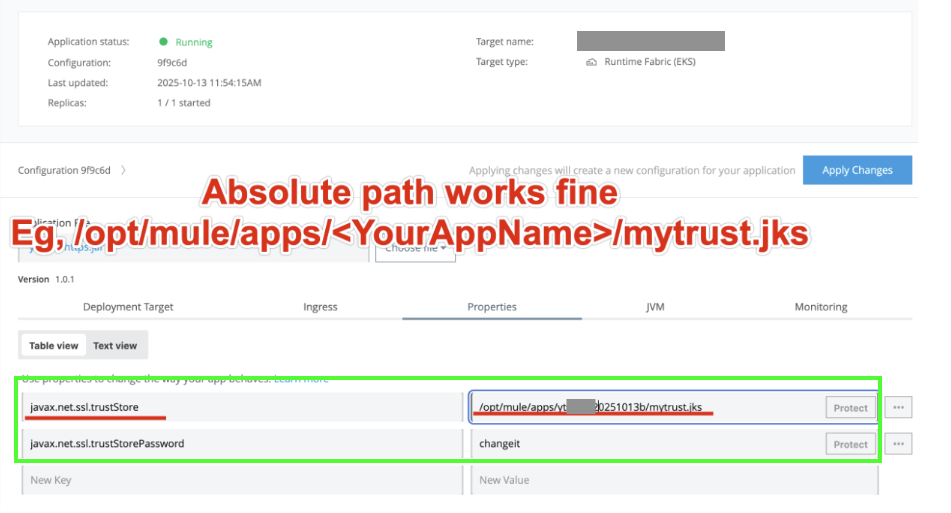
- Another approach is to override the default Java truststore using the properties below.
* javax.net.ssl.trustStore=/path/to/your/custom-cacerts
* javax.net.ssl.trustStorePassword=yourpassword
NOTE: You must ensure that the custom truststore file is included in the application JAR.
If mTLS is required when using a self-signed certificate, you can configure the keystore in the same way as the truststore by setting javax.net.ssl.keyStore and javax.net.ssl.keyStorePassword
ナレッジ記事番号
001116330
この記事で問題は解決されましたか?
ご意見をお待ちしております。
