Выбрать организацию
How to Use Encrypted SSH Key for SFTP Connector In CloudHub for Mule 4
Дата публикации: Aug 6, 2025
Действия
CONTENTS
You are using Mule 4 and need to use SFTP connector in CloudHub. However, your organization has a requirement that the SSH key must be encrypted inside the JAR file and decrypted only inside the worker. However, the SFTP connector always fails the connectivity test in CloudHub and the app doesn't start. Here is a way to make it work.
STEPS TO FOLLOW
1. Please take this sample app sftp-ch-example.jar and import it into Studio 7.7.0 or newer with Mule 4.3.0+2. Fill in the Crypto PGP configuration and add the private and public keys per this guide: How to Generate PGP Keys From Scratch With GPG Keychain and Then Decrypt/Encrypt Files in Mule 4
3. The only difference for this app is to ensure "passphrase" is referenced as a variable. You will be passing in the variable at deployment time so that PGP decryption will be enabled then.
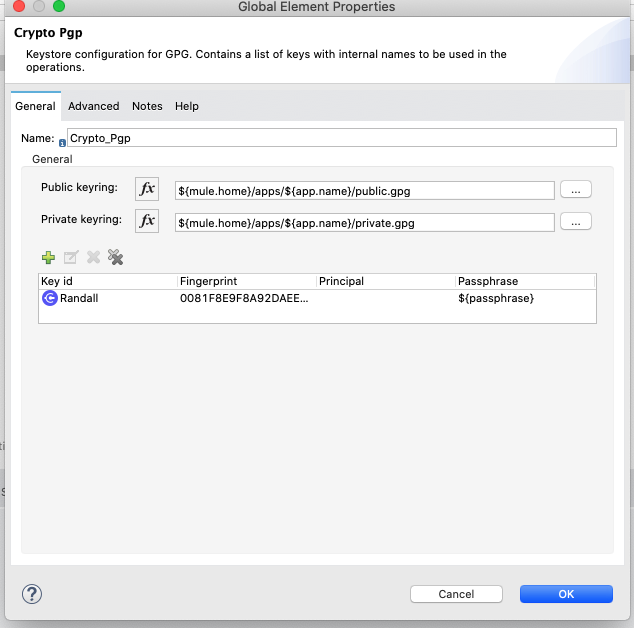
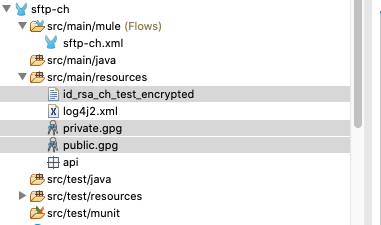
4. Also, ensure that your SSH key is in src/main/resources with public.gpg and private.gpg from step 2. Be sure that it is encrypted with PGP. For more information on how to encrypt it, please refer to the guide in step 2.
5. Replace the SFTP username and SFTP server IP address in the SFTP connector configuration.
6. This app will list a directory every second from the SFTP server.
7. It makes a 1 time schedule at the startup of the app to self-decrypt the file per your passphrase and enables the other flow's scheduler to run every sec to poll the SFTP server. The other flow is initially disabled and programmatically enabled by the Groovy script.
8. Upload the app to CloudHub. Ensure the following properties are set, including the passphrase for your PGP key.
doTestConnectivity=False
anypoint.platform.config.analytics.agent.enabled=true
passphrase=testme
9. Upload the app and let it auto-start the process.
14:18:38.494     03/03/2021     Worker-0     [MuleRuntime].uber.01: [sftp-ch].sftp-chFlow.CPU_INTENSIVE @7edfe5e4     INFO
event:66d27f10-7c6e-11eb-818f-02773b1bd8e6 [
  {
    "inboundAttachmentNames": [

    ],
    "exceptionPayload": null,
    "inboundPropertyNames": [

    ],
    "outboundAttachmentNames": [

    ],
    "payload": "aa\n",
    "outboundPropertyNames": [

    ],
    "attributes": {
      "symbolicLink": false,
      "regularFile": true,
      "directory": false,
      "path": "/home/ubuntu/good/aa.txt",
      "size": 3,
      "name": "aa.txt",
      "timestamp": "2021-03-03T21:05:16"
    }
  }
]
Номер статьи базы знаний
001116359
Эта статья решила вашу проблему?
Оставьте свой отзыв, чтобы мы могли стать лучше!
