Välj en organisation
How to send Logs from CloudHub application to AWS CloudWatch
Publiceringsdatum: Jul 22, 2025
Uppgift
GOAL
To be able to integrate the Cloudwatch service to forward logs for CloudHub applications.Steg
Step 1. Verify that the appropriate dependencies are packaged with the application.
Following is the example of the pom.xml file.
<dependency>
    <groupId>com.kdgregory.logging</groupId>
    <artifactId>log4j2-aws-appenders</artifactId>
    <version>2.4.1</version>
</dependency>
<dependency>
    <groupId>com.amazonaws</groupId>
    <artifactId>aws-java-sdk-logs</artifactId>
    <version>1.12.293</version>
</dependency>
Step 2. Add the required packages, appenders, and loggers in the log4j.xml
Followings are the snippets of log4j.xml configurations for CloudHub 1.0 application.
.......
<Configuration status="INFO" name="cloudhub" packages="com.mulesoft.ch.logging.appender,com.kdgregory.log4j2.aws">

<Appenders>
.......
<CloudWatchAppender name="CLOUDWATCH">
    <logGroup><logGroupName></logGroup>
    <logStream><LogStreamName></logStream>
    <rotationMode>daily</rotationMode>
    <PatternLayout
        pattern="[%d{yyyy-MM-dd HH:mm:ss.SSS}] %-5p [%t] %c - %m%n" />
</CloudWatchAppender>

<Log4J2CloudhubLogAppender name="CLOUDHUB"
    addressProvider="com.mulesoft.ch.logging.DefaultAggregatorAddressProvider"
    applicationContext="com.mulesoft.ch.logging.DefaultApplicationContext"
    appendRetryIntervalMs="${sys:logging.appendRetryInterval}"
    appendMaxAttempts="${sys:logging.appendMaxAttempts}"
    batchSendIntervalMs="${sys:logging.batchSendInterval}"
    batchMaxRecords="${sys:logging.batchMaxRecords}"
    memBufferMaxSize="${sys:logging.memBufferMaxSize}"
    journalMaxWriteBatchSize="${sys:logging.journalMaxBatchSize}"
    journalMaxFileSize="${sys:logging.journalMaxFileSize}"
    clientMaxPacketSize="${sys:logging.clientMaxPacketSize}"
    clientConnectTimeoutMs="${sys:logging.clientConnectTimeout}"
    clientSocketTimeoutMs="${sys:logging.clientSocketTimeout}"
    serverAddressPollIntervalMs="${sys:logging.serverAddressPollInterval}"
    serverHeartbeatSendIntervalMs="${sys:logging.serverHeartbeatSendIntervalMs}"
    statisticsPrintIntervalMs="${sys:logging.statisticsPrintIntervalMs}">
	<PatternLayout pattern="[%d{MM-dd HH:mm:ss}] %-5p %c{1} [%t]: %m%n"/>
</Log4J2CloudhubLogAppender>
.......
</Appenders>
.......
.......
<Loggers>
.......
.......
<AsyncRoot level="INFO">
.......
    <AppenderRef ref="CLOUDWATCH" />
    <AppenderRef ref="CLOUDHUB"/>
.......
</AsyncRoot>
    <AsyncLogger name="com.gigaspaces" level="ERROR"/>
    <AsyncLogger name="com.j_spaces" level="ERROR"/>
    <AsyncLogger name="com.sun.jini" level="ERROR"/>
    <AsyncLogger name="net.jini" level="ERROR"/>
    <AsyncLogger name="org.apache" level="WARN"/>
    <AsyncLogger name="org.apache.cxf" level="WARN"/>
    <AsyncLogger name="org.springframework.beans.factory" level="WARN"/>
    <AsyncLogger name="org.mule" level="INFO"/>
    <AsyncLogger name="com.mulesoft" level="INFO"/>
    <AsyncLogger name="org.jetel" level="WARN"/>
    <AsyncLogger name="Tracking" level="WARN"/>
.......
</Loggers>
The followings are the snippets of log4j.xml configurations for CloudHub 2.0 application.
.......
<Configuration status="INFO" name="cloudhub" packages="com.mulesoft.ch.logging.appender,com.kdgregory.log4j2.aws">

<Appenders>
.......
<CloudWatchAppender name="CLOUDWATCH">
    <logGroup><logGroupName></logGroup>
    <logStream><LogStreamName></logStream>
    <rotationMode>daily</rotationMode>
    <PatternLayout
        pattern="[%d{yyyy-MM-dd HH:mm:ss.SSS}] %-5p [%t] %c - %m%n" />
</CloudWatchAppender>
.......
</Appenders>
.......
.......
<Loggers>
.......
.......
<AsyncRoot level="INFO">
.......
    <AppenderRef ref="CLOUDWATCH" />
.......
</AsyncRoot>
.......
</Loggers>
Step3. When deploying the app, disable CloudHub Logs as explained in Integrate with Your Logging System Using Log4j
Please skip this step if it's for CloudHub 2.0 application.
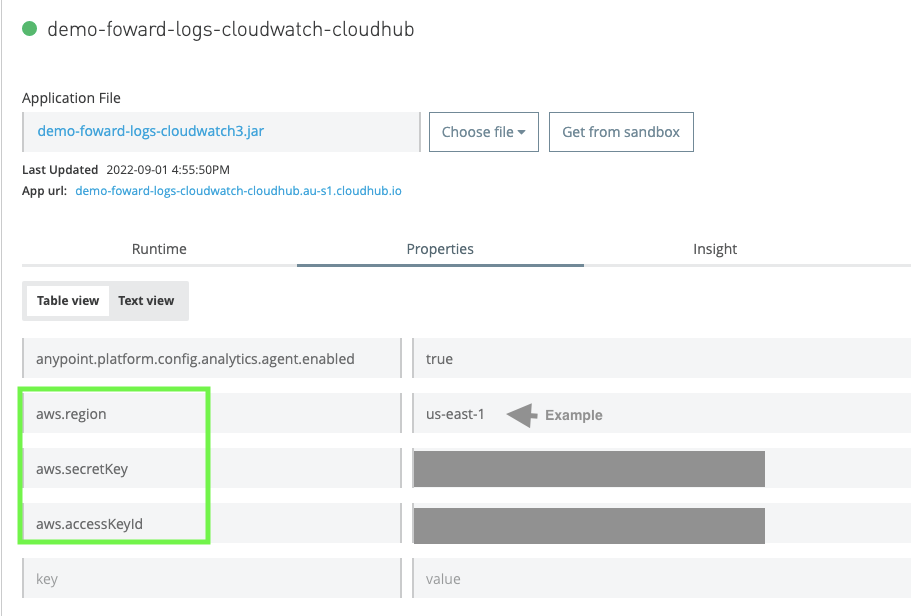
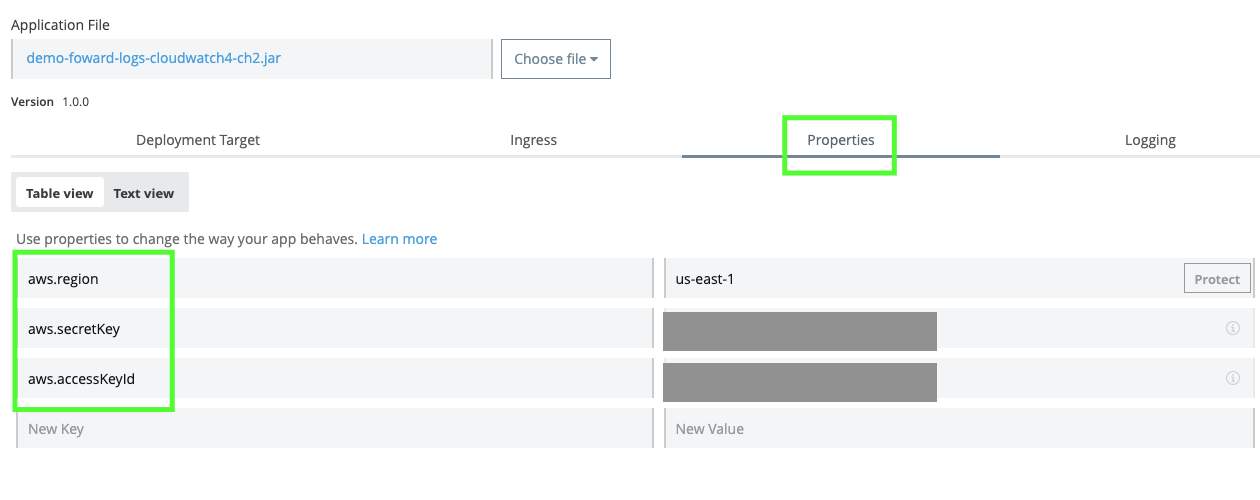
Step4. Setup the following properties from Runtime Manager UI
There are certain parameters that the AWS packages would require to be initialized before they can be executed. The authentication parameters are detailed in the link here.
# Custom AWS Cloudwatch Configurations
aws.region=<aws_region_example_us-east-1>
aws.accessKeyId=<iam_user_access_key>
aws.secretKey=<iam_user_secret_key>
Settings for CloudHub 1.0 application:
Settings for CloudHub 2.0 application:
After relaunching the Mule CloudHub application with recommended changes, the Cloudhub application must be able to push logs to AWS cloudwatch in the corresponding logging group and stream.
If you would like to forward logs from Hybrid on-prem applications to Cloudwatch, please refer to KB "How to send Logs from Mule Hybrid runtime to AWS CloudWatch?"
Disclaimer: This is provided as a reference for your own usage and it's not part of the official Mule product so its use will be considered as a custom implementation made by the customer.
Knowledge-artikelnummer
001116414
Löste denna artikel ditt problem?
Berätta för oss vad vi kan förbättra!
