Sélectionner une organisation
HTTP Connector | How to configure OAuth 2.0 Authorization code grant type in HTTP Request configuration for an application that is deployed to the CloudHub
Date de publication: Mar 2, 2024
Étapes
DESCRIPTION
This article helps to connect to an API that has OAuth 2.0 Authorization code grant type enabled using an HTTP requester from a mule 4.x application which is deployed to the CloudHub.STEPS TO FOLLOW
- Add the OAuth module from the exchange. Here is the link https://www.mulesoft.com/exchange/org.mule.modules/mule-oauth-module/
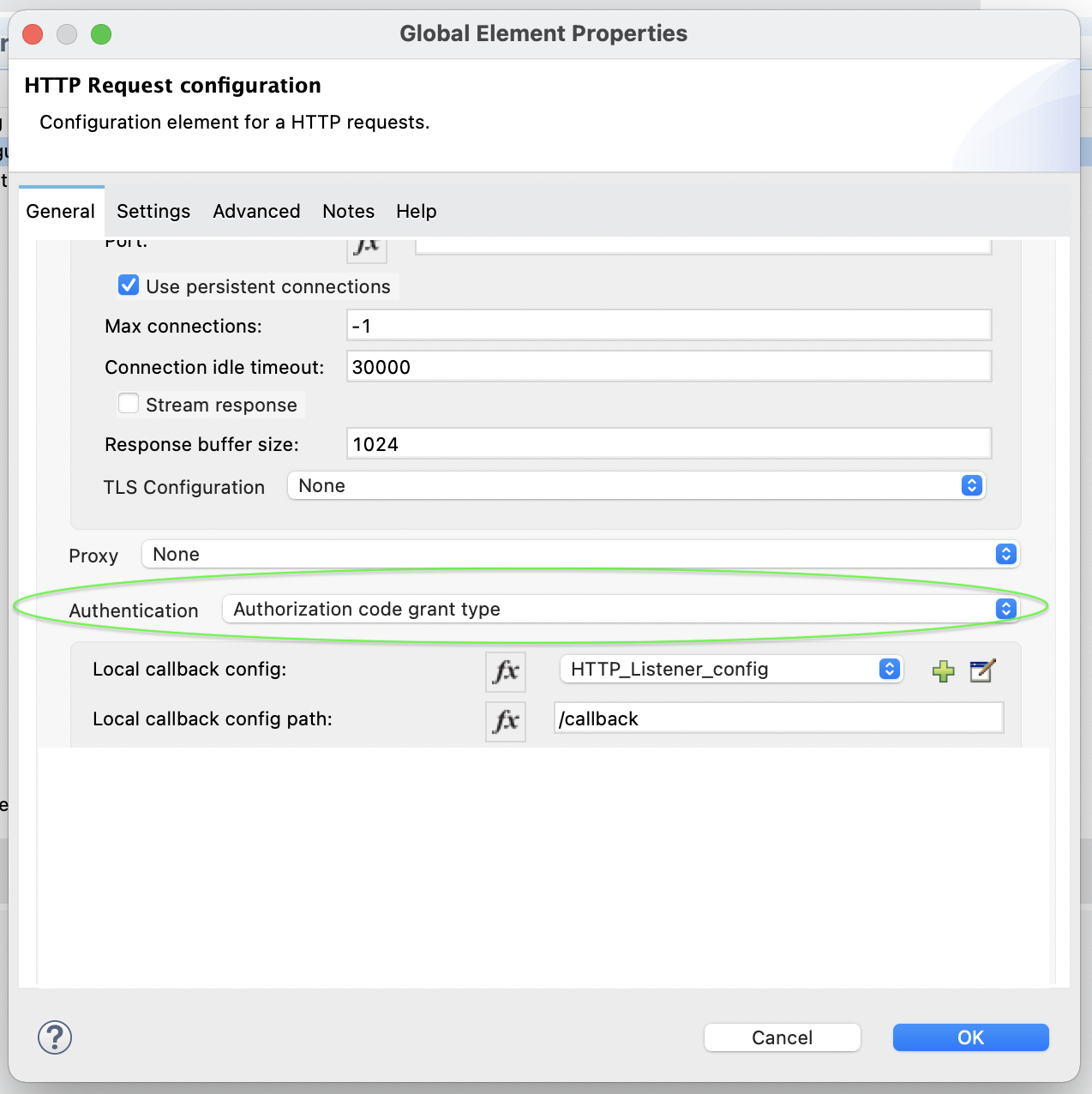
- Create a new HTTP Request configuration and select the Authorization code grant type for the Authentication field.
- Below is the example HTTP Request configuration configured with the OAuth2 Authorization code grant type for a Box API. It is the same configuration for any OAuth-enabled API. Replace the values with your configuration values.
<http:request-config name="HTTP_Request_configuration" doc:name="HTTP Request configuration" doc:id="10d9a5cf-1029-45c9-b10e-47056a08161d" basePath="/2.0">
	<http:request-connection protocol="HTTPS" host="api.box.com">
		<http:authentication >
			<oauth:authorization-code-grant-type clientId="" clientSecret="" scopes="root_readwrite" externalCallbackUrl="https://<your_cloudhub_app_url>/callback" authorizationUrl="https://account.box.com/api/oauth2/authorize" tokenUrl="https://api.box.com/oauth2/token" localAuthorizationUrl="https://localhost:8082/authorize" localCallbackConfig="HTTP_Listener_config" localCallbackConfigPath="/callback">
			</oauth:authorization-code-grant-type>
		</http:authentication>
	</http:request-connection>
</http:request-config>
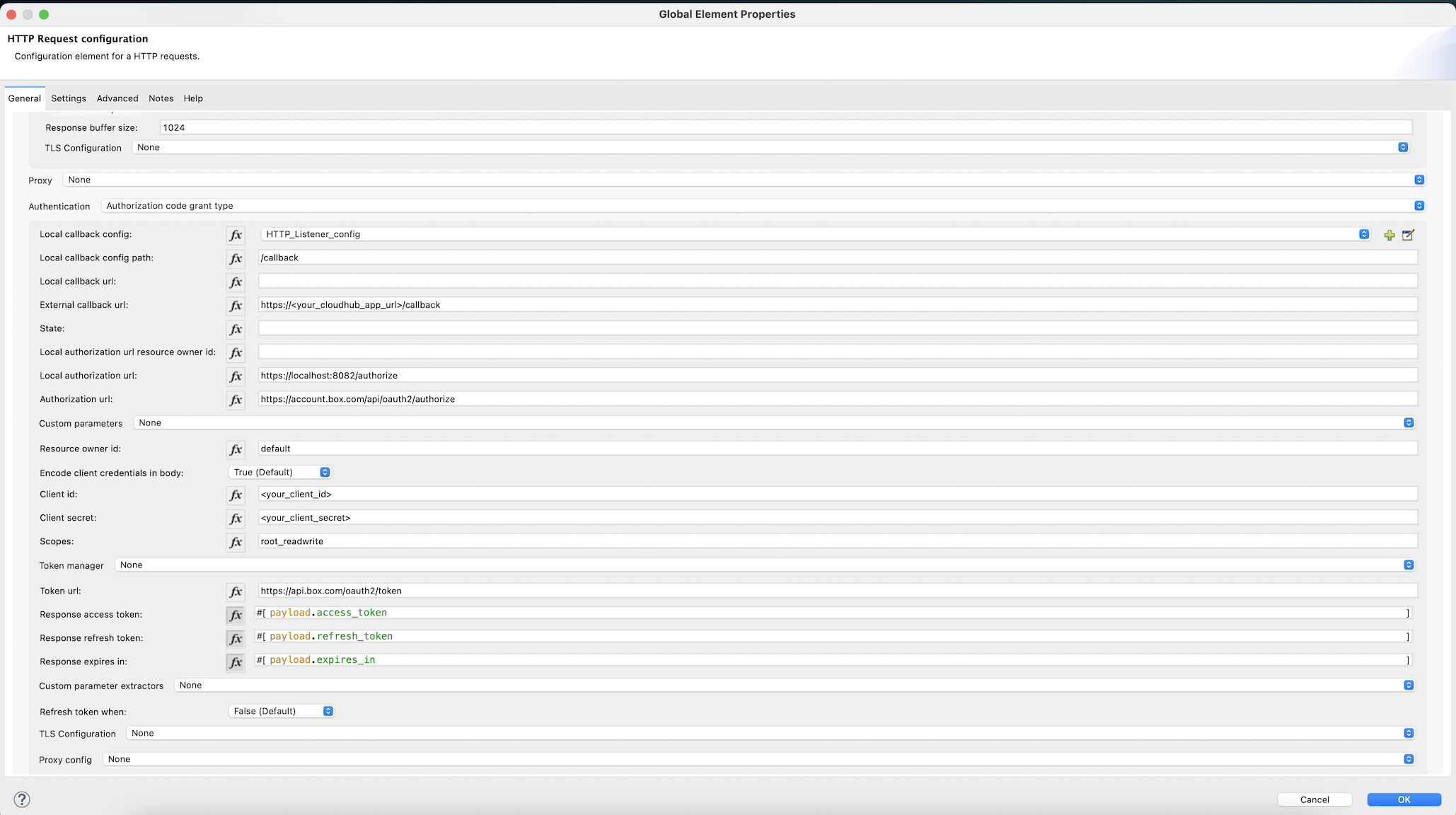
- You need to give your CloudHub app url for the externalCallbackUrl field. And the same url is configured for the OAuth 2.0 Redirect URI at the application created on the server side (Box in the above example)
- Below is the complete example of working code with a sample flow.
<?xml version="1.0" encoding="UTF-8"?>
<mule xmlns:tls="http://www.mulesoft.org/schema/mule/tls" xmlns:oauth="http://www.mulesoft.org/schema/mule/oauth"
	xmlns:http="http://www.mulesoft.org/schema/mule/http"
	xmlns="http://www.mulesoft.org/schema/mule/core" xmlns:doc="http://www.mulesoft.org/schema/mule/documentation" xmlns:xsi="http://www.w3.org/2001/XMLSchema-instance" xsi:schemaLocation="http://www.mulesoft.org/schema/mule/core http://www.mulesoft.org/schema/mule/core/current/mule.xsd
http://www.mulesoft.org/schema/mule/http http://www.mulesoft.org/schema/mule/http/current/mule-http.xsd
http://www.mulesoft.org/schema/mule/oauth http://www.mulesoft.org/schema/mule/oauth/current/mule-oauth.xsd
http://www.mulesoft.org/schema/mule/tls http://www.mulesoft.org/schema/mule/tls/current/mule-tls.xsd">
	<http:listener-config name="HTTP_Listener_config" doc:name="HTTP Listener config" doc:id="96c81ff6-3147-403e-b7d8-f06aa9d8e560" >
		<http:listener-connection host="0.0.0.0" port="8082" protocol="HTTPS">
			<tls:context >
				<tls:key-store type="jks" path="mule.jks" keyPassword="password" password="password"/>
			</tls:context>
		</http:listener-connection>
	</http:listener-config>
	<http:request-config name="HTTP_Request_configuration" doc:name="HTTP Request configuration" doc:id="10d9a5cf-1029-45c9-b10e-47056a08161d" basePath="/2.0">
		<http:request-connection protocol="HTTPS" host="api.box.com">
			<http:authentication >
				<oauth:authorization-code-grant-type clientId="clientid" clientSecret="clientsecret" scopes="root_readwrite" externalCallbackUrl="https://oauth-http-cloudhub-test.us-e2.cloudhub.io/callback" authorizationUrl="https://account.box.com/api/oauth2/authorize" tokenUrl="https://api.box.com/oauth2/token" localAuthorizationUrl="https://localhost:8082/authorize" localCallbackConfig="HTTP_Listener_config" localCallbackConfigPath="/callback">
				</oauth:authorization-code-grant-type>
			</http:authentication>
		</http:request-connection>
	</http:request-config>
	<flow name="oauth-http-cloudhub-testFlow" doc:id="2365a5bf-82ef-47a2-b237-a07a769717b8" >
		<http:listener doc:name="Listener" doc:id="7d552126-6a59-449e-b80a-014908a0a9b0" config-ref="HTTP_Listener_config" path="/OAuthTest"/>
		<http:request method="GET" doc:name="Request" doc:id="01b61c31-222a-4c85-a9b7-fb05848dfdf7" path="/folders/0/items" config-ref="HTTP_Request_configuration"/>
		<logger level="INFO" doc:name="Logger" doc:id="86640cdd-0422-4b71-af24-bdf4ab16e878" message="#[payload]"/>
	</flow>
</mule>
- Deploy the application to CloudHub and perform the OAuth dance from any browser with the URL https://<your_cloudhub_app_url>/authorize to generate an access token.
Numéro d’article de la base de connaissances
001116440
Cet article a-t-il résolu votre problème ?
Dites-nous ce que nous pouvons améliorer !
