組織を選択
Outlook 365 Connector | How to configure message field to send an email and with an attachment
公開日: Mar 2, 2024
タスク
GOAL
How to use Outlook connector to configure the message field for the requested operation.ステップ
Message flow from Studio App:
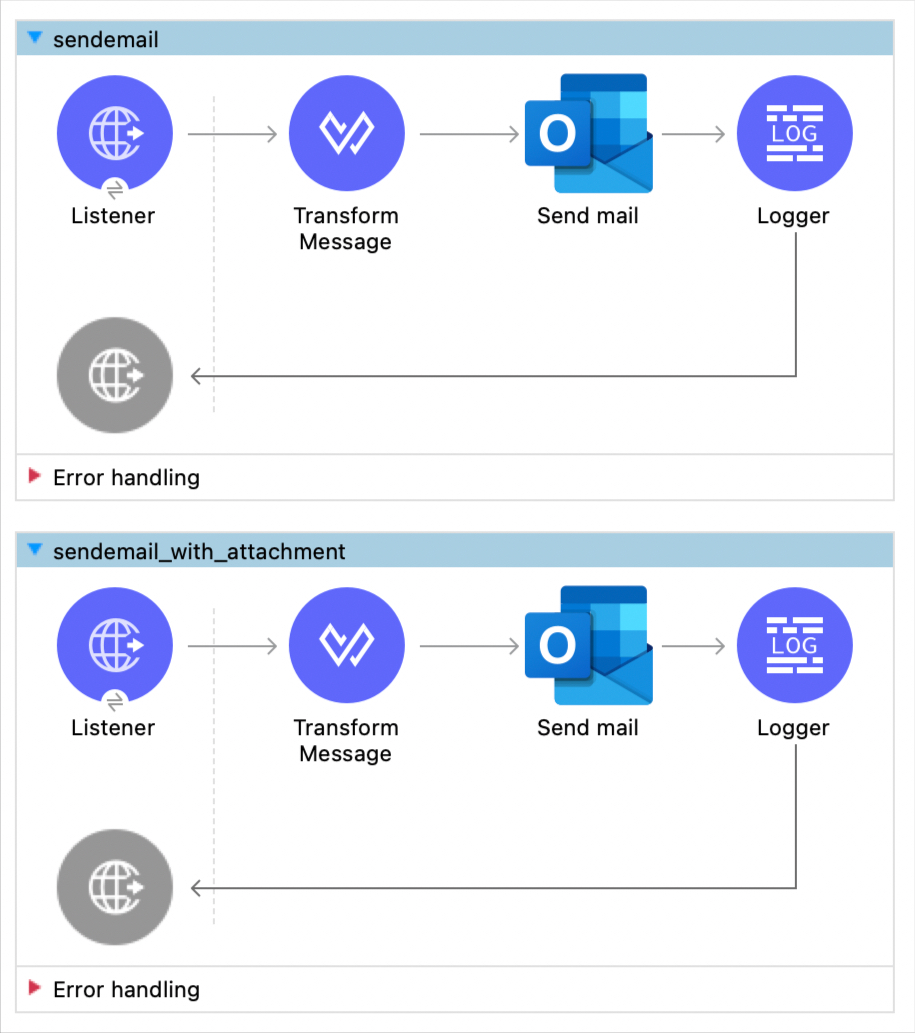
Configuration XML from Studio App:
<?xml version="1.0" encoding="UTF-8"?>

<mule xmlns:http="http://www.mulesoft.org/schema/mule/http" xmlns:ee="http://www.mulesoft.org/schema/mule/ee/core"
	xmlns:outlook365="http://www.mulesoft.org/schema/mule/outlook365"
	xmlns="http://www.mulesoft.org/schema/mule/core" xmlns:doc="http://www.mulesoft.org/schema/mule/documentation" xmlns:xsi="http://www.w3.org/2001/XMLSchema-instance" xsi:schemaLocation="http://www.mulesoft.org/schema/mule/core http://www.mulesoft.org/schema/mule/core/current/mule.xsd
http://www.mulesoft.org/schema/mule/outlook365 http://www.mulesoft.org/schema/mule/outlook365/current/mule-outlook365.xsd
http://www.mulesoft.org/schema/mule/ee/core http://www.mulesoft.org/schema/mule/ee/core/current/mule-ee.xsd
http://www.mulesoft.org/schema/mule/http http://www.mulesoft.org/schema/mule/http/current/mule-http.xsd">
	<outlook365:outlook365-config name="Outlook365_Outlook365_Config" doc:name="Outlook365 Outlook365 Config" doc:id="4b2be5cd-abda-4040-ae92-126df57cdf4f" >
		<outlook365:oauth-client-credentials-connection >
			<outlook365:oauth-client-credentials clientId="******" clientSecret="******" tokenUrl="******" scopes="******" />
		</outlook365:oauth-client-credentials-connection>
	</outlook365:outlook365-config>
	<http:listener-config name="HTTP_Listener_config" doc:name="HTTP Listener config" doc:id="1667d007-14ea-41b2-adef-5c12232d65a5" >
		<http:listener-connection host="0.0.0.0" port="8081" />
	</http:listener-config>
	<flow name="sendemail" doc:id="2708c2dd-f0d6-4475-a70c-e3458deef5d1" >
		<http:listener doc:name="Listener" doc:id="19532796-a48d-4c5a-a2a7-774d6207fc9d" config-ref="HTTP_Listener_config" path="/sendmail"/>
		<ee:transform doc:name="Transform Message" doc:id="5602cc57-43ee-46fc-9148-efc517bc2ccf" >
			<ee:message >
				<ee:set-payload ><![CDATA[%dw 2.0
output application/json
---
{
  "message": {
    "subject": "Meet for lunch?",
    "body": {
      "contentType": "Text",
      "content": "The new cafeteria is open."
    },
    "toRecipients": [
      {
        "emailAddress": {
          "address": "muletest@mulesoft.com"
        }
      }
    ]
  },
  "saveToSentItems": "false"
}]]></ee:set-payload>
			</ee:message>
		</ee:transform>
		<outlook365:send-mail doc:name="Send mail" doc:id="a3266114-d04a-450e-8b6c-311dd9c59cc5" config-ref="Outlook365_Outlook365_Config" userId="88f176b2-84ca-4cfe-828c-954db0096efa"/>
		<logger level="INFO" doc:name="Logger" doc:id="f90f21c2-abfe-405b-9a0b-13269d48166d" message="#[attributes.statusCode]"/>
	</flow>
	<flow name="sendemail_with_attachment" doc:id="206588ed-1f4f-44ed-a46f-d880dccbbdfe" >
		<http:listener doc:name="Listener" doc:id="ec445fc7-024c-4088-9e35-fcca5b995035" config-ref="HTTP_Listener_config" path="/sendmailattach"/>
		<ee:transform doc:name="Transform Message" doc:id="140e0fa4-3a78-4a76-b58d-86494bfc572b" >
			<ee:message >
				<ee:set-payload ><![CDATA[%dw 2.0
output application/json
---
{
  "message": {
    "subject": "Meet for lunch?",
    "body": {
      "contentType": "Text",
      "content": "The new cafeteria is open."
    },
    "toRecipients": [
      {
        "emailAddress": {
          "address": "muletest@mulesoft.com"
        }
      }
    ],
    "attachments": [
      {
        "@odata.type": "#microsoft.graph.fileAttachment",
        "name": "attachment.txt",
        "contentType": "text/plain",
        "contentBytes": "SGVsbG8gV29ybGQh"
      }
    ]
  }
}]]></ee:set-payload>
			</ee:message>
		</ee:transform>
		<outlook365:send-mail doc:name="Send mail" doc:id="6acbb5f9-4bab-4727-ab6d-3e85228b8c70" config-ref="Outlook365_Outlook365_Config" userId="88f176b2-84ca-4cfe-828c-954db0096efa"/>
		<logger level="INFO" doc:name="Logger" doc:id="ea9a7352-b65a-4910-8c5f-6421928491e9" message="#[attributes.statusCode]"/>
	</flow>
</mule>
This gives an idea of how to use the message field.
There are more examples here: https://docs.microsoft.com/en-us/graph/api/user-sendmail?view=graph-rest-1.0&tabs=http
Disclaimer: This example is provided as a reference for your own usage and it's not part of the official MuleSoft product so its use will be considered as a custom implementation made by MuleSoft customers.
ナレッジ記事番号
001116470
この記事で問題は解決されましたか?
ご意見をお待ちしております。
