Organisation auswählen
How to enable HTTP keep-alive in HTTP Request configuration
Veröffentlichungsdatum: Mar 2, 2024
Aufgabe
GOAL
Enable HTTP keep-alive in HTTP Request configuration
Schritte
HTTP keep-alive, a.k.a., HTTP persistent connection, is an instruction that allows a single TCP connection to remain open for multiple HTTP requests/responses.
By default, HTTP connections close after each request. HTTP keep-alive decreases latency for 2nd, 3rd,... HTTP requests and decreases network traffic. It also reduces both CPU and memory usage on your server.
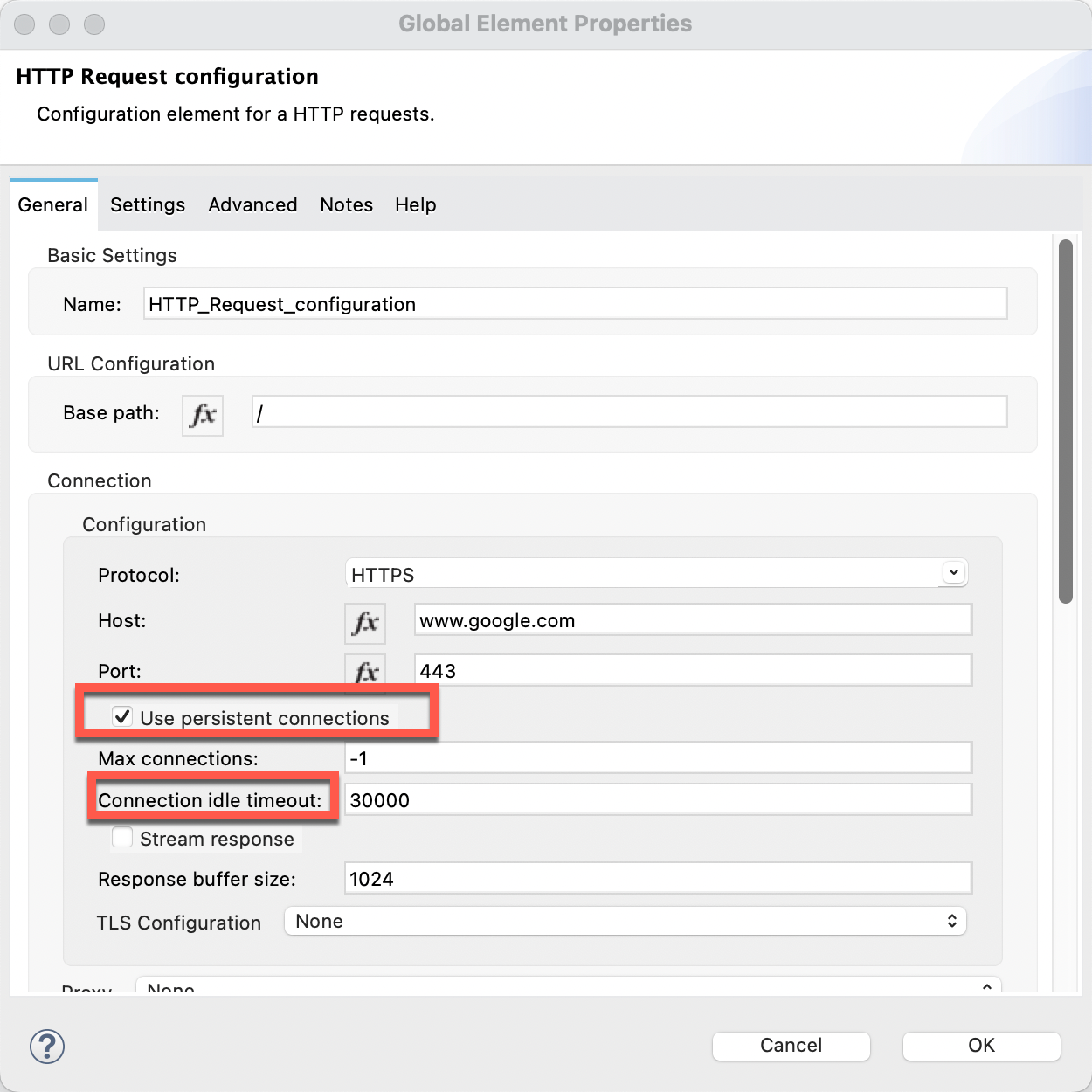
To enable HTTP keep-alive in HTTP Request configuration, tick the checkbox "Use persistent connections" and set a value greater than 0 for the "Connection idle timeout" field.
NOTES
If the checkbox "Use persistent connections" is ticked but the "Connection idle timeout" field is set to 0, you will observe the HTTP header "Connection: close" instead of "Connection: keep-alive" when issuing a request through the HTTP Request configuration.For more details, refer to the following article:
Controlling the Connection: close or keep-alive HTTP Header
Nummer des Knowledge-Artikels
001116490
Konnten Sie Ihr Problem mithilfe dieses Artikels lösen?
Geben Sie uns Feedback, damit wir uns verbessern können.
