Valitse organisaatio
How to enable TCP keep-alive in HTTP Request configuration
Julkaisupäivä: Jul 25, 2025
Tehtävä
GOAL
Enable TCP keep-alive in HTTP Request configurationVaiheet
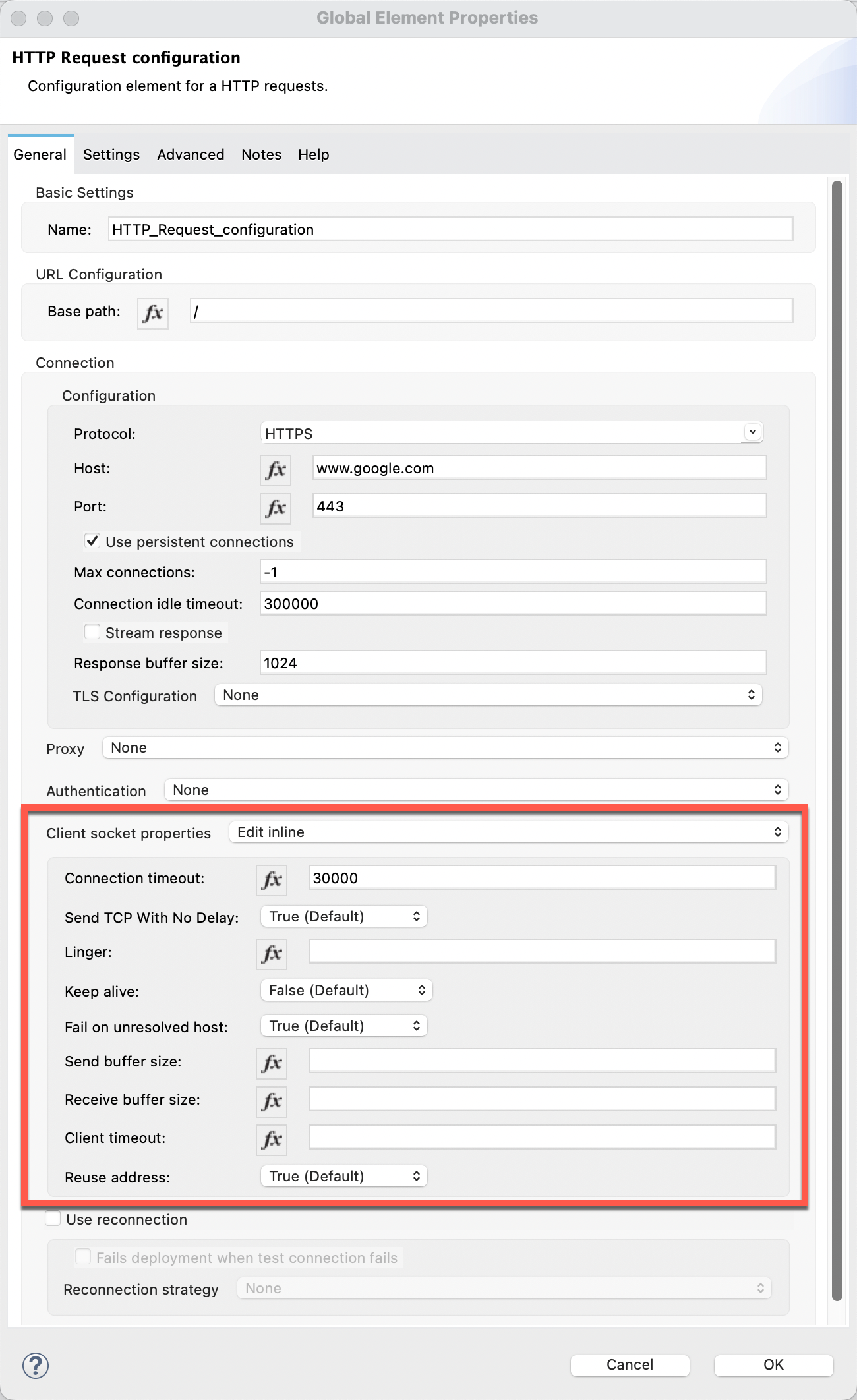
TCP keep-alive is set to False by default. Change it to True to enable TCP keep-alive.
In case you see a warning message of "There are no elements available to configure Client socket properties" under the "Client socket properties" field, refer to the KB article below:
HTTP Request configuration - There are no elements available to configure Client socket properties
The TCP keep-alive parameters such as "tcp_keepalive_time", "tcp_keepalive_intvl" and "tcp_keepalive_probes" on Linux can only be set at operating system level. Ask your system administrator if you need any assistance.
Knowledge-artikkelin numero
001116507
Ratkaisiko tämä artikkeli ongelmasi?
Anna palautetta, jotta voimme kehittyä!
