Seleccionar una organización
HTTP Request Connector Response Streaming Example in Mule 4
Fecha de publicación: Jul 24, 2025
Pasos
GOAL
By default, the HTTP Request Connector does not stream the response payload.When streaming is enabled, Mule will:
- Save the chunks to an in-memory buffer.
- Continue processing chunks as they are received.
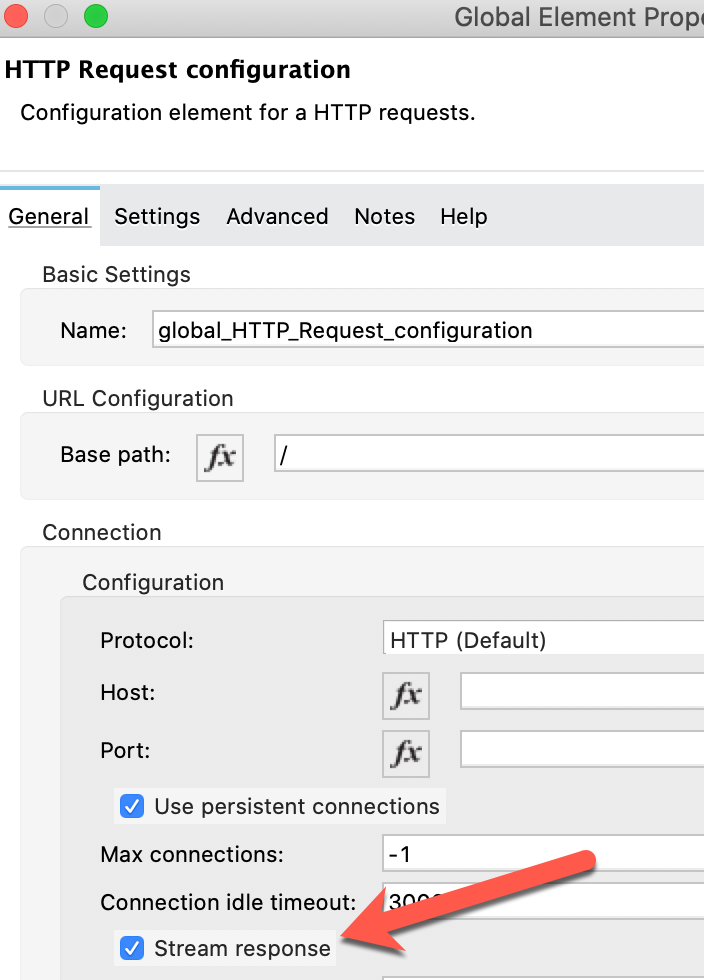
This article looks at a streaming example using the File Connector (Write to file).
The public documentation for HTTP Request Connector response streaming is available here.
PROCEDURE
The below flow sends a HTTP request and writes the received payload to a file called "write-file-test.txt".
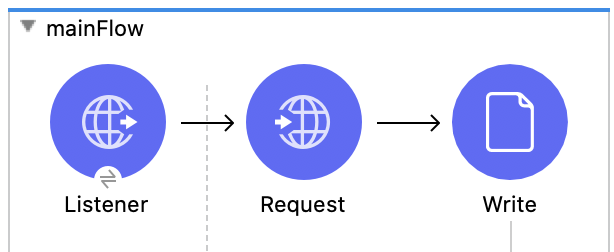
1. Response streaming disabled (streamResponse="false") - default
The output below scans for a file called "write-file-test.txt" every 1 second. Initially, the file does not exist. A request is sent to trigger the flow and the file is created after the entire payload is received.
> while true; do ls -ltr write-file-test.txt; sleep 1; done;
ls: write-file-test.txt: No such file or directory
-rw-r--r-- 1 test.user staff 294K 28 Jul 16:48 write-file-test.txt
2. Response streaming enabled (streamResponse="true")
The same actions are performed, but with response streaming enabled. The file is created after the first chunk is received. As further chunks are received, they are processed and written to the file. This is evident by the gradual file size increase.
> while true; do ls -ltr write-file-test.txt; sleep 1; done;
ls: write-file-test.txt: No such file or directory
-rw-r--r-- 1 test.user staff 22K 28 Jul 16:41 write-file-test.txt
-rw-r--r-- 1 test.user staff 88K 28 Jul 16:41 write-file-test.txt
-rw-r--r-- 1 test.user staff 151K 28 Jul 16:41 write-file-test.txt
-rw-r--r-- 1 test.user staff 222K 28 Jul 16:41 write-file-test.txt
-rw-r--r-- 1 test.user staff 294K 28 Jul 16:41 write-file-test.txt
Número del artículo de conocimiento
001116566
¿Resolvió este artículo su problema?
¡Háganos saber cómo podemos mejorar!
