Vælg en organisation
How to Update an MuleSoft Anypoint Platform User With REST API
Udgivelsesdato: Jul 22, 2025
Opgave
How to update user details using the REST API.
Trin
Pre-Requisites To Update User Details With REST API
1) Retrieve the Organization ID by referring to the article - "How to know my Organization ID (Org ID) on the Anypoint Platform"
2) Retrieve the Authorization token by referring to the article - "How to generate a bearer token for Anypoint Platform API calls using a SAML enabled account"
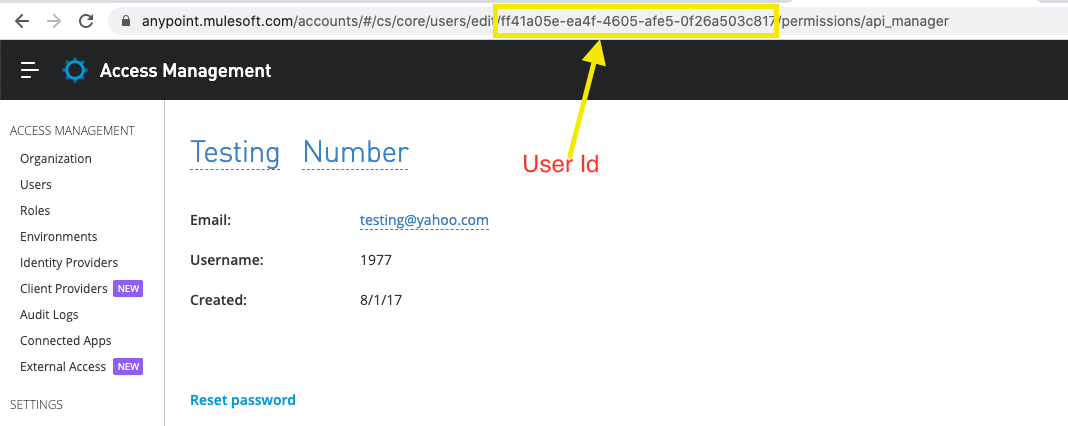
3) Retrieve the User ID, as demonstrated in the below screenshot from Access Management -> Users -> <User to update> page.
For example, to update a user's "lastName", execute the below API by passing the Auth Token, Org ID, and User ID:
curl -v -X PUT -H 'Authorization: bearer <AUTH_TOKEN>' -H 'Content-Type: application/json' https://anypoint.mulesoft.com/accounts/api/organizations/<ORG_ID>/users/<USER_ID> -d '{"lastName":"Doe"}'
- AUTH_TOKEN - Replace with your Auth token
- ORG_ID - Replace with your Organization Id
- USER_ID - Replace with your user Id
Note: Auth token should be generated from an Org Admin user.
For more information on what other attributes can be passed to update the user details, refer to the Access Management REST API.
Vidensartikelnummer
001116570
Løste denne artikel dit problem?
Giv os besked, så vi kan forbedre os!
