組織を選択
How to Update an MuleSoft Anypoint Platform User With REST API
公開日: Jul 22, 2025
タスク
How to update user details using the REST API.
ステップ
Pre-Requisites To Update User Details With REST API
1) Retrieve the Organization ID by referring to the article - "How to know my Organization ID (Org ID) on the Anypoint Platform"
2) Retrieve the Authorization token by referring to the article - "How to generate a bearer token for Anypoint Platform API calls using a SAML enabled account"
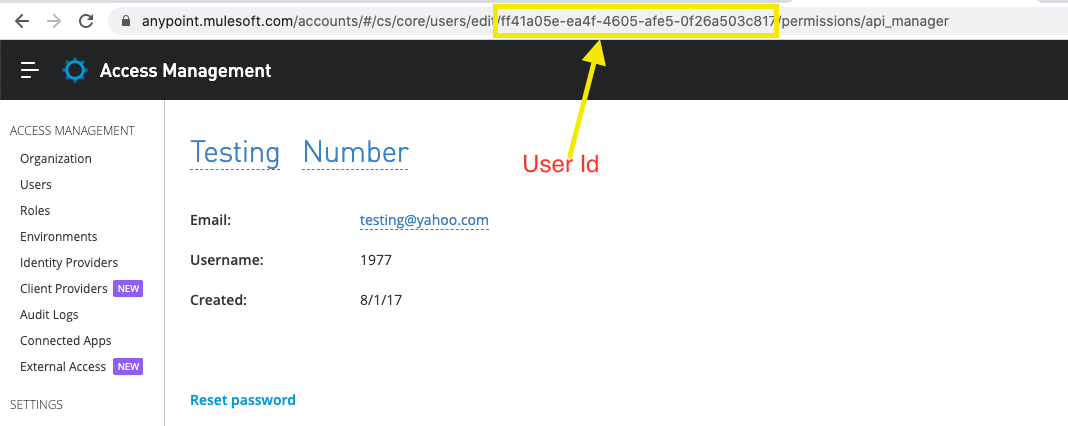
3) Retrieve the User ID, as demonstrated in the below screenshot from Access Management -> Users -> <User to update> page.
For example, to update a user's "lastName", execute the below API by passing the Auth Token, Org ID, and User ID:
curl -v -X PUT -H 'Authorization: bearer <AUTH_TOKEN>' -H 'Content-Type: application/json' https://anypoint.mulesoft.com/accounts/api/organizations/<ORG_ID>/users/<USER_ID> -d '{"lastName":"Doe"}'
- AUTH_TOKEN - Replace with your Auth token
- ORG_ID - Replace with your Organization Id
- USER_ID - Replace with your user Id
Note: Auth token should be generated from an Org Admin user.
For more information on what other attributes can be passed to update the user details, refer to the Access Management REST API.
ナレッジ記事番号
001116570
この記事で問題は解決されましたか?
ご意見をお待ちしております。
