Organisation auswählen
Salesforce Connector | Use Idempotent message filter to avoid processing events multiple times and duplicating process while using on-premise clustered environment
Veröffentlichungsdatum: Mar 2, 2024
Aufgabe
GOAL
When you deploy an application containing the Salesforce Connector's listener like Replay Channel listener to an on-premise clustered environment, you might notice an issue that the same message/event is processed by each cluster node which duplicates the process. Please refer to the below procedure to resolve this issue.
Note: This does not apply to CloudHub applications with multiple workers due to the issue documented in the following article:
Schritte
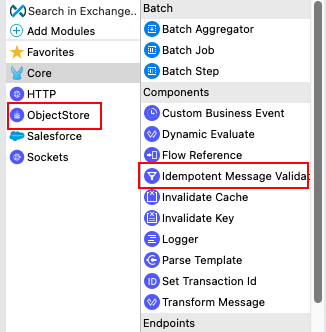
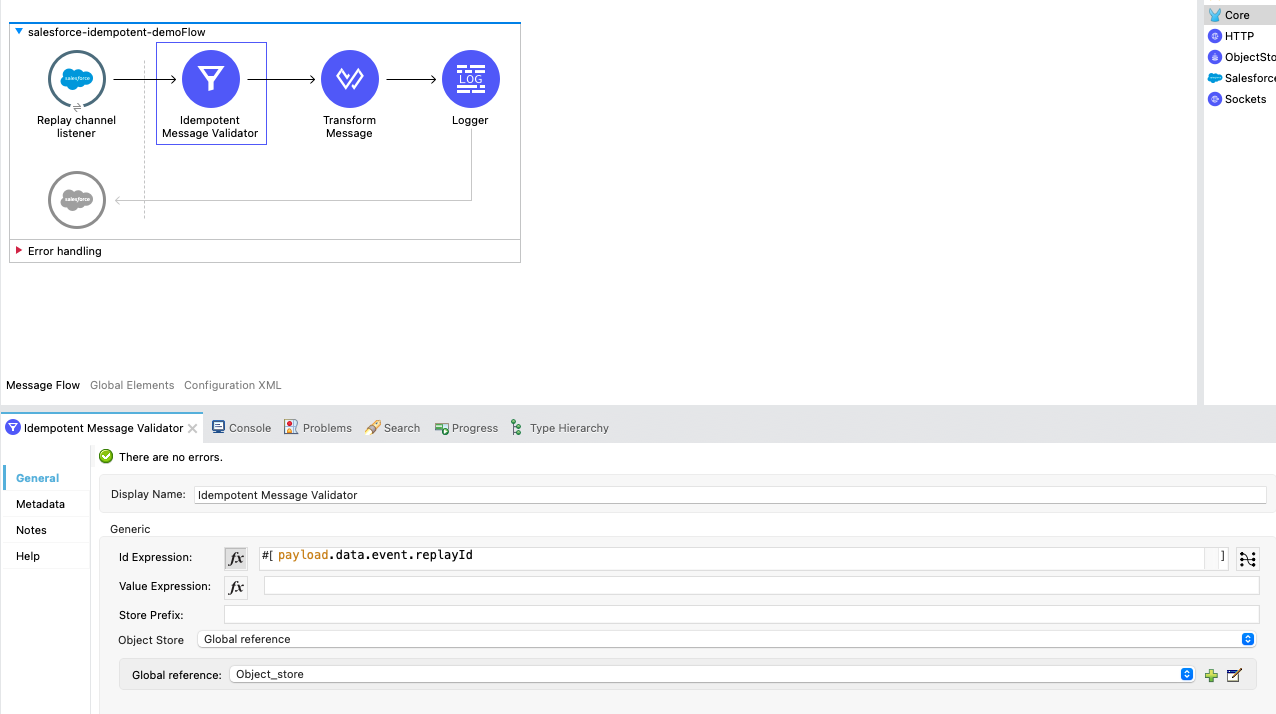
In your Salesforce listener flow, please use "Idempotent Message Validator" and "Object Store" as displayed in the first screenshot below. Then, store the result in a persistent object store, and then use the processed Replay IDs as the unique identifier to filter the message as shown in the second screenshot.
Please refer to this article about Idempotent Message Validator: https://docs.mulesoft.com/mule-runtime/4.4/idempotent-message-validator#examples
Deploy this flow to your cluster to avoid the events being processed by all the nodes and duplicating the process. The first worker that picks up the event will process it successfully and the other workers that pick up the same event will throw the below error with "Error type : MULE:DUPLICATE_MESSAGE".
Disclaimer: This is provided as a reference for your own usage and it's not part of the official Mule product so its use will be considered as a custom implementation made by the customer.
Nummer des Knowledge-Artikels
001116572
Konnten Sie Ihr Problem mithilfe dieses Artikels lösen?
Geben Sie uns Feedback, damit wir uns verbessern können.
