組織を選択
How to Reprocess Messages After an Exception When Using Jms Listener Operation in Mule 4
公開日: Aug 6, 2025
タスク
GOAL
When retrieving and processing messages using the JMS Listener, it is possible that an exception occurs during handling of the messages. In such cases, you may want to reprocess the message. This KB show one method that can be used to reprocess the message.
ステップ
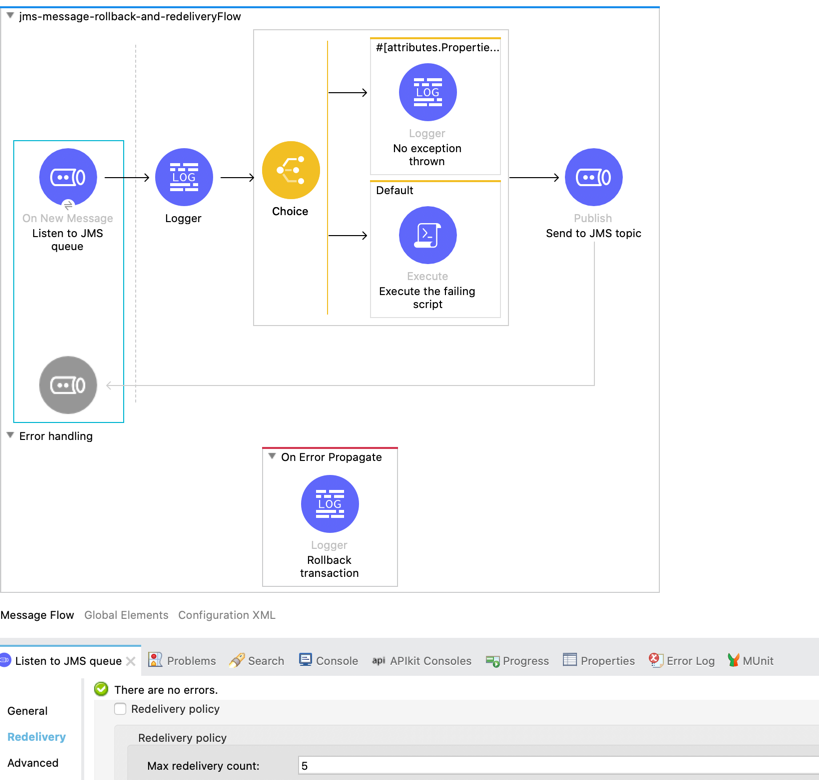
In order to rollback and reprocess the messages, you can set the "max redelivery count" in your JMS Listener connector configuration. This will ensure that the messages are reprocessed if an exception occurs in the flow. This works without configuring a redelivery policy but only the "max delivery count".
<jms:config name="JMS_Config" doc:name="JMS Config"
	doc:id="5411c616-8b37-48d4-b875-2025440eef69">
	<jms:active-mq-connection username="admin"
		password="admin">
		<jms:factory-configuration
			brokerUrl="tcp://localhost:61616" maxRedelivery="5" />
	</jms:active-mq-connection>
</jms:config>
<flow name="jms-message-rollback-and-redeliveryFlow"
	doc:id="6b6ce959-6c63-4656-bfd2-8f974ed09362">
	<jms:listener doc:name="Listen to JMS queue"
		doc:id="6b0fad44-91d0-439d-b040-85a3c319573a" config-ref="JMS_Config"
		destination="TestQueue" transactionalAction="ALWAYS_BEGIN"
		ackMode="IMMEDIATE">
		<jms:consumer-type>
			<jms:queue-consumer />
		</jms:consumer-type>
	</jms:listener>
The sample application flow for this use case looks like this. Sample application and logs shared below.
Note: JMS server will not be aware of the redelivery attempt in Mule application. Please ensure that your "Max redelivery count" takes in account the redelivery attempts by JMS Server.
その他のリソース
Log File: application_log.log
ナレッジ記事番号
001116577
この記事で問題は解決されましたか?
ご意見をお待ちしております。
