Select An Org
How to update SAML public key prior to expiration from the external identity provider
Publish Date: Mar 2, 2024
Task
GOAL
The Public Key field in the Identity Provider will change periodically, as the certificate from the External Identity Provider contains an expiry date. If the new key if not added in a timely fashion, it can lock a customer out entirely. To prevent being locked out of SSO completely (and getting an Unauthorized response during Sign-On), it is important to update the Public Key before its expiration properly.Please follow the steps below to properly update the Public Key field for SAML Configuration in Access Management.
Steps
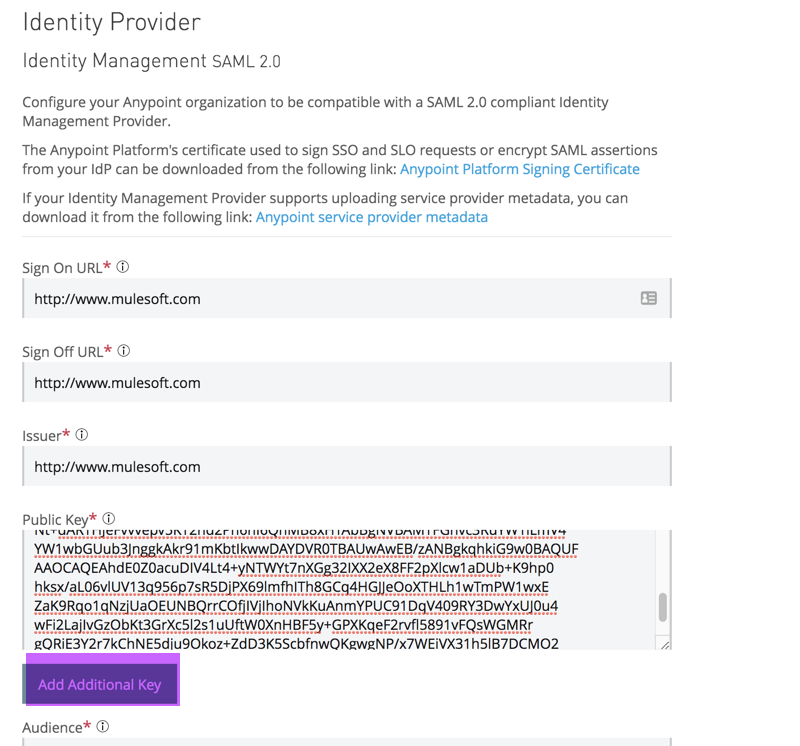
To do this you will it's possible to add the new Public Key as an additional Key as is shown in the following screenshot.
Click on Add Additional Key, and paste the new key in the additional textbox that gets created, leaving the current Public Key in place. This older key can be removed at a future date, when the External Identity Provider is using the new Public Key.
By doing this way, the Mule Platform will accept both Public Keys, which will prevent a lockout situation due to authorization failures.
Additional note
It is a good practice to retain a user with Organization administration privileges that is registered solely against Anypoint and not an External IDP.Knowledge Article Number
001116601
Did this article solve your issue?
Let us know so we can improve!
