Sélectionner une organisation
How to collect a thread dump from locally (Anypoint Studio) deployed applications
Date de publication: Oct 27, 2026
Tâche
GOAL
The purpose of its usage is to collect relevant thread dump information for troubleshooting issues in Studio and/or Mule applications running in Studio. If your Mule application is currently working in local Studio, it provides an easy way to collect thread dump information from your local Studio.
NOTE: This feature is only available since Studio 7.6.0.
Étapes
The following highlighted steps are based on the documentation: Troubleshooting-Export-Tool
NOTE: Here make sure you selected the thread dump information that you would like to export. The options available for selection are as follows:
- Tooling - Runtime - Workspace logs: It will collect the last execution logs from your mule application and Studio error logs.
- Studio .ini: It will collect a copy of your AnypointStudio.ini file. It provides initialization settings used by Studio.
- Mule Project: It will export a copy of your Mule Project. Make sure to select this option to be able to select the projects you want to export in Step 3.
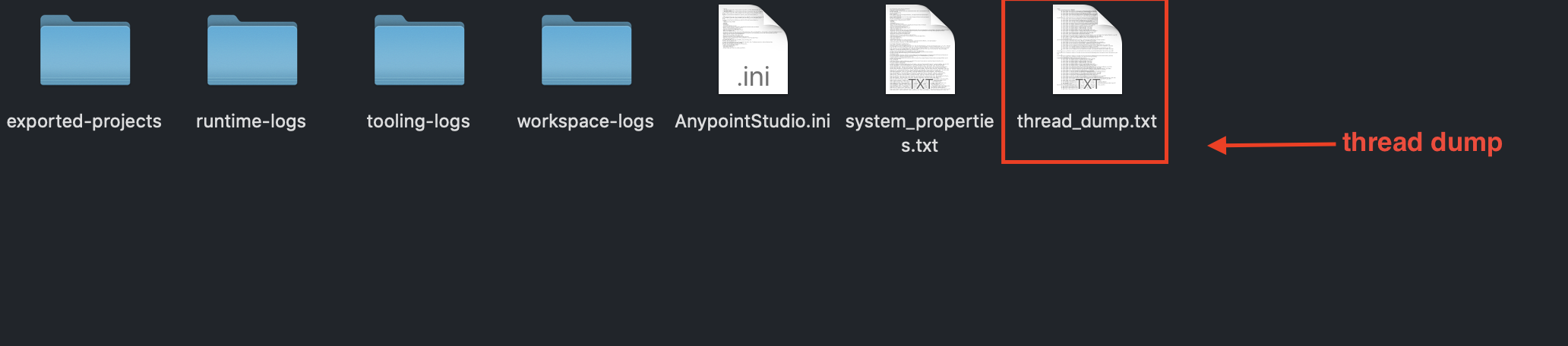
- Thread dump: It will collect a thread dump that is part of the Studio process.
- System Properties: It is a summarized version of Studio's configuration file.
Numéro d’article de la base de connaissances
001116697
Cet article a-t-il résolu votre problème ?
Dites-nous ce que nous pouvons améliorer !
