조직 선택
How to check Dedicated Load Balancer (DLB) current version
게시 일자: Jul 28, 2025
단계
QUESTION
How do I check the version of DLB on each of the business groups?
ANSWER
The DLB version is not available on the console. However, you can check the version with an API call.
1. Get a bearer token from a user who has the permission to view the DLB, refer to How to generate your Authorization Bearer token for Anypoint Platform and How to generate a bearer token for Anypoint Platform API calls using a SAML enabled account
2. Get your organisation ID, refer to How to know my Organization ID (Org ID) on the Anypoint Platform
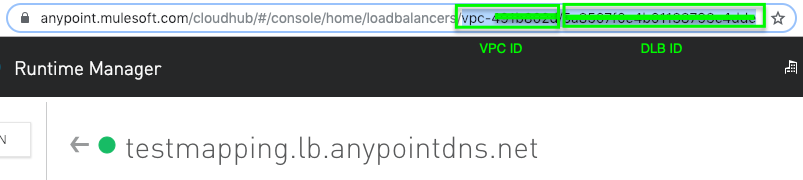
3. Get your VPC and DLB ID from the URL in the DLB console
4. Get from the DLB endpoint and check the output
GET https://anypoint.mulesoft.com/cloudhub/api/organizations/<Org ID>/vpcs/<VPC ID>/loadbalancers/<DLB ID>For example
$ curl -s 'https://anypoint.mulesoft.com/cloudhub/api/organizations/b2ee7923-e6c7-4ca3-86a0-01234567890/vpcs/vpc-491b01234/loadbalancers/5cc28459597f3001234567890' -H 'Authorization: Bearer xxxxxx-xxxx-xxxx-xxxx-xxxxxx'

{
    "id": "5cc28459597f3010943e2204",
    "name": "dlbtest",
    "domain": "lb.anypointdns.net",
    "state": "STARTED",
    "instanceConfig": {
        "imageName": "DLB_10_DEC_2020"
    },
...
}
The "imageName" field is the version information. If jq is installed, you can just run
curl -s 'https://anypoint.mulesoft.com/cloudhub/api/organizations/b2ee7923-e6c7-4ca3-86a0-01234567890/vpcs/vpc-491b01234/loadbalancers/5cc28459597f3001234567890' -H 'Authorization: Bearer xxxxxx-xxxx-xxxx-xxxx-xxxxxx' | jq -r '.instanceConfig.imageName'

DLB_10_DEC_2020
The image name is "DLB_10_DEC_2020". According to https://docs.mulesoft.com/release-notes/cloudhub/cloudhub-dedicated-load-balancer-release-notes, it's version 1.5.0 that got released in December 10th 2020
1.5.0
December 10, 2020
Knowledge 기사 번호
001116759
이 기사를 통해 문제를 해결했습니까?
개선을 위한 의견을 보내주세요.
