Sélectionner une organisation
How to Grant Access Control List (ACL) Permissions for an Object That Already Exists in Amazon S3 Bucket
Date de publication: Jul 25, 2025
Tâche
GOAL
You already have an object in Amazon S3 bucket and now the Access Control List (ACL) permission needs to be set for the object.
Étapes
In order to grant ACL permission for an object in Amazon S3 bucket, Set Object Acl operation from Amazon S3 connector needs to be used.
Generate the dataweave mapping by dragging a Transform Message component in front of the connector component. Once you select the attributes (double click) from the generated mapping, sample dataweave code is generated in Anypoint Studio.
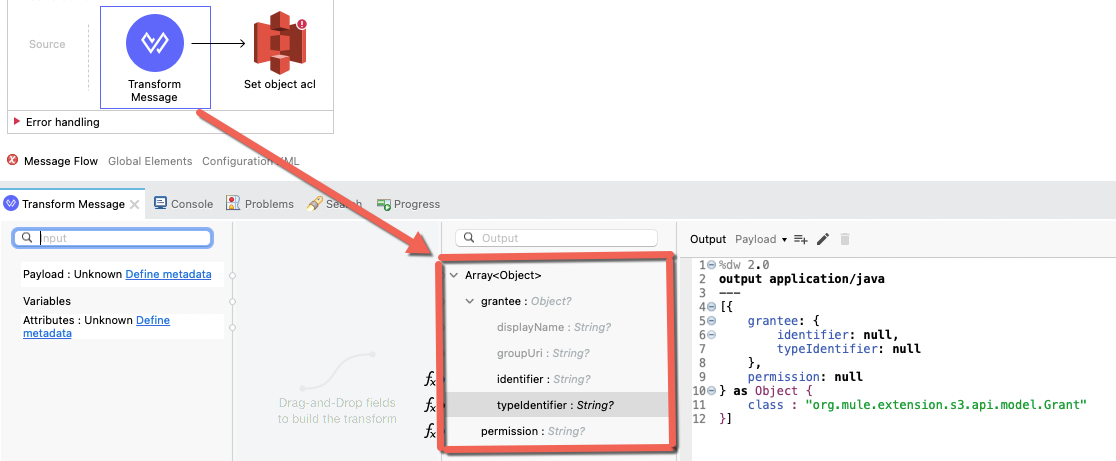
%dw 2.0
output application/java
---
[
   {
      grantee: {
         identifier: <your-identifier>,
         typeIdentifier: <your-typeidentifier>
      },
      permission: <your-permission>
   } as Object {
      class : "org.mule.extension.s3.api.model.Grant"
   }
]
Numéro d’article de la base de connaissances
001116764
Cet article a-t-il résolu votre problème ?
Dites-nous ce que nous pouvons améliorer !
