Valitse organisaatio
How to Deploy API Proxy Using Rest API to Hybrid and CloudHub
Julkaisupäivä: Jul 31, 2025
Tehtävä
GOAL
This article explains the steps to deploy API Proxy from API Manager to Hybrid (On-Premises) / CloudHub using REST APIs.
Vaiheet
Step 1: Retrieve the Authorization Token
Please refer to the knowledge article "How to generate your Authorization Bearer token for Anypoint Platform".
Step 2: Retrieve the Organization ID
By using the Authorization Token from Step 1, execute the below API
curl -H "Authorization: Bearer AUTH_TOKEN" https://anypoint.mulesoft.com/accounts/api/me
Below is the sample output snippet from the above API call, "id" field contains the Organization ID value.
"organization": {
"name": "user.name",
"id": "xxxx-yyyy-zzzzz-vvvv"
}
Note: Values in the above snippet output are masked. Use it as a reference only
Step 3: Retrieve the Environment ID
By using the Authorization Token and Organization ID from Step 1 & 2, execute the below API call
curl -H "Authorization: Bearer AUTH_TOKEN" https://anypoint.mulesoft.com/accounts/api/organizations/ORG_ID/environments
Below is the output snippet from the above API call, "id" field contains the environment ID value:
{
"id": "xxxxxxxxxxxxx",
"name": "TestEnv",
"organizationId": "xxxx-yyyy-zzzzz-vvvv",
"isProduction": true
}
Note: Values in the above snippet output are masked. Use it as a reference only
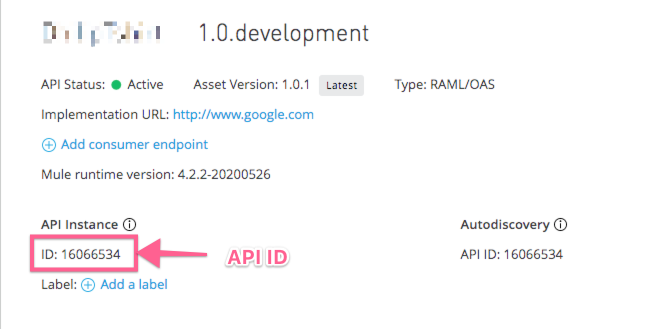
Step 4: Retrieve the API ID
Retrieve the API Id from the API Manager UI as shown below:
Step 5: Deploy the API Proxy
To deploy the API Proxy execute the below API using the POST method
curl -H "Authorization: Bearer AUTH_TOKEN" https://anypoint.mulesoft.com/proxies/xapi/v1/organizations/<ORG_ID>/environments/<ENV_ID>/apis/<API_ID>/deployments
For Hybrid Deployment pass the below body as JSON format
-d '{
  "gatewayVersion": "4.3.0", <--- Version of the Mule runtime
  "targetId": 8724539, <--- Id of the Mule server
  "targetName": "430-server", <-- Name of the server
  "targetType": "server",  <--- Type of the env eg., Server, Server Group etc
  "type": "HY", <--- Type of Deployment: HY for Hybrid, CH for Cloudhub
  "environmentId": "<ENV_ID>", <--- ID of the Environment same as in Step3
  "environmentName": "Test" <----- Name of the Environment
}'
For CloudHub Deployment pass the below body as JSON format
-d '{	"applicationName": "Tickets-app", <--- Name of the application
	"environmentName": "Sandbox", <--- Name of the Environment
	"environmentId": "<ENV_ID>", <----- ID of the Environment same as in Step3
	"type":"CH", <---- Type of Deployment: HY for Hybrid, CH for Cloudhub
	"overwrite": true, <--- flag to confirm overriding, if application with that name exist
	"gatewayVersion":"4.3.0" <--- Version of the Mule runtime
}'
Knowledge-artikkelin numero
001116781
Ratkaisiko tämä artikkeli ongelmasi?
Anna palautetta, jotta voimme kehittyä!
