Seleziona un'organizzazione
Connectivity Options for Customers to move to Transit Gateway in Cloudhub
Data pubblicazione: Oct 9, 2025
Operazione
N/A
Fasi
Transit Gateway will help customers replace other connectivity options to consolidate their networking through the Transit Gateway. The following process will help customers set up Transit Gateway attachment and test connectivity and then remove an existing connection and replace it with the Transit Gateway connection.
For customers with existing connectivity methods in CloudHub, there are specific steps required to migrate to Transit Gateway. These steps will vary depending on which connectivity method is in use. This document will outline the steps required to migrate a particular method to Transit Gateway.
Migrating connectivity options could result in downtime for your organization during switchover. We recommend coordinating with your network and operations personnel to plan and coordinate the migration from existing methods to the transit gateway and follow your appropriate pre-production testing and validation procedures.
Set up Transit Gateway and attach to Anypoint VPC
Regardless of the connectivity option, you're looking to migrate from, the first step is to attach your AWS Transit Gateway to your Anypoint VPC on CloudHub. Follow the steps in the docs below to achieve this. Stop when you get to the step “Configure Transit Gateway Routing.”
After following those steps, you should have an Anypoint VPC attached to your AWS Transit Gateway with no route set to take advantage of this connection. The next step is to test this connection before you cut over the traffic.
Test connection with specific route
To ensure you test your connectivity via the Transit Gateway before you move traffic to it. Add an IP that you'll use for testing to be routed through the TGW.
For example, if the subnet connected via VPC peering is 10.0.1.0/24, then add a route to a test endpoint on the customer’s AWS VPC, let say this is 10.0.1.5/32.
Complete the required network settings on the Transit Gateway to ensure end-to-end connectivity to the test IP exists.
Test this connectivity from the Anypoint VPC via the Transit Gateway. Use the network connectivity tool.
Once this connectivity is confirmed to be working. Prepare your network to connect all CIDRs used in the currently used connectivity option via the Transit Gateway. Follow the steps below depending on your connectivity type.
Anypoint VPN
Once the specific routes have been tested, you can move the routes between AVPN and Transit Gateway features using the respective routing.
Steps to migrate:
- Remove the route associated with the Anypoint VPN. If you're using BGP routing, you can update the route propagation from your VPN device (i.e. customer VPN gateway).
If you're using static routing, then:
- Navigate to Runtime Manager > VPN.
- Click the VPN you're going to replace.
- See Static routes. Hover to the right of the CIDR you want to delete and click the trash icon as seen in the snapshot below to delete the route. Be sure to note down the route in case you have to roll back the change.
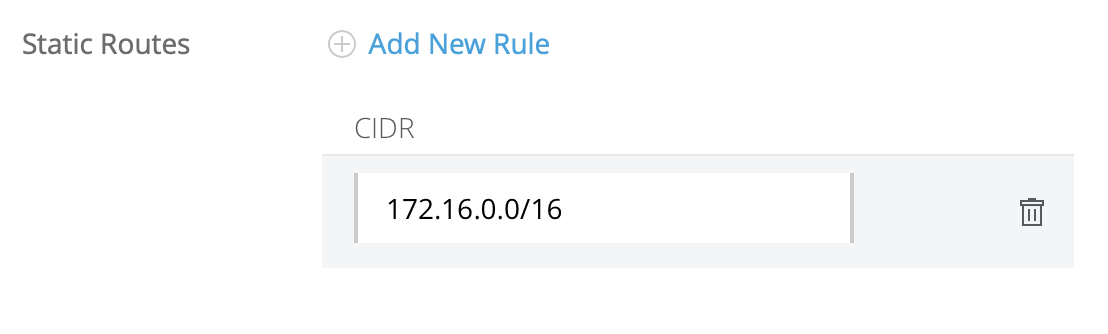
- Add route to TGW:
- Navigate to Runtime Manager > Transit Gateways.
- Click the Transit Gateway in question.
- Add the CIDR that was previously configured on the Anypoint VPN as shown here.
- Remove the specific route (see here) you've configured for testing.
- Test the connection to confirm connectivity.
- Roll back the changes by reversing the steps.
VPC Peering
At this point, you have tested that a more specific route is working. This validates connectivity across the AWS Transit Gateway.
Next step is to contact MuleSoft support to remove the VPC peering route from the Anypoint VPC. Follow this action by adding the route to the required CIDR via the Transit Gateway.
Making this change quickly will reduce any downtime.
Direct Connect
Your operations and network personnel will be required to complete this migration.
In the case of DX, all routes are pushed to the Anypoint VPC route table using propagated BGP routes. These need to be replaced by static routes through the Transit Gateway. You are encouraged to consolidate routes to larger static CIDR blocks.
The VPC’s route table prioritizes static routes over dynamic routes. Which means any routes added to go through the Transit Gateway will take precedence over the DX connection.
Steps to migrate:
- Bring down the Direct Connect BGP session to stop advertising the prefixes to Anypoint VPC.
- Add static routes via TGW to replace the DX routes (There should be no propagated routes from the DX).
- Once the connectivity has been tested and confirmed to be working, remove the BGP based routes from your DX network element.
- Open a Support case to remove the Direct Connect attachment.
Numero articolo Knowledge
001116795
Questo articolo ha risolto il problema?
Facci sapere, così possiamo migliorare!
