Выбрать организацию
Anypoint VPN to Azure keeps going down every hour
Дата публикации: Oct 29, 2024
Задача
SYMPTOMS
After upgrade of Anypoint VPN, the tunnels towards Azure keep going down every hour and need to be reset.
CAUSE
If the Azure VPN was created with default values this may cause issues after upgrading the Anypoint VPN.
In Azure, PFS is disabled by default and is only available when the Azure VPN is set as responder. The issue here is that Anypoint VPN is also acting as responder only and it requires PFS.
Действия
SOLUTION (A)
Update Azure VPN settings to enable PFS group
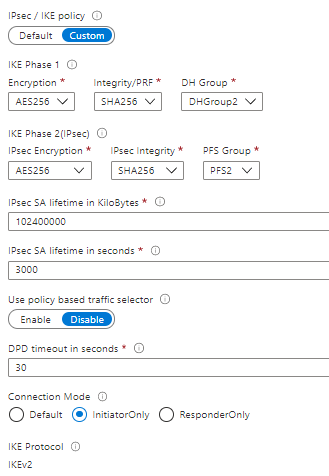
- Ensure that PFS group is enabled in Azure, (By default this is disabled)
- Set connection mode to initiatorOnly.
- Select IKEv2
- Set IPsec SA lifetime to 3000 sec.
- DPD timeout 30 sec.
Sample:
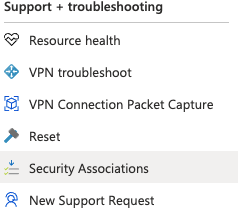
Verify the above settings have taken effect by navigating to Support tools within your Virtual Network Gateway and click on "Security Associations" This will download a file with the updated settings as per below.
SOLUTION (B)
If the above settings still do not change.
- You may need to set a custom policy, and adjust the phase 2 lifetime to something higher i.e 3900 sec. Azure phase 1 lifetime is hard set at 28800 and cannot be changed. Refer to Azure documentation for more details. (https://docs.microsoft.com/en-us/cli/azure/network/vpn-connection/ipsec-policy?view=azure-cli-latest)
- Set the connection mode to "Default"
- Ensure PFS group is enabled.
Номер статьи базы знаний
001116834
Эта статья решила вашу проблему?
Оставьте свой отзыв, чтобы мы могли стать лучше!
