Valitse organisaatio
How to implement health check monitor for your apis in CloudHub, Hybrid On-Prem, and RTF
Julkaisupäivä: Mar 2, 2024
Tehtävä
GOAL
You want to have an endpoint that can be called to validate if an api is running or not in CloudHub, Hybrid On-Prem, and RTF. The way to do it relies on the scenario you are facing.Vaiheet
1) CloudHub Deployments
Use the CloudHub API to retrieve the application status. Take into account that to make that request you will need to generate a Bearer Token as explained here. Also the Environment ID which can be found in the URL when going to Access Management.Then call the API where domain is the CloudHub application name. For example:
curl GET 'https://anypoint.mulesoft.com/cloudhub/api/applications/<appName>/status' \
--header 'X-ANYPNT-ENV-ID: <ENV_ID>' \
--header 'Authorization: bearer <BEARER_TOKEN>'
This call will return READY in the body response if the application is up and running. The list of all possible status is explained in the CloudHub API endpoint doc.
2) OnPrem Deployments
-
A) MuleRuntime 3.x and before MuleRuntime 4.2.2
You need to manually create a flow that will reply back with a 200 response. If the app is up and running the flow will reply successfully. Instead, you will have a failure response code.
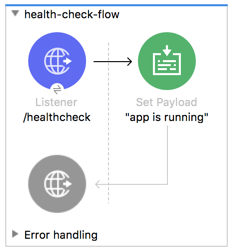
-
B) MuleRuntime 4.2.2 and above
Since MuleRuntime Runtime 4.2.2 this feature has been included out of the box. To use it, you need to:- Enable the REST Agent API by manually modifying the <MULE_HOME>/conf/mule-agent.yml file:
-
transports:
  rest.agent.transport:
    enabled: true
    port: 9999
-
- Call the Agent API like this:
- Enable the REST Agent API by manually modifying the <MULE_HOME>/conf/mule-agent.yml file:
curl GET 'http://localhost:<rest.agent.transport.port>/mule/healthcheck/applications/<appName>/ready'for example:
curl GET 'http://localhost:9999/mule/healthcheck/applications/hello-world/ready'this will return
200 - Ok: If app is running.
409 - Conflict: If app is not running.
3) RTF Deployments - 2 options:
- Option A) You can implement the health monitor from 2A) above
- Option B) You can query the RTF AMC Application Manager API (API Docs link)
- First, get the bearer token: How to generate your Authorization Bearer token for Anypoint Platform
- Then get the deployment ID of your app: How to Get List of Apps Deployed in RTF via API?
- Also get the environment ID and org ID: How to get the Environment ID & How to know my Organization ID (Org ID) on the Anypoint Platform
- Finally, use this command:
curl -L -X GET 'https://anypoint.mulesoft.com/amc/application-manager/api/v2/organizations/<org ID>/environments/<env ID>/deployments/<deployment ID>/
You should see something like this and need to parse to "applications" -> "status"{ "id": "1234556-7b8c-4ccd-9c0f-c94b6186119d", "name": "mytestjvm1", "creationDate": 1642186000878, "lastModifiedDate": 1642186000878, "target": { "provider": "MC", "targetId": "1234556-ca86-45f1-bbfc-9058c2b5125c", "deploymentSettings": { "jvm": { "args": "-Daksert=true, -Dqwert=false" }, "anypointMonitoringScope": "cluster", "sidecars": { "anypoint-monitoring": { "image": "auto", "resources": { "cpu": { "limit": "50m", "reserved": "0m" }, "memory": { "limit": "50Mi", "reserved": "50Mi" } } } }, "updateStrategy": "rolling", "runtimeVersion": "4.4.0:20211227-1", "clustered": false, "forwardSslSession": false, "http": { "inbound": { "publicUrl": null } }, "resources": { "cpu": { "limit": "1000m", "reserved": "1000m" }, "memory": { "limit": "3000Mi", "reserved": "3000Mi" } }, "lastMileSecurity": false, "enforceDeployingReplicasAcrossNodes": false }, "replicas": 1 }, "status": "APPLIED", "application": { "status": "RUNNING", "desiredState": "STARTED", "ref": { "groupId": "1234556-e6c4-475c-8711-a2653959a2f4", "artifactId": "testdlb-api-1.0.0-snapshot-mule-application-dlb", "version": "1.0.1", "packaging": "jar" }, "configuration": { "mule.agent.application.properties.service": { "properties": {}, "applicationName": "mytestjvm1" } } }, "desiredVersion": "1234556-4f49-436a-bfad-ce325e64b10f", "replicas": [ { "state": "STARTED", "deploymentLocation": "1234556-ca86-45f1-bbfc-9058c2b5125c", "currentDeploymentVersion": "1234556-4f49-436a-bfad-ce325e64b10f", "reason": "" } ], "lastSuccessfulVersion": "1234556-4f49-436a-bfad-ce325e64b10f" } - The JQ command is this:
curl -L -X GET 'https://anypoint.mulesoft.com/amc/application-manager/api/v2/organizations/<org ID>/environments/<env ID>/deployments/<deployment ID>/ | jq -r '.application.status'
Result:RUNNING
Knowledge-artikkelin numero
001116913
Ratkaisiko tämä artikkeli ongelmasi?
Anna palautetta, jotta voimme kehittyä!
