Seleziona un'organizzazione
How to Subscribe to Salesforce Change Data Capture with Mule 4
Data pubblicazione: Jul 21, 2025
Operazione
GOAL
This applies to Mule 4, Anypoint Studio 7.x
Salesforce Connector Replay Channel can subscribe to Salesforce Change Data Capture, in order to receive any data change on Salesforce. For example, Account record creation, update, delete, or for any other Salesforce objects. This article explains how to Subscribe to Salesforce Change Data Capture in Mule Application flow.
Fasi
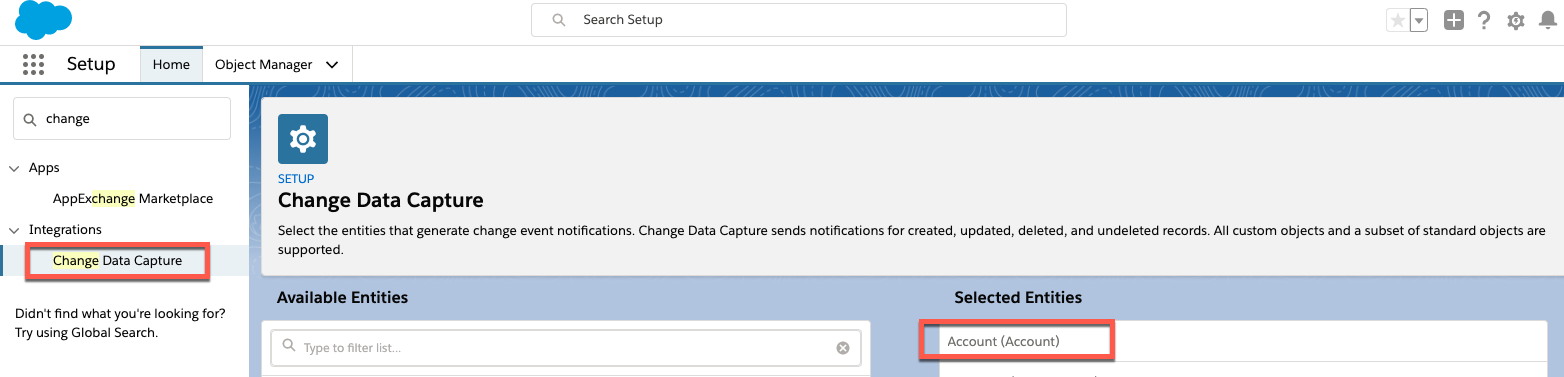
1. Login to Salesforce. Go to Setup -> Integrations -> Change Data Capture, then select a target Salesforce object. In this example, the target object is Account.
2. Create a Mule application
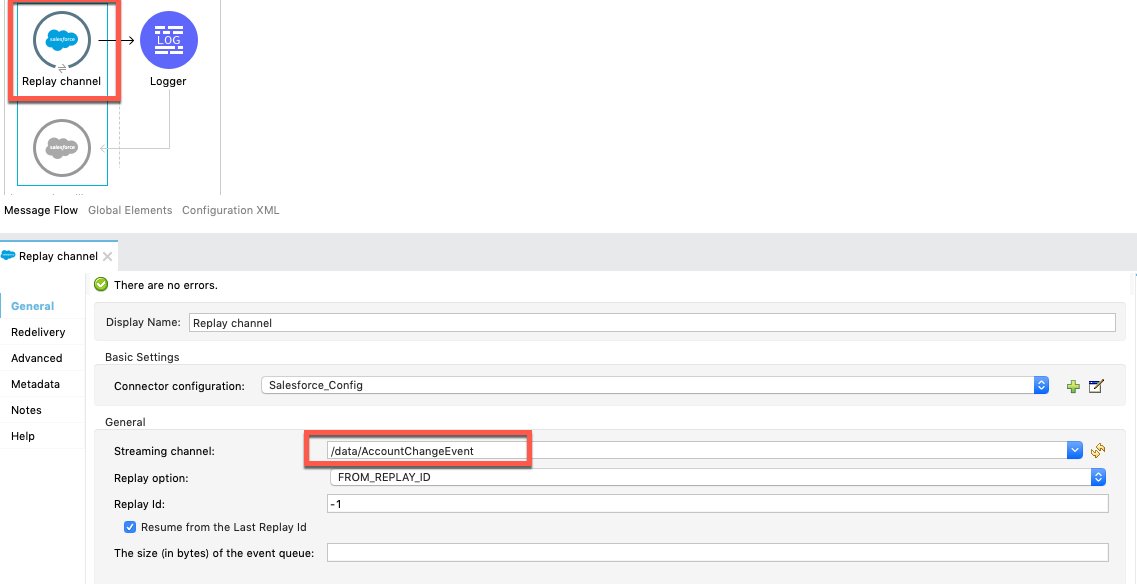
2-1. Create a component Salesforce Connector Replay Channel, then specify channel name as Streaming channel. In this example, the target object is Account so the value will be “/data/AccountChangeEvent”. For other channel names, please refer Salesforce CDC Developer guide
2-2. Create a logger component to show payload, so that we will see the received message on Console.
Example)
<flow name="ytaoka-salesforce-replaychannelFlow" doc:id="01d0fd5c-f777-4eda-a167-a931ef240f65" >
		<salesforce:replay-channel streamingChannel="/data/AccountChangeEvent" replayOption="FROM_REPLAY_ID" doc:name="Replay channel" doc:id="c036e7c5-86ed-4904-ae34-185ea42319e9" config-ref="Salesforce_Config" replayId="-1" autoReplay="true"/>
		<logger level="INFO" doc:name="Logger" doc:id="978f0aad-ab09-4910-bc54-a7c3dcc5935c" message="#[payload]"/>
	</flow>
3. Login to Salesforce then update any Account record. In this example, update an Account name to "TestName2". You will see something like below in the Console log, which is equivalent to the updated Account record which includes the new name "TestName2".
INFO  2019-11-12 08:17:27,496 [[MuleRuntime].cpuLight.05: [sample].sampleFlow.CPU_LITE @14741f50] [event: xxx]
org.mule.runtime.core.internal.processor.LoggerMessageProcessor: {data={schema=CEjkFTwpfASSecY9UGNoOg,
payload={LastModifiedDate=2019-11-11T23:17:30.000Z, ChangeEventHeader={commitNumber=10743571519745, commitUser=0050o00000XTesxAAD,
sequenceNumber=1, entityName=Account, changeType=UPDATE,
changedFields=[Ljava.lang.Object;@4f738b9d, changeOrigin=com/salesforce/api/soap/47.0;client=SfdcInternalAPI/,
transactionKey=0002463d-1e88-1d80-5638-15c821f06b79, commitTimestamp=1573514251000, recordIds=[Ljava.lang.Object;@6e812151},
Name=TestName2},
event={replayId=1065378}}, channel=/data/AccountChangeEvent}
Disclaimer: This example is provided as a reference for your own usage and is not to be considered a MuleSoft product. This example should be considered as a custom solution. The custom solution is not a Supported MuleSoft product.
Numero articolo Knowledge
001116946
Questo articolo ha risolto il problema?
Facci sapere, così possiamo migliorare!
