選擇組織
How to enable last-mile security in Runtime Fabric (RTF)
發佈日期: Aug 5, 2025
工作
GOAL
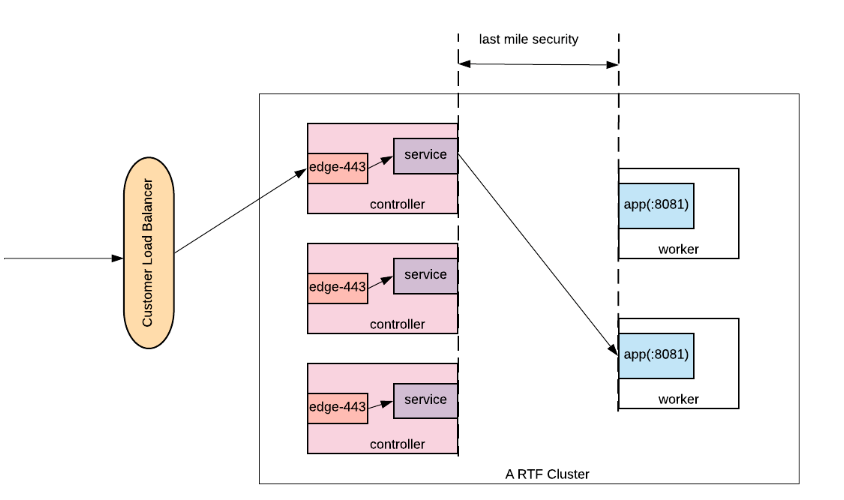
The last-mile security means use HTTPS instead of HTTP between the edge and application. This article explains how to enable the last mile security.
步驟
Create an HTTPS connector listening on the port 8081
- Create a key store and set up the Key Store Configuration in an HTTPS listener config
- Specify the listening port to ${https.port} or 8081 if it's hard-coded. Do bear in mind, unlike CloudHub which listens on the port 8081 for HTTP and 8082 for HTTPS, an RTF application has to listen on the port 8081 for both HTTP and HTTPS as edge-443 only forwards the request to this port. The property ${https.port} defaults to 8081 in RTF as well.
Enable the last mile security
You can enable the last mile security from either option:
- The ingress tab of the application console
- Set "lastMileSecurity" to true in maven deployment (https://docs.mulesoft.com/runtime-fabric/1.3/deploy-maven-3.x)
- Set "lastMileSecurity" to true in API deployment (https://anypoint.mulesoft.com/exchange/portals/anypoint-platform/f1e97bc6-315a-4490-82a7-23abe036327a.anypoint-platform/amc-application-manager/1.0.5/console/method/%231087/)
知識文章編號
001117051
此文章是否解決您的問題?
請讓我們知道,以便我們改進!
