選擇組織
How To Use DataWeave To Extract A Subtable In An Excel Spreadsheet
發佈日期: Jul 25, 2025
步驟
QUESTION
How to use DataWeave to extract a subtable in an Excel Spreadsheet?
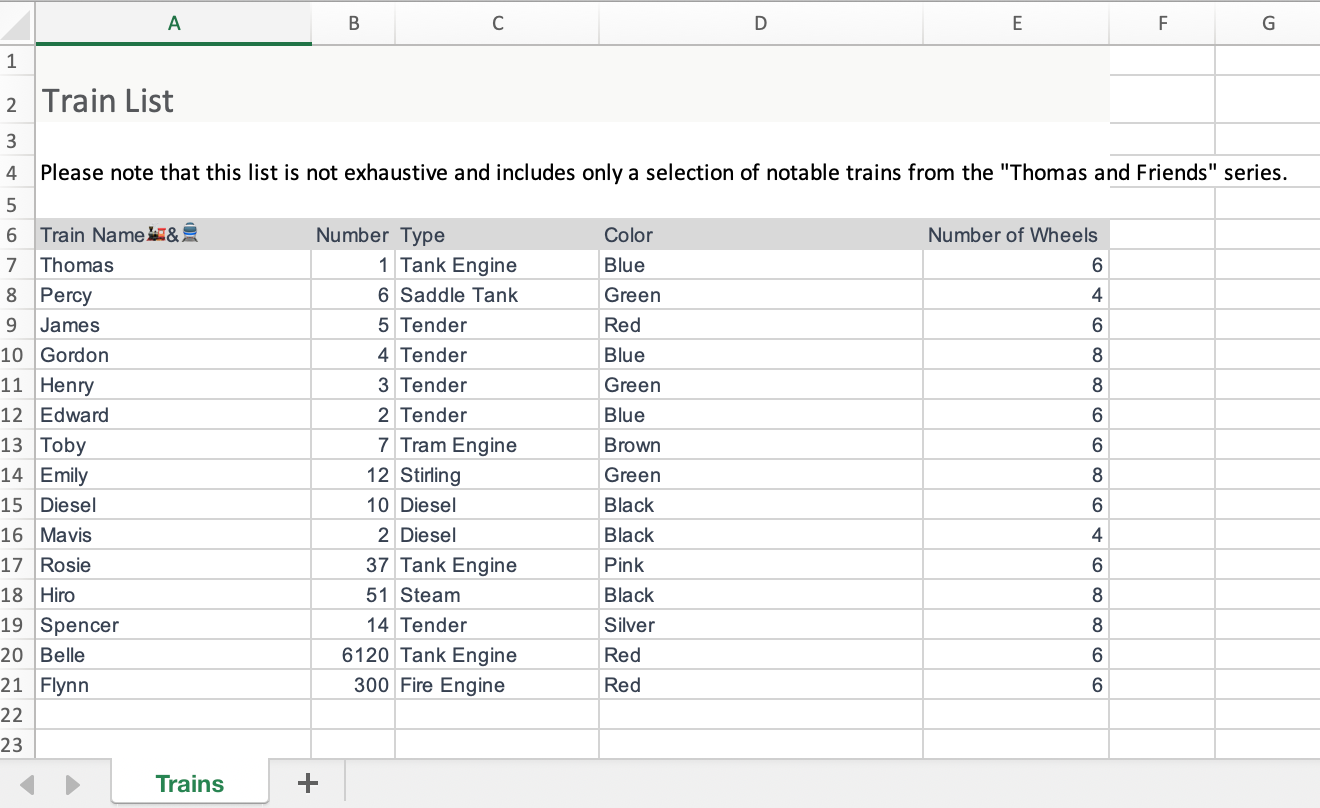
For example, we have an Example.xlsx in which on the Trans sheet there is a train list from row 6 to row 21, we would like to fetch this list and generate a JSON payload.
ANSWER
- Read the Excel payload, for example, the following code assumes Example.xlsx is a resource therefore we can load it via readUrl()
%dw 2.0 output application/json --- readUrl("classpath://Example.xlsx","application/xlsx") - Locate the title line (row 6) and fetch the rest of the data
<ee:transform doc:name="Transform Message" doc:id="5acaac2a-4060-4460-a3a8-1ad190f5bb6e" >
 <ee:message >
 <ee:set-payload ><![CDATA[
%dw 2.0
output application/json
var allRecords = (payload pluck $)[0]
fun isTitle (obj: Object) = ! isEmpty(((obj pluck $) map ($ matches /.*Train Name.*/)) filter $)
var title = (allRecords filter (item, index) -> (isTitle(item)))[0]
var titleFields = (title pluck $) map ($ replace /[^0-9a-zA-Z:\s]/ with "")
var idx = (allRecords find title)[0]
var restOfRecords = allRecords[idx+1 to -1]
fun addTitle (obj: Object) = (obj mapObject (value,key,index) -> { (titleFields[index]) : (value) }) -- { "": ""}
var formatedRecords = restOfRecords map (addTitle($))
---
formatedRecords
]]>
 </ee:set-payload>
 </ee:message>
</ee:transform>
ADDITIONAL INFORMATION
- https://docs.mulesoft.com/dataweave/2.4/dw-core-functions-pluck
- https://docs.mulesoft.com/dataweave/2.4/dw-core-functions-map
知識文章編號
001117066
此文章是否解決您的問題?
請讓我們知道,以便我們改進!
