Vælg en organisation
How to parse XML attributes larger than 524288
Udgivelsesdato: Mar 11, 2025
Trin
SYMPTOM
You receive the following error when receiving a big XML Attribute and you want to parse it:org.xml.sax.SAXParseException; Maximum attribute size limit (524288) exceeded (javax.xml.transform.TransformerException).
CAUSE
The default maximum attribute size limit is set to 524288 and exceeded.
SOLUTION
Mule 3:If using Mule 3.9.3 or below open a case and request the following patches:
<dw:transform-message doc:name="Transform Message">
    <dw:input-payload  mimeType="application/xml">
        <dw:reader-property name="maxAttributeSize" value="1000000"/>
    </dw:input-payload>
    <dw:set-payload><![CDATA[%dw 2.0
%output application/json
---
payload]]></dw:set-payload>
</dw:transform-message>
Mule 4:For Dataweave's Transformation, reader and writer properties are available since Mule 4.2.1 to allow you to manipulate large attributes. The solution is to set the correct MIME Type and Parameters at the source of the data. For example, add a Read connector before the DataWeave Transform Message and set MIME Type to "application/xml" and add the "maxAttributeSize" parameter with a value of "1000000".
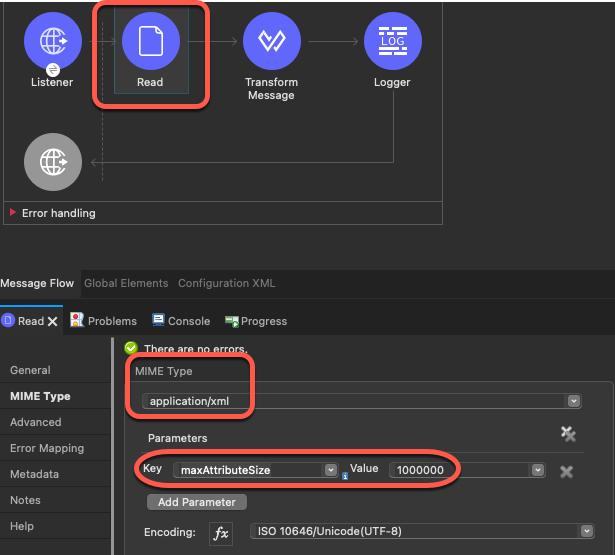
Refer to these documents for more information:
- https://docs.mulesoft.com/mule-runtime/4.3/dataweave-formats-xml#reader-properties
- https://docs.mulesoft.com/dataweave/2.4/dataweave-cookbook-reader-prop-connector
Vidensartikelnummer
001117147
Løste denne artikel dit problem?
Giv os besked, så vi kan forbedre os!
