Sélectionner une organisation
How to Get CloudHub Application Platform Logs Using Anypoint Platform API
Date de publication: Aug 1, 2025
Tâche
GOAL
From Anypoint Runtime Manager UI, we can see:- Platform logs, shown as System Log
- Application logs, shown as Worker-0...Worker-n
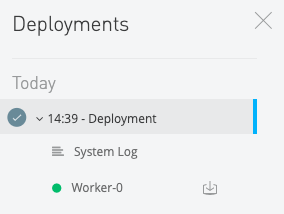
Platform Log contains deployment information, like:
xx:xx:xx.xxx xx/xx/xxxx     Deployment     system     SYSTEM
Deploying application to 1 workers in ap-southeast-2 region(s).
xx:xx:xx.xxx xx/xx/xxxx     Deployment     system     SYSTEM
Provisioning CloudHub worker in region=ap-southeast-2...
xx:xx:xx.xxx xx/xx/xxxx     Deployment     system     SYSTEM
Starting CloudHub worker at xxx.xxx.xxx.xxx ...
xx:xx:xx.xxx xx/xx/xxxx     Deployment     system     SYSTEM
Worker(xxx.xxx.xxx.xxx): Starting your application on mule=3.8.5...
xx:xx:xx.xxx xx/xx/xxxx     Deployment     system     SYSTEM
Worker(xxx.xxx.xxx.xxx): Your application has started successfully.
xx:xx:xx.xxx xx/xx/xxxx     Deployment     system     SYSTEM
Application was updated successfully with zero downtime. The new version of your application has been launched and the old version has been stopped.
xx:xx:xx.xxx xx/xx/xxxx     Deployment     system     SYSTEM
Your application is started.
Also other events like impairment
[xxxx-xx-xx xx:xx:xx.xxx] SYSTEM Platform [system]: WARN: Worker-0 in region(ap-southeast-2) with IPAddress(xx.xx.xx.xx) is impaired, and will wait for recovery before relaunching.This article explains how to get the Platform Logs using the Anypoint Platform API.
Étapes
Please follow How to get CloudHub application information using Anypoint Platform API and you can get:
- Access Token from step 1
- Environment ID from step 3
- Deployment ID from step 5
curl -H "Authorization: Bearer <YOUR_ACCESS_TOKEN>" -H "X-ANYPNT-ENV-ID: <YOUR_ENV_ID>" https://anypoint.mulesoft.com/cloudhub/api/v2/applications/<YOUR_APPLICATION_NAME>/instances/<DEPLOYMENT_ID>/logs
Numéro d’article de la base de connaissances
001117149
Cet article a-t-il résolu votre problème ?
Dites-nous ce que nous pouvons améliorer !
