選擇組織
How to connect to a GovCloud VPC via Direct Connect
發佈日期: Mar 2, 2024
工作
GOAL
Establish connectivity between a GovCloud VPC and your own network, using AWS Direct Connect (DX).
Important: You are using the GovCloud management plane if you login via URL gov.anypoint.mulesoft.com
If you are using a different login URL, please follow How to connect to a CloudHub (CH) VPC via Direct Connect (DX) instead.
步驟
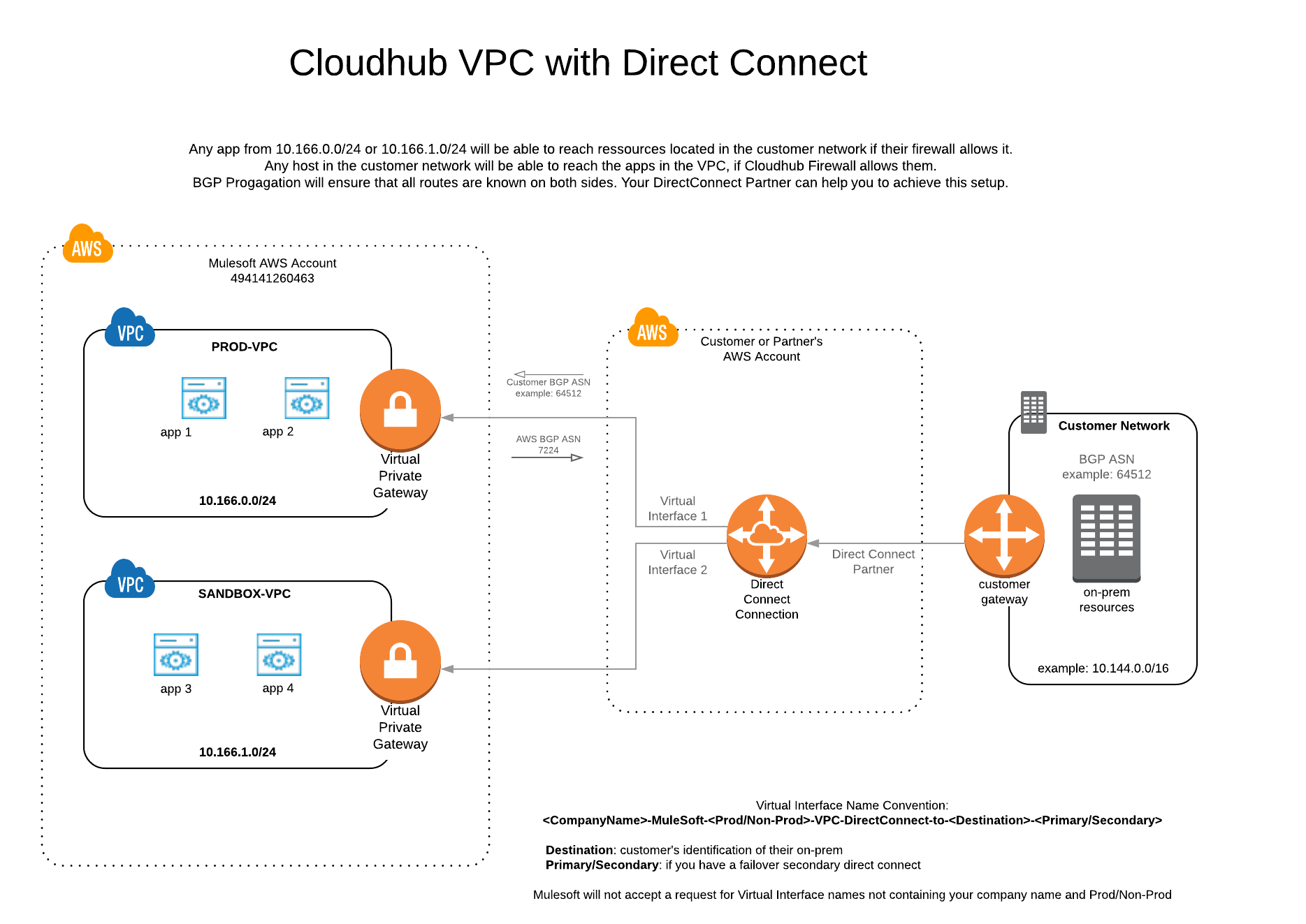
You must establish Direct Connect connections to your own AWS account, or your partner's AWS account, as shown in the diagram below. For more details on this step, please refer to the AWS documentation or engage the AWS support.
- DO NOT create a Direct Connect request to the MuleSoft AWS account
- Direct Connect MUST be in the same region as the CloudHub VPC
2. Create a private Virtual Interface (VIF)
a) Create a private VIF request to account ID 600505353442
b) Follow the VIF naming convention [<CompanyName>-MuleSoft-<Prod/Non-Prod>-VPC-DirectConnect-to-<Destination>-<Primary/Secondary>]
c) Download the VPC Discovery Form
d) Fill out the Overview and Direct Connect tabs (please fill out one form per VPC)
c) Download the VPC Discovery Form
d) Fill out the Overview and Direct Connect tabs (please fill out one form per VPC)
3. Raise a case with MuleSoft Support
a) Attach the VPC Discovery Form to the case.
b) A MuleSoft support engineer will accept the VIF request, attach it the CH VPC via a Virtual Gateway (VGW), and enable route propagation.
c) You will be notified via the Support case once these actions are complete.
c) You will be notified via the Support case once these actions are complete.
4. Enable BGP
a) Bring up the BGP session for the VIF.
b) Follow How to View the VPC Route Table via the UI to confirm the routes are being advertised to the MuleSoft peer as expected.
5. Test Connectivity
a) Follow How to Verify VPC Connectivity using Direct Connect to validate the new connection.
FAQ
1. What is AWS Direct ConnectAWS Direct Connect is a dedicated network connection service from your premises to the AWS data center.
2. Can I connect to a CH VPC with a secondary DX connection?
Yes. That's AWS best practice. If you have established a second AWS DX connection, traffic will failover to the second link automatically. You can even establish a third DX as a redundant connection.
3. Can I use Anypoint VPN connections as a backup for DX?
No, it is not possible to establish Anypoint VPN connections and DX connections for the same VPC.
4. Can I use static routes?
Direct Connect (DX) requires the use of the Border Gateway Protocol (BGP) for dynamic routing. This allows you to have full control of the routes advised to the CH VPC.
5. How do I establish DX connectivity?
Please review the AWS Direct Connect documentation, and reach out to AWS support for further assistance if needed.
6. Is it mandatory to have an AWS Account?
Yes, you need to establish connectivity in your own AWS account, or your partner's AWS account. Some partners hide the AWS Account, which means they are the ones initiating the requests on your behalf.
Behind the scenes, it is the same setup but the "Customer AWS Account" would be a "Partner AWS Account". Please ensure they follow the naming convention "<CompanyName>-MuleSoft-<Prod/Non-Prod>-VPC-DirectConnect-to-<Destination>-<Primary/Secondary>" when creating a VIF or hosted connection request.
知識文章編號
001117192
此文章是否解決您的問題?
請讓我們知道,以便我們改進!
