組織を選択
How to Configure High Availability with Anypoint VPN
公開日: Jul 21, 2025
タスク
GOAL
Each Anypoint VPN connection consists of two endpoints, providing high availability (HA) on the MuleSoft side by default. This article explains how to achieve high availability on the your side.
Important: This Knowledge Article aims to provide basic guidelines for configuring High Availability with Anypoint VPN. The contents of the article are to be used at your own risk and are provided as-is. For further information on configuring your own VPN devices, please reach out to the device vendor.
ステップ
In order to configure a fully HA VPN connection, you must:
- Have sufficient entitlements, one for each VPN connection. See How to Calculate VPC and VPN License Requirements.
- Have two VPN endpoints available in your network that use different public IP addresses.
- Create two VPN connections in Runtime Manager. See Create an Anypoint VPN Connection.
Here is a high level example of the HA VPN topology, using a single MuleSoft VPC, and two VPN connections.
A MuleSoft Virtual Private Gateway (VGW) Gateway may only be associated with a single MuleSoft VPC, but it can support up to 10 VPN connections.
The customer VPN Gateways may be located in the same data center, or in different physical locations.
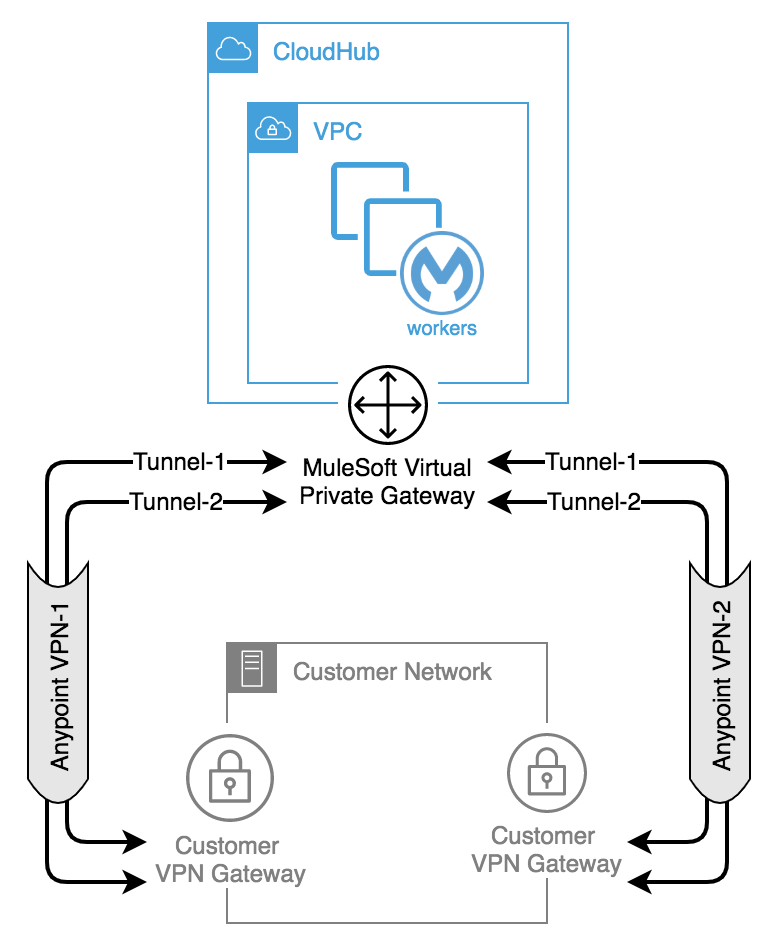
Using BGP routing allows us to advertise the same routes via VPN-1 and VPN-2, and Anypoint VPN Path Selection using BGP Routing explains how you can control path selection via the routing protocol.
In this scenario, the Customer VPN Gateways are configured to prefer: VPN-1 Tunnel-1, then VPN-1 Tunnel-2, then VPN-2 Tunnel-1, and finally VPN-2 Tunnel-2.
This allows you to make use of automatic failover to another tunnel, and to another VPN in the event of a VPN connectivity issue, making the Anypoint VPN solution more resilient and robust. For this reason, we recommend using BGP routing if your device supports it.
It is possible to configure a HA VPN connection using static routing. In this scenario, VPN-2 is a redundant, standby connection, which can be manually established in the event of a failure with VPN-1. There is no automatic failover between the VPNs, referring to Secondary VPN Connection for Static Routes. We recommend running BGP over VPN tunnel to establish HA connections.
ナレッジ記事番号
001117225
この記事で問題は解決されましたか?
ご意見をお待ちしております。
