Velg en organisasjon
Configure Cloudhub Application to Send a HTTPS Request Directly to Another CloudHub Application in CloudHub 2.0 (CH 2.0)
Publiseringsdato: Oct 6, 2024
Løsning
GOAL
As indicated in our documentation it's possible to send request within the same PS bypassing the ingress Load Balancer. And you would like to successfully configure a CloudHub 2 application (app1) to send a HTTPS request directly to another CloudHub 2 application (app2) in the same Private Space (PS).
PROCEDURE
Solution 1: tick the Insecure option in your HTTPS request connector. If you use this option, the contents of your keystore on the destination app doesn't matter.
Solution 2: configure truststore on the requesting app and keystore on the destination app.
Steps:
1) The application should be deployed using the https.port listener and port 8081. Unlike CH1, all applications run on port 8081, no matter if they are using http or https protocol.
2) Create the keystore and truststore.
Refer to this doc for more information on how to create a keystore/truststore. The certificate common name must match your request, which would be destination application name.
3) Configure the HTTP request connector on the sending app.
On app1 (the app making the request) configure the HTTP request connector.
-
Set the protocol to HTTPS
-
Configure the URL for accessing app2. Which is the application name.
-
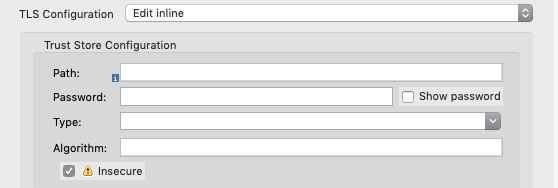
Specify the trust store in the Trust Store Configuration section and add your truststore file to /src/main/resources.
-
An alternative to configuring the trust store is to simply enable the Insecure option (as indicated in solution 1). If you tick the Insecure box like in the image below, you don't need to configure the trust store. This also means you don't need to have a valid certificate common name in the keystore configured on app2 (destination of your request).
4. Configure the HTTP listener connector on the destination app.
-
Set the protocol to HTTPS
-
Specify your keystore in the Key Store Configuration section under TLS. Add your keystore file to /src/main/resources.
-
Keep this app private by using the port variable https.port (8081).
Knowledge-artikkelnummer
001117631
Hjalp denne artikkelen med å løse problemet ditt?
La oss få vite det slik at vi kan forbedre!
