Sélectionner une organisation
DataWeave lookup blocks CPU intensive threads in Mule 4
Date de publication: May 26, 2025
Résolution
SYMPTOMS
- The application includes DataWeave scripts that utilize the lookup function to invoke flows.
- Requests are being blocked, causing the application to experience latency or become unresponsive.
- Upon capturing a thread dump and examining the CPU-intensive threads, the stack trace appears similar to the example provided below.
"[MuleRuntime].cpuIntensive.02: [appname].flow.CPU_INTENSIVE @7c2cefb6" #23 prio=5 os_prio=0 tid=0x00007fb2112e0000 nid=0xcc9 waiting on condition [0x00007fb1f5f82000]
   java.lang.Thread.State: WAITING (parking)
    at sun.misc.Unsafe.park(Native Method)
    - parking to wait for  <0x00000000bf725fd0> (a java.util.concurrent.CompletableFuture$Signaller)
    at java.util.concurrent.locks.LockSupport.park(LockSupport.java:175)
    at java.util.concurrent.CompletableFuture$Signaller.block(CompletableFuture.java:1693)
    at java.util.concurrent.ForkJoinPool.managedBlock(ForkJoinPool.java:3323)
    at java.util.concurrent.CompletableFuture.waitingGet(CompletableFuture.java:1729)
    at java.util.concurrent.CompletableFuture.get(CompletableFuture.java:1895)
    at org.mule.runtime.core.internal.el.mvel.function.LookupFunction.call(LookupFunction.java:81)
    at org.mule.weave.v2.el.ExpressionFunctionToFunctionValueAdapter.call(ExpressionFunctionToFunctionValueAdapter.scala:27)
    at org.mule.weave.v2.interpreted.node.FunctionCallNode.doExecute(FunctionCallNode.scala:56)
    at org.mule.weave.v2.interpreted.node.ValueNode.execute(ValueNode.scala:41)
CAUSE
DataWeave scripts in Mule 4 are executed within the CPU Intensive thread pool. When a DataWeave script includes a lookup function, the executing thread initiates the lookup in parallel and waits for the response. Issues arise when the lookup function triggers another task that also requires a CPU Intensive thread, such as a scripting component. In such cases, there may be insufficient threads available for execution due to the limited size of the thread pool.
This situation can lead to unresponsive applications. It is important to note that the lookup function is designed for invoking flows that return quickly. For more resource-intensive processes, lookup is not the appropriate option, as it is not designed to support such usage.
SOLUTION
The DataWeave lookup function is deprecated and may not be compatible with the latest Mule Runtime versions. Therefore, it is not recommended to be used. For more information, please refer to the DataWeave lookup function documentation, which highlights the deprecation of this function.
You can opt for one of the solutions below to substitute the lookup function.
- Option 1: Flow Reference component
If your lookup function invokes a flow that contains multiple components to execute, then the Flow Reference component would be an ideal solution, offering superior performance compared to the DataWeave lookup function. For parallel invocation of flows, consider using the Parallel For Each Scope to invoke Flow References.
- Option 2: Create Custom Modules and Mappings
If your lookup function invokes a flow that only contains a Transform Message component, consider updating the logic to modify this to a Custom Mapping or a Module.
Below is an example of how to replace a lookup function with a Custom Mapping:
1. The lookup function code below invokes the "transform_data" flow.
DATA: Mule::lookup("transform_data", payload, 60000)2. The "transform_data" flow performs a transformation of the payload using the "transform.dwl" file.
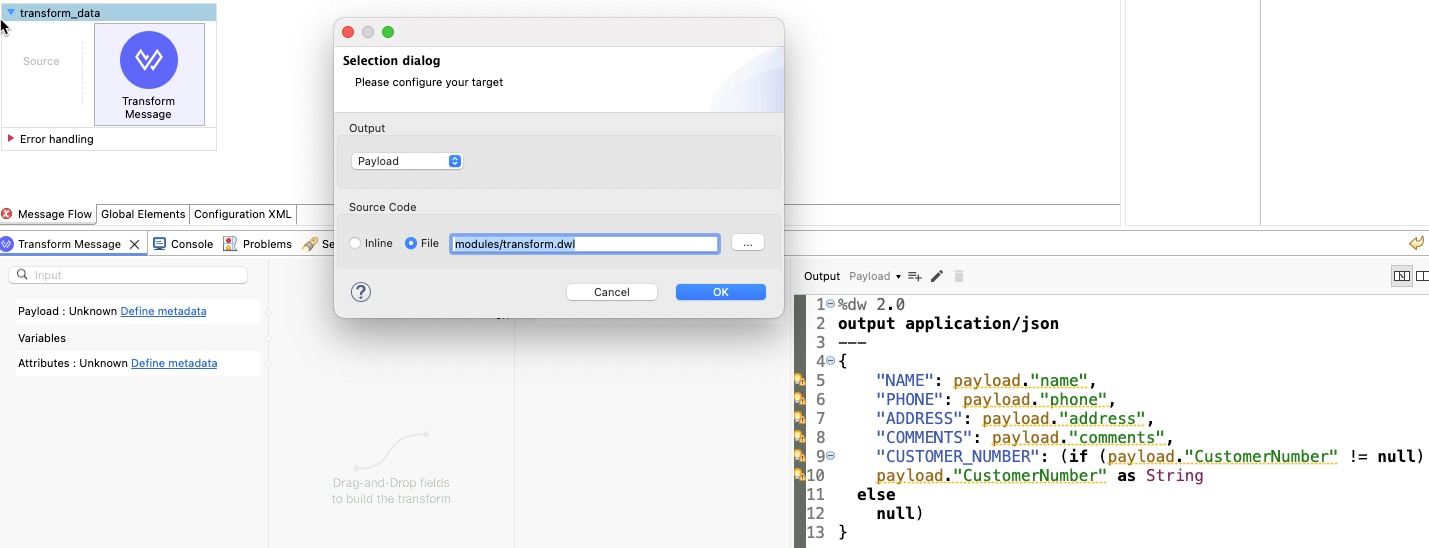
3. Now, the lookup function can be replaced by importing the "transform.dwl" file as a custom mapping and invoking the code using the main function as shown below.
%dw 2.0
import modules::transform
output application/json
---
{
	DATA: transform::main(payload: payload)
}
4. With this change, the "transform_data" flow would be nonfunctional and can be removed.
5. Note that Custom Modules and Mappings cannot access any variables or payload outside the dwl file. Any such values must be passed in the main function invocation.
Related:
For instructions on how to take a thread dump: How to obtain as much information as possible from an unresponsive Mule server
Numéro d’article de la base de connaissances
001117845
Cet article a-t-il résolu votre problème ?
Dites-nous ce que nous pouvons améliorer !
