Vælg en organisation
Unable to Login? How to reset your Password in Anypoint Platform
Udgivelsesdato: Sep 25, 2025
Løsning
GOAL
This article describes what you can do if you have forgotten or need to change your password. It can also be used to remind you of your username. This procedure applies to users created by the Anypoint Platform user management. If you are an SSO User, where your user account is part of an Organization with an External Identity configured for single sign-on (Salesforce, Okta, Ping, or Azure Authenticators), please change your password via your External Identity provider. Please reach out to your organization administrator if you have trouble doing so.
PROCEDURE
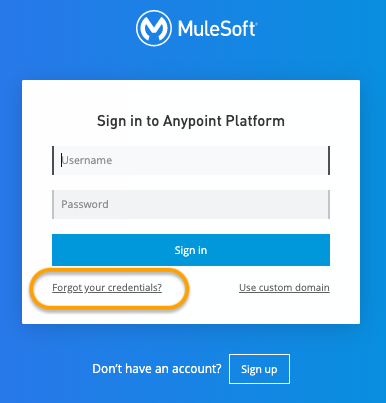
There is a link provided on the Anypoint login page that allows you to reset your password.
You may also access the reset password screen from this link Forgot your credentials? - This form will accept either your username or your email address.
- If you supply an email address, an email will be generated and sent to the provided address telling you the username(s) associated with that email address as an email address can be associated with multiple usernames
- If you supply a username (or you have identified the affected username from your email address and used that), you can use the Forgot your credentials? link to get the password reset link for the specified username. Please note, if you have a username that looks like an email address, you will not be able to reset your password using this method.
- If you do not get an email with a reset link sent to your email address, then please contact your company's Organization Administrator for Anypoint Platform and request that they reset the password for your username. Then can complete this task, if they enter Access Management -> Users -> <username>, they will be able to send a reset password link.
- Should for some reason, your email address be incorrect or invalid for your username, please review Fixing incorrect Email addresses for users prior to issuing the password reset.
- Some email clients may incorrectly filter the password reset email to your email client Spam/Junk folder. Please check your spam/junk folder if you do not see the email arrive.
- If you've confirmed your email is correct, it may be that your email server or network firewall captures or blocks the email. You may check with your email administrator who can confirm this - the email address for the password reset is anypoint-noreply@mulesoft.com. Please ask them to whitelist this email address.
- A workaround for this in case the server is blocking is to change the email address to your personal email address - Gmail or similar- and perform a reset request. Once you complete resetting and are able to successfully log in, change your email address back to the original email
- It may also be that there is an issue with your Multi-Factor Authentication - If you need to change your device or reregister it, please work with your Organisation administrator to do.
- MuleSoft Support cannot reset a password for you. This is a task that can only be performed by your Anypoint Organization Administrators.
If you have reset your password and you are using it in Anypoint Studio, Anypoint CLI, the Cloudhub Connector, or another scripting scenario you will have to update it. How to update Anypoint user credentials in common usage scenarios explains some common scenarios.
If you are concerned about the security of your account, your administrators can check the Audit Logs to ensure no unauthorized access has occurred.
If you have attempted to reset the password for a user account but are not receiving the password reset email, please check if you can receive an email to retrieve a list of your usernames. This will help determine if the mail server is blocking emails from the MuleSoft email account or the password resetting email goes to the spam folder.
If you do receive the email for retrieving your usernames but not for resetting the password, please confirm the URL you used to log in. If you previously used https://composer.mulesoft.com/login, this indicates it is a Composer account, and the URL for resetting the password should be https://composer.mulesoft.com/login rather than https://anypoint.mulesoft.com/login/.
Need More Assistance?
If you cannot successfully reset your Anypoint Platform account, and you need assistance, please contact your account team and supply the following information
- Your full name
- Your Anypoint username
- Your email address - please keep in mind that if we don't have this, we may not be able to contact you.
- Your company name
- The Anypoint Organisation name
- The Anypoint Organisation ID.
If you don't know these last two pieces of information, please speak to one of your company's Anypoint Organization Administrators to obtain them.
Attachments
DEMO
Vidensartikelnummer
001117999
Løste denne artikel dit problem?
Giv os besked, så vi kan forbedre os!
