Velg en organisasjon
CloudHub Static IP Frequently Asked Questions
Publiseringsdato: Mar 2, 2024
Løsning
How do I set a static IP for my CloudHub Application?
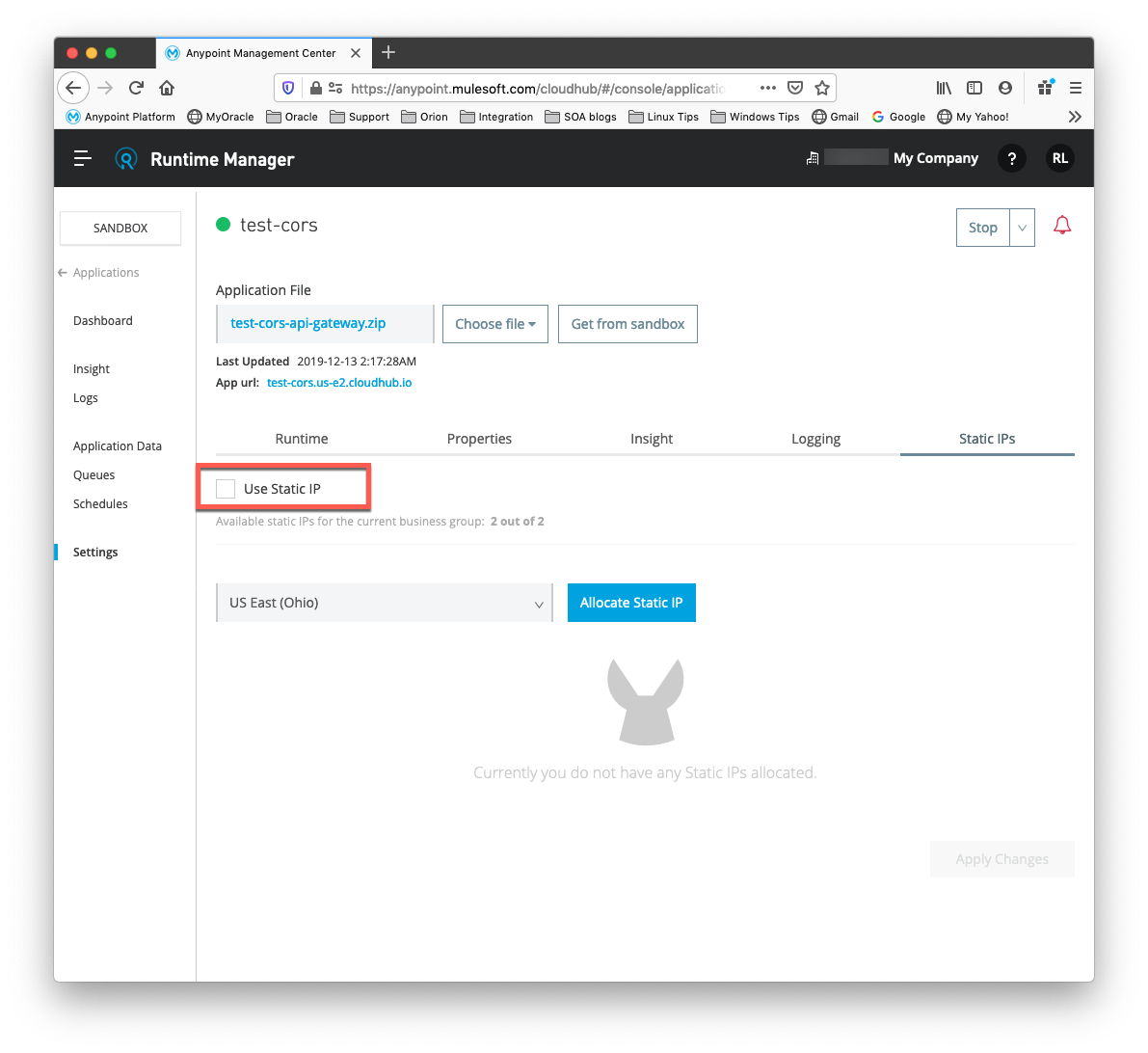
To enable a static IP for your application, go to the Static IPs tab in the application settings page on the Runtime Manager UI, then enable the Use Static IP checkbox:
By default, you are allocated a number of static IPs equal to twice the number of Production vCores in your subscription. To increase this limit, please see "We have run out of Static IP addresses in out Organization!" below.
How do I know what my static IP is?
The IP address of your worker is displayed in the CloudHub Console, on the right hand side of the Dashboard for the chosen application. The static IP is also listed on application startup, in the CloudHub Application Log. Look for a string similar to:
Applying static IP(54.163.253.17) to your application.
Also see KB article How to find my CloudHub Worker IP Address.
Can I modify my application that is assigned a static IP?
Yes, you can stop and start the application, you may upload a new project zip file, you may change settings and redeploy.
In what situations could my static IP change?
There are some specific scenarios where your static IP may be removed or reassigned. You should be aware of the following scenarios:
- Deleting an application will also remove its Static IP. If you create a new application with the same name, it will have a new dynamically assigned IP address.
- Adding a new application by moving it from Sandbox to Production. This requires a new application name, hence a new Static IP
- An application is re-deployed to a different geographic region
- Release unused IP(s) in an application and then later enabling "use Static IP" feature
- A formal request to the Account Team to remove the Static IP is completed.
Can I request a specific Static IP?
No. CloudHub utilizes a pool of Static IP’s, which are only assigned to a CloudHub Application upon first deployment. If/when that application releases that static IP (for reasons in Question 4), that IP is returned to the pool, and is available to other applications.
I am running in a CloudHub Virtual Private Network, how do I assign a Static IP to my internal private IP?
CloudHub is able to set the worker's public IP address to Static. However, the internal private IP address always remains Dynamic. The private IP address is assigned from the range specified in the CloudHub Worker's Address Space, which was determined at the creation of your VPC.
Where can I get additional information?
CloudHub Network Architecture, including Static IP's is discussed in the CloudHub Public documentation. CloudHub Networking Guide. If you are not able to find the answer to your question here, or in the knowledge base, please go ahead and raise a support case and our Customer Support team will provide assistance.
What are the possible ranges from which are assigned Static or Dynamic IPs?
As CloudHub deploys on Amazon EC2, IP addresses are chosen from the Amazon EC2 IP pool. For a list of these ranges, please consult Amazon AWS IP Address Ranges API: AWS IP address ranges. The download link in that page will retrieve a dynamically generate JSON representation of all the ranges that include the region. Note that Amazon may change the ranges without notice so you may want to update this information regularly.
Could you tell me the range of IPs used by my CloudHub applications for whitelisting purposes?
This is not possible for the public Internet. Please see the previous answer for the reason and the current available global ranges. If you need to access your applications from inside a secure network you could establish a Virtual Private Cloud (VPC) in which we could configure the IP range for your CloudHub applications. Please see Virtual Private Cloud for details.
We have run out of Static IP addresses in out Organization! How do I get more?
For details on how to get more Static IP addresses added to your organization, please review How to Request Additional Static IPs for your Anypoint Organisation
Attachments
https://docs.mulesoft.com/runtime-manager/cloudhub-networking-guide#ip-ranges-and-static-ips
Knowledge-artikkelnummer
001118904
Hjalp denne artikkelen med å løse problemet ditt?
La oss få vite det slik at vi kan forbedre!
