Seleziona un'organizzazione
Not Able To Create Client Application While Requesting Access To A Resource In Anypoint Exchange
Data pubblicazione: Mar 2, 2024
Risoluzione
SYMPTOM
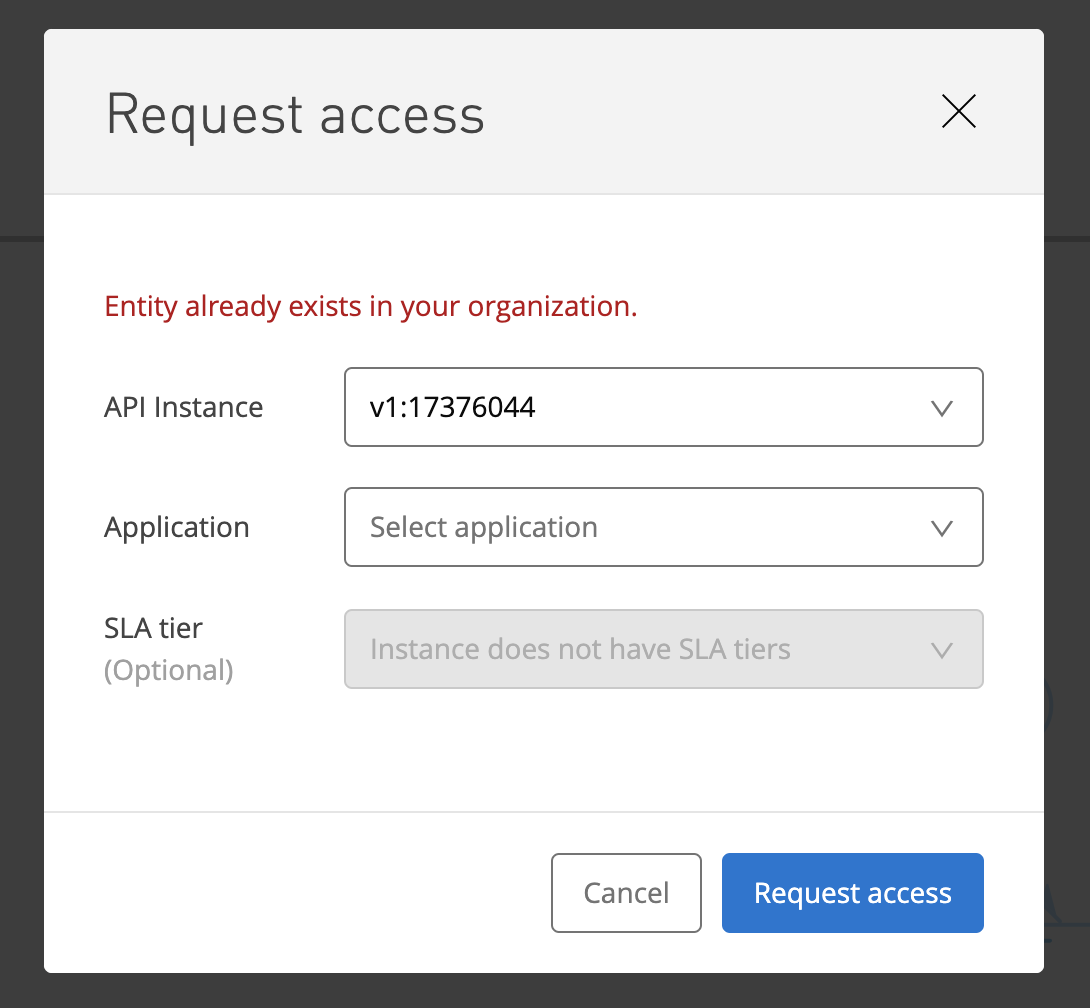
User is not able to create the client application with a particular name while requesting access to the resource in Anypoint Exchange. The error message is "Entity already exists in your organization"
CAUSE
That is because while making the request you are trying to create a Client Application name which already exists in your organization.
Client applications are created and stored at a master-organization level, and these applications are visible only to the respective application owner(s). User who creates the client application in the first place, gets assigned as the application owner. So this is the expected behavior since some other user under your organization must have created the client application with the same name.
Note)
If you capture a HAR file on that screen, you would see HTTP Response code "409 Conflict".
Sample HAR snippet)
"request": {
          "method": "POST",
          "url": "https://anypoint.mulesoft.com/exchange/api/v1/organizations/1ccaf589-xxx/applications?apiInstanceId=18063568",
...
          "postData": {
            "mimeType": "application/json",
            "text": "{\"name\":\"test1\",\"redirectUri\":[],\"grantTypes\":[],\"apiEndpoints\":false}"
          }
        },
        "response": {
          "status": 409,
          "statusText": "Conflict",
...
            "text": "{\"status\":409,\"message\":\"Entity already exists in your organization.\",\"details\":{}}"
SOLUTION
Make sure to use a unique name when you create a new client application.
Users having "Organization Administrator" role can go and check the list of all the client applications present in the organization and confirm if the client Application already exist with the same name by logging into Anypoint Platform -> API Manager -> Client Applications.
If yes, then this is a valid scenario and you can request your "Organization Administrator" to add you as an "Application Owner" for the respective client application, post which user will be able to see the same client application while requesting an access to the resource in Anypoint Exchange.
If there is no client application exist with the same name, please feel free to raise a ticket with MuleSoft Support.
Numero articolo Knowledge
001119212
Questo articolo ha risolto il problema?
Facci sapere, così possiamo migliorare!
