組織を選択
Mule Sharepoint connector - Code: 400 Message: Server relative urls must start with SPWeb.ServerRelativeUrl
公開日: Jul 25, 2025
解決策
SYMPTOM
Your application is using the MuleSoft Sharepoint connector - Folder Create operation and is having the Connection type of "OAuth v2.0 Authorization Code". On running the API, you see that the SharePoint operation fails with the error as below:********************************************************************************
Message : Code: 400 Message: {"error":{"code":"-2147024809, System.ArgumentException","message":{"lang":"en-US","value":"Server relative urls must start with SPWeb.ServerRelativeUrl"}}}
Element : CreateFolder/processors/1 @ sharepoint-integration-service:sharepoint-integration-service.xml:32 (Folder create)
Element DSL : <sharepoint:folder-create doc:name="Folder create" doc:id="6193347f-b52b-4ae9-9415-9b2535b8bc49" config-ref="Sharepoint_Sharepoint_online" url="/MuleSupportTestFolder/RahatTest" welcomePage="This is welcome page"></sharepoint:folder-create>
Error type : SHAREPOINT:CONNECTIVITY
FlowStack : at CreateFolder(CreateFolder/processors/1 @ sharepoint-integration-service:sharepoint-integration-service.xml:32 (Folder create))
(set debug level logging or '-Dmule.verbose.exceptions=true' for everything)
********************************************************************************
DEBUG 2022-05-31 15:44:29,293 [[MuleRuntime].uber.13: [sharepoint-integration-service].CreateFolder.BLOCKING @186d9b71] [processor: CreateFolder/processors/1; event: 7427be20-e0ca-11ec-ac7d-147dda423de0] org.mule.service.http.impl.service.HttpMessageLogger.HTTP_Listener_config: LISTENER
HTTP/1.1 500 Server Error
Content-Type: text/plain; charset=UTF-8
Content-Length: 175
Date: Tue, 31 May 2022 10:14:29 GMT
Connection: close
Code: 400 Message: {"error":{"code":"-2147024809, System.ArgumentException","message":{"lang":"en-US","value":"Server relative urls must start with SPWeb.ServerRelativeUrl"}}}
CAUSE
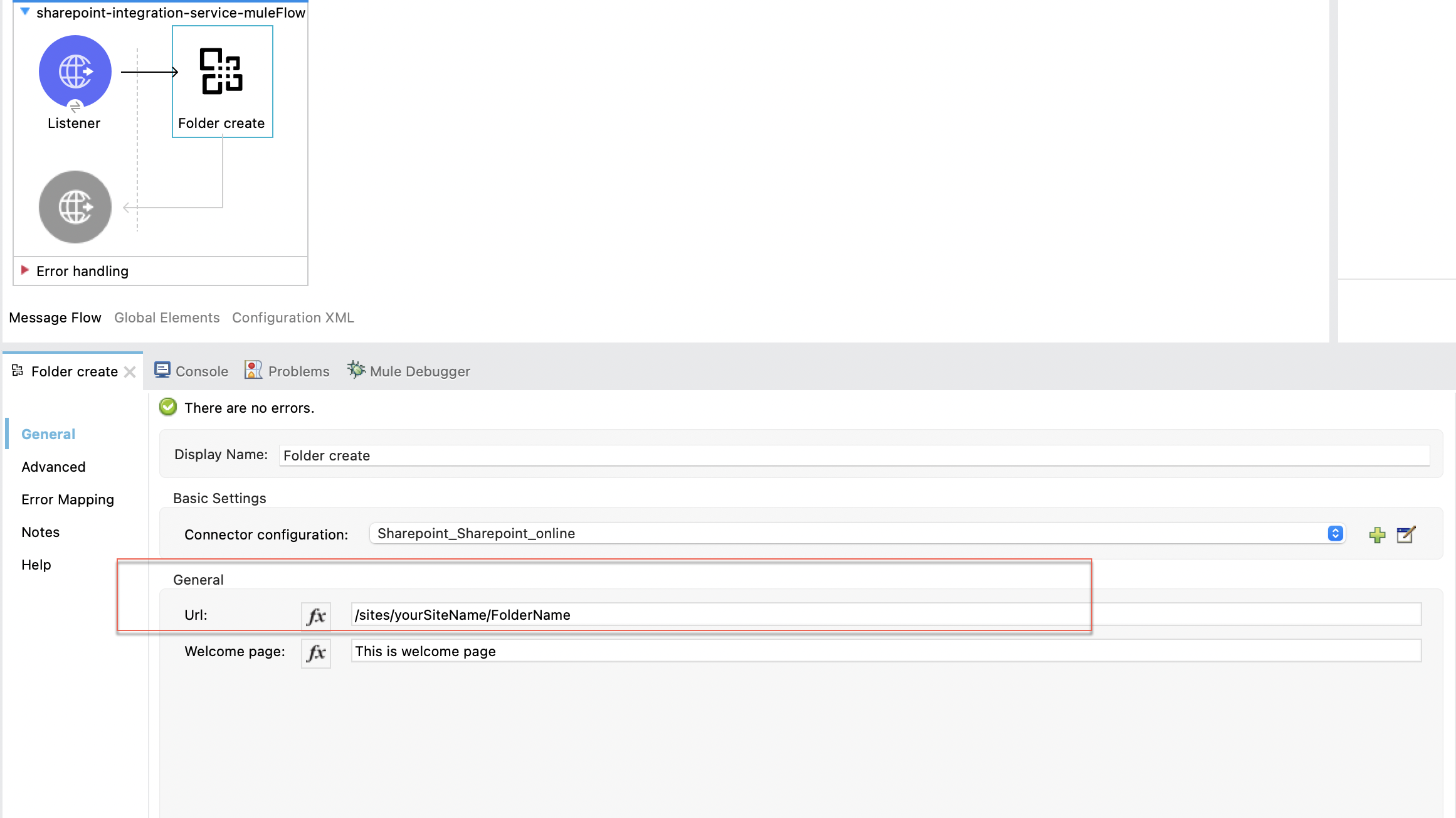
The issue happens if you are using the wrong value for the Url field for the Folder Create operation.SOLUTION
Please use the "Url" field value as "/sites/yourSiteName/FolderName"
ナレッジ記事番号
001119216
この記事で問題は解決されましたか?
ご意見をお待ちしております。
