Velg en organisasjon
SAML Redirect binding error while connecting to Exchange using Azure SSO (Entra ID)
Publiseringsdato: Sep 25, 2024
Løsning
SYMPTOM
Not able to log into From SSO URL, e.g., https://anypoint.mulesoft.com/accounts/login/<domain> or from Studio with SSO enabled user.
Error:
| Request Id: xxxxxxxx-xxxx-xxxx-xxxx-xxxxxxxxx Correlation Id: xxxxxxxx-xxxx-xxxx-xxxx-xxxxxxxxx Timestamp: 2022-05-27T16:08:26Z Message: AADSTS750054: SAMLRequest or SAMLResponse must be present as query string parameters in HTTP request for SAML Redirect binding. Flag sign-in errors for review: Enable flagging If you plan on getting help for this problem, enable flagging and try to reproduce the error within 20 minutes. Flagged events make diagnostics available and are raised to admin attention. |
CAUSE
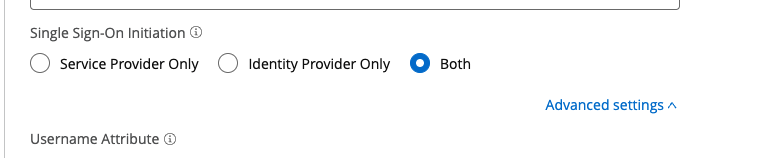
Studio needs permission to be able to Initiate Single Sign-On.
SOLUTION
- - Log into Anypoint
- - Go to Access Management --> identity providers
- - Select your identity provider
- - Single Sign-On Initiation should be set to "Both"
- - Save Changes
Knowledge-artikkelnummer
001119241
Hjalp denne artikkelen med å løse problemet ditt?
La oss få vite det slik at vi kan forbedre!
