組織を選択
File, FTP and SFTP Connectors | How to Use a Specific Encoding for the Write Operation
公開日: Mar 2, 2024
解決策
QUESTION
The 'Default write encoding' is DEPRECATED in the File, FTP, and SFTP connectors. How can I use a specific encoding for the Write operation?ANSWER
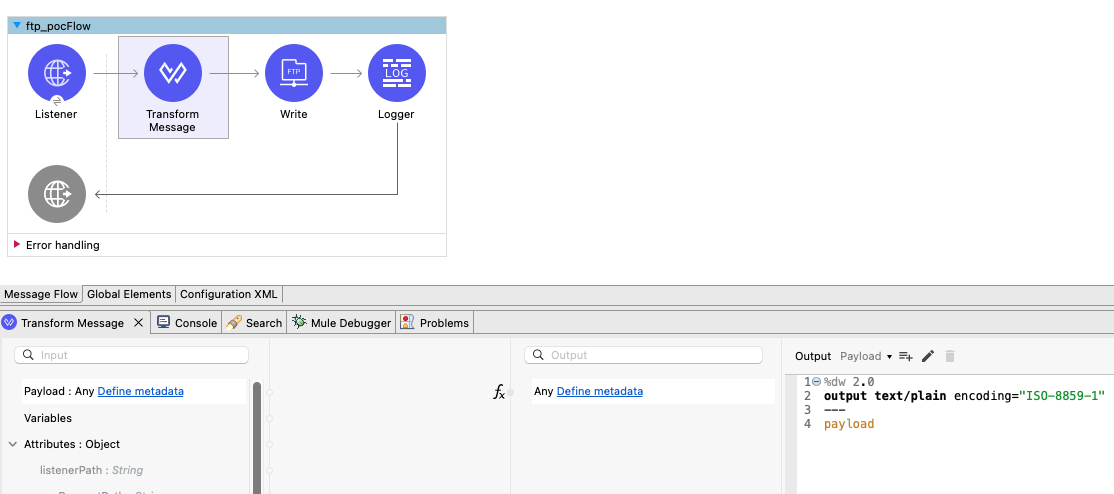
You can use the DataWeave transformation for a specific encoding before calling the Write operation.For example:
%dw 2.0
output text/plain encoding="ISO-8859-1"
---
payload
Note:
Set the proper MIME type ("text/plain" in the above example), and evaluate the usage of deferred and streaming directives if you're processing large files.
For Binary content such as an image or PDF, use the MIME type "application/octet-stream".
For all data formats supported by DataWeave, refer to https://docs.mulesoft.com/dataweave/2.4/dataweave-formats.
ナレッジ記事番号
001119424
この記事で問題は解決されましたか?
ご意見をお待ちしております。
