Seleziona un'organizzazione
How to Retrieve Certificate and Key Uploaded to DLB
Data pubblicazione: Feb 10, 2025
Risoluzione
Can customers download their DLB certificates/keys (that were uploaded) on Anypoint Platform?
No. There is no download option on Anypoint Platform. Customers must store and manage the certificates/keys in their own system.
Note that while a download option doesn't exist on Anypoint Platform, it is technically possible to retrieve the certificate. The DLB will present the certificate to clients (e.g. a browser) that are making a connection.
Below are a few screenshots showing how to download the certificate using a browser (Chrome).
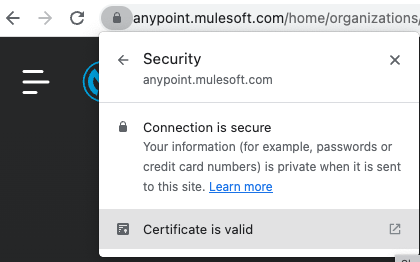
1. Browse to the URL and click on the padlock. Below screenshot has anypoint.mulesoft.com. Replace this with the common name of the certificate uploaded to the DLB (e.g. https://mycompany.example.com).
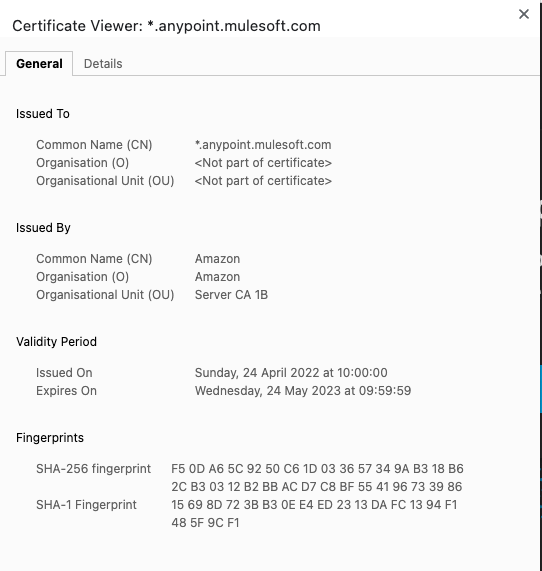
2. Click on Certificate is valid.
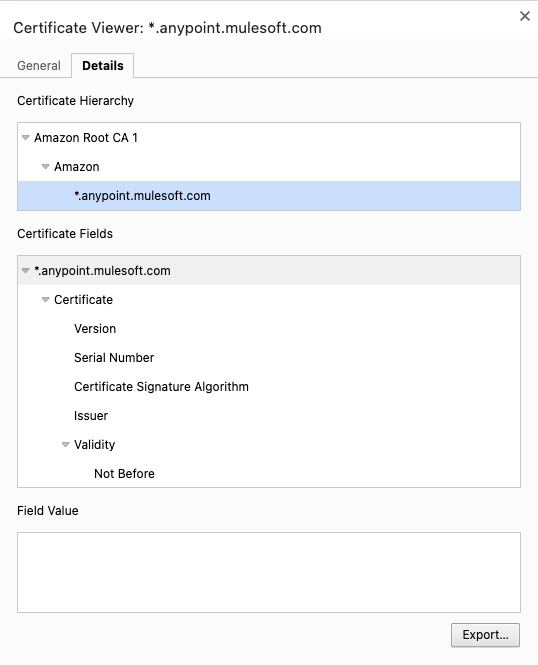
3. Click on Details.
4. Select the specific certificate (signed, intermediate and root) in the Certificate Hierarchy section and click on "Export..." to download.
Note, while it is possible to retrieve a public certificate, due to security reasons, it is not possible to retrieve (this includes contacting MuleSoft Support team):
- private keys
- client certificates
Numero articolo Knowledge
001119568
Questo articolo ha risolto il problema?
Facci sapere, così possiamo migliorare!
