Vælg en organisation
Update DPD Timeout Action for Private Space VPN Connection in CloudHub 2.0
Udgivelsesdato: Mar 2, 2024
Løsning
GOAL
The CloudHub Private Space VPN (Referring to Creating VPN Connections) supports Automatic Tunnel Initiation. This option is enabled by default. It's in the "Advanced Options"
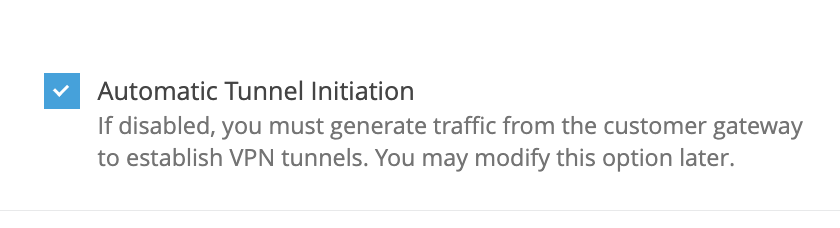
By default, VPN tunnels are initiated automatically.
If you deselect this option, you must generate traffic from the customer gateway to establish VPN tunnels.
The CloudHub 2 VPN connection will initiate the IKE negotiation process to bring the tunnel up with this option clicked. Note, the CloudHub 2 VPN only initiates the tunnel once when the VPN is created or updated, referring to Anypoint VPN Upgrade - 2022 for the VPN update. If the tunnel goes down afterwards, the CloudHub 2 VPN won't initiate the tunnel again by default. You will need to bring up the tunnel by sending traffic from the remote VPN side.
CloudHub 2 also has an API to configure the DPD (Dead Peer Detection) timeout action to restart the tunnel.
DPD timeout action: The action to take after dead peer detection (DPD) timeout occurs. By default, the IKE session is stopped, the tunnel goes down, and the routes are removed. You can specify that Anypoint VPN must restart the IKE session when DPD timeout occurs, or you can specify that no action is taken when DPD timeout occurs.The following limitations apply:
- IKE initiation (startup action) from the Anypoint side of the VPN connection is supported for IKEv2 only with route-based VPN. Does not support policy-based VPNs.
- Route-based VPN must be used. Policy-based VPN is not supported.
- If your customer gateway device is behind a firewall or other device using Network Address Translation (NAT), it must have an identity (IDr) configured. For more information about IDr, see RFC 729
- Fragmentation: The initiator connection proposal is large, and it requires that the answering Customer VPN Gateway allow fragmentation. Some gateways do not, you will need to check with your vendor. One known such CGW is Azure VPN.
- Ambiguous/unintended proposal: The large proposal from Anypoint VPN can result in unintended (or rejected) security combinations at the Customer VPN Gateway. You will need to monitor your logs to ensure the correctness and desirability of the connections that are made. Note that these can change over time due to configurations for VPNs being added or deleted on the CGW
- Default Proposal: By default, VPN endpoint on AWS side will propose AES-128, SHA-1 and DH group 2. Reference: AWS VPN FAQs
If you do not configure IKE initiation from the Anypoint side for your VPN tunnel and the VPN connection experiences a period of idle time (usually 10 seconds, depending on your configuration), the tunnel might go down. To prevent this, you can use a network monitoring tool to generate keepalive traffic.
PROCEDURE
Update DPD Timeout Action to Restart
1. You will need a bearer token to send the request. Please refer to the How to generate your Authorization Bearer token for Anypoint Platform or How to generate a bearer token for Anypoint Platform API calls using a SAML enabled account
2. The API requires the org-id, ps-id, connection-id and vpn-id. You can find your org-id by following How to know my Organization ID (Org ID) on the Anypoint Platform
3. The ps-id is in the address bar when you are in the Private Space console
4. Use the bearer token, org-id and ps-id to find out the connection ID and VPN ID. As shown in the below example, vpnId is the vpn-id and connectionId is connection-id. Ensure the values are in the right VPN JSON body if there are multiple VPNs

curl -H 'Authorization: Bearer <bearer token>' https://anypoint.mulesoft.com/runtimefabric/api/organizations/<org-id>/privatespaces/<ps-id>/connections

# For example
curl -H 'Authorization: Bearer ee7e1e5d-42b8-4fa1-967a-0123456789ab' https://anypoint.mulesoft.com/runtimefabric/api/organizations/b2ee7923-e6c7-4ca3-0123456789ab/privatespaces/f2b360ea-15fe-48f2-9061-0123456789ab/connections | jq
[
  {
    "id": "9538a4e1-3133-44e3-9d26-0123456789ab",
    "name": "bgpvpndemo",
    "vpns": [
      {
        "name": "VPN 1",
        "vpnId": "148e700a-1316-4a1b-be22-0123456789ab",
        "connectionId": "9538a4e1-3133-44e3-9d26-0123456789ab",
        "connectionName": "bgpvpndemo",
        "vpnConnectionStatus": "available",
        "remoteAsn": 65001,
        "localAsn": 64512,
        ...
      }]
  }
]
5. Send a PATCH call
curl -XPATCH 'https://anypoint.mulesoft.com/runtimefabric/api/organizations/{org-id}/privatespaces/{ps-id}/connections/{connection-id}/vpns/{vpn-id}' \
-H 'Content-Type: application/json;charset=utf-8' \
-H 'Authorization: Bearer {bearer token}' \
-d '{"vpnTunnels": [{"dPDTimeoutAction": "restart"}, {"dPDTimeoutAction": "restart"}]}'


# For example
curl -XPATCH 'https://anypoint.mulesoft.com/runtimefabric/api/organizations/b2ee7923-e6c7-4ca3-86a0-0123456789ab/privatespaces/f2b360ea-15fe-48f2-9061-0123456789ab/connections/9538a4e1-3133-44e3-9d26-0123456789ab/vpns/148e700a-1316-4a1b-be22-0123456789ab' \
-H 'Content-Type: application/json;charset=utf-8' \
-H 'Authorization: Bearer ee7e1e5d-42b8-4fa1-967a-0123456789ab' \
-d '{"vpnTunnels": [{"dPDTimeoutAction": "restart"}, {"dPDTimeoutAction": "restart"}]}'

{"id":"9538a4e1-3133-44e3-9d26-0123456789ab","name":"bgpvpndemo","vpns":[{"name":"VPN 1","vpnId":"148e700a-1316-4a1b-be22-0123456789ab","connectionId":"9538a4e1-3133-44e3-9d26-0123456789ab","connectionName":"bgpvpndemo","vpnConnectionStatus":"unavailable","remoteAsn":65001,"localAsn":64512,"remoteIpAddress":"12.34.56.78","vpnTunnels":[{"psk":"","ptpCidr":"","startupAction":"start","dPDTimeoutAction":"restart"},{"psk":"","ptpCidr":"","startupAction":"start","dPDTimeoutAction":"restart"}]}]}%
You can send another API call to check that the values have been updated. The update will trigger a VPN tunnel reset, referring to Tunnel Switch in an Anypoint Dynamic (BGP) VPN Update. Please be patient as the modification usually takes between 15-20mins during which time the tunnels will go down when the endpoints are updated.
curl -H 'Authorization: Bearer <bearer token>' https://anypoint.mulesoft.com/runtimefabric/api/organizations/<org-id>/privatespaces/<ps-id>/connections
Note: If your account is using the EU control plane, please use the endpoint https://eu1.anypoint.mulesoft.com
dPDTimeoutAction
The action to take after dead peer detection (DPD) timeout (default to 30s) occurs. You can specify the following:
- Clear: End the IKE session when DPD timeout occurs (stop the tunnel and clear the routes)
- None: Take no action when DPD timeout occurs
- Restart: Restart the IKE session when DPD timeout occurs
Default: Clear
You can also Update Automatic Tunnel Initiation via API in CloudHub 2
Vidensartikelnummer
001119824
Løste denne artikel dit problem?
Giv os besked, så vi kan forbedre os!
