Sélectionner une organisation
After installing Flex Gateway in a Docker container, Anypoint Runtime Manager display it in Disconnected status
Date de publication: Feb 2, 2026
Résolution
SYMPTOM
We are using Docker container to install the Flex Gateway and have registered the Flex Gateway in connected mode using the username and password. I am able to start the Flex Gateway using the below command:docker run --rm -v "$(pwd)":/usr/local/share/mulesoft/flex-gateway/conf.d -p 8085:8085 docker/mulesoft/flex-gateway
But I don't see the Flex Gateway details in Anypoint Runtime Manager.
CAUSE
In Anypoint Runtime Manager, the Flex Gateway is in Disconnected status because the Flex Gateway was not started properly. The registration.yaml file is missing.To check the container logs, run the below command:
docker logs <id-or-name-of-the-container>If you check the logs for the container, you will see a message similar to the one below:
[flex-gateway-agent][error] the following errors where found during commands execution: (Extension default/http-basic-authentication-flex: the registration configuration is missing), (Extension default/jwt-validation-definition: the registration configuration is missing), (Extension default/ip-blocklist-definition: the registration configuration is missing), (Extension default/openidconnect-access-token-enforcement-flex: the registration configuration is missing), (Extension default/header-removal-impl: the registration configuration is missing), (Extension default/http-caching-definition: the registration configuration is missing), (Extension default/cors-flex: the registration configuration is missing), (Extension default/envoy-route: the registration configuration is missing), (Extension default/extension-implementation: the registration configuration is missing), (Extension default/rate-limiting-sla-based-flex: the registration configuration is missing), (Extension default/extension-metrics: the registration configuration is missing), (Extension default/client-id-enforcement-definition: the registration configuration is missing), (Extension default/header-removal-definition: the registration configuration is missing), (Extension default/ip-blocklist-flex: the registration configuration is missing), (Extension default/monitoring: the registration configuration is missing), (Extension default/oauth2-token-introspection-flex: the registration configuration is missing), (Extension default/route: the registration configuration is missing), (Extension default/ldap-authentication-flex: the registration configuration is missing), (Extension default/envoy-tls: the registration configuration is missing), (Extension default/open-id-definition: the registration configuration is missing), (Extension default/jwt-validation-flex: the registration configuration is missing), (Extension default/header-removal-flex: the registration configuration is missing), (Extension default/extension-authorization: the registration configuration is missing), (Extension default/tls: the registration configuration is missing), (Extension default/envoy-filter: the registration configuration is missing), (Extension default/header-injection-definition: the registration configuration is missing), (Extension default/ip-allowlist-definition: the registration configuration is missing), (Extension default/envoy-api-context: the registration configuration is missing), (Extension default/proxy-wasm-filter: the registration configuration is missing), (Extension default/shared-storage: the registration configuration is missing), (Extension default/oauth2-token-introspection-definition: the registration configuration is missing), (Extension default/extension-definition: the registration configuration is missing), (Extension default/cors-definition: the registration configuration is missing), (Extension default/extension-authentication: the registration configuration is missing), (Extension default/api-context: the registration configuration is missing), (Extension default/header-injection-impl: the registration configuration is missing), (Extension default/metering: the registration configuration is missing), (Extension default/tls-inbound: the registration configuration is missing), (Extension default/spike-schema: the registration configuration is missing), (Extension default/http-basic-authentication-definition: the registration configuration is missing), (Extension default/tls-common: the registration configuration is missing), (Extension default/extension-qos: the registration configuration is missing), (Extension default/rate-limit-sla-definition: the registration configuration is missing), (Extension default/client-id-enforcement-flex: the registration configuration is missing), (Extension default/oauth2-token-introspection-impl: the registration configuration is missing), (Extension default/http-caching-flex: the registration configuration is missing), (Extension default/json-threat-protection-definition: the registration configuration is missing), (Extension default/rate-limit-definition: the registration configuration is missing), (Extension default/message-logging-flex: the registration configuration is missing), (Extension default/spike-control-flex: the registration configuration is missing), (Extension default/header-injection-flex: the registration configuration is missing), (Extension default/ip-allowlist-flex: the registration configuration is missing), (Extension default/open-id-impl: the registration configuration is missing), (Extension default/logging-definition: the registration configuration is missing), (Extension default/json-threat-protection-flex: the registration configuration is missing), (Extension default/rate-limiting-flex: the registration configuration is missing)
SOLUTION
To address this error, follow these steps:1. Create a new directory in your home folder on the Linux host;
mkdir gateway-dir2. Change the current directory to the newly created one;
cd gateway-dir/
3. Add a new Flex Gateway in the Runtime Manager;

4. Run the suggested commands from the UI (user interface) on your Linux host;
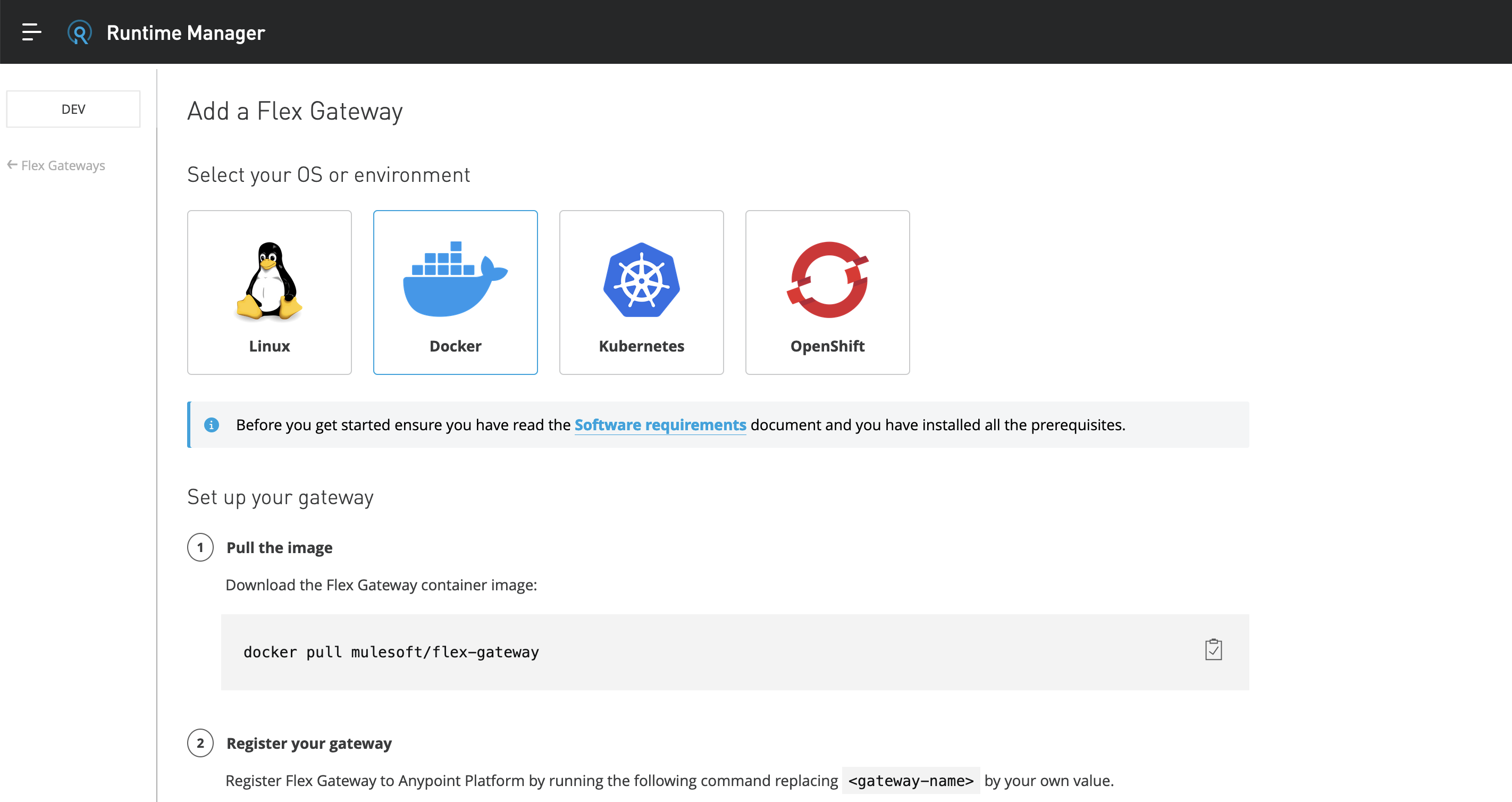
5. Run the docker pull command;
docker pull mulesoft/flex-gateway
6. Specify your organisation details and the Flex Gateway name, and run the docker run command;
docker run --entrypoint flexctl -u $UID \
  -v "$(pwd)":/registration mulesoft/flex-gateway \
  register --organization=<your-organization-id> \
  --token=<the-token-from-ui> \
  --output-directory=/registration \
  --connected=true \
  <name-of-your-flex-gateway>
7. Run the last docker command;
docker run --rm \
>   -v "$(pwd)":/usr/local/share/mulesoft/flex-gateway/conf.d \
>   -p 8081:8081 \
>   mulesoft/flex-gateway
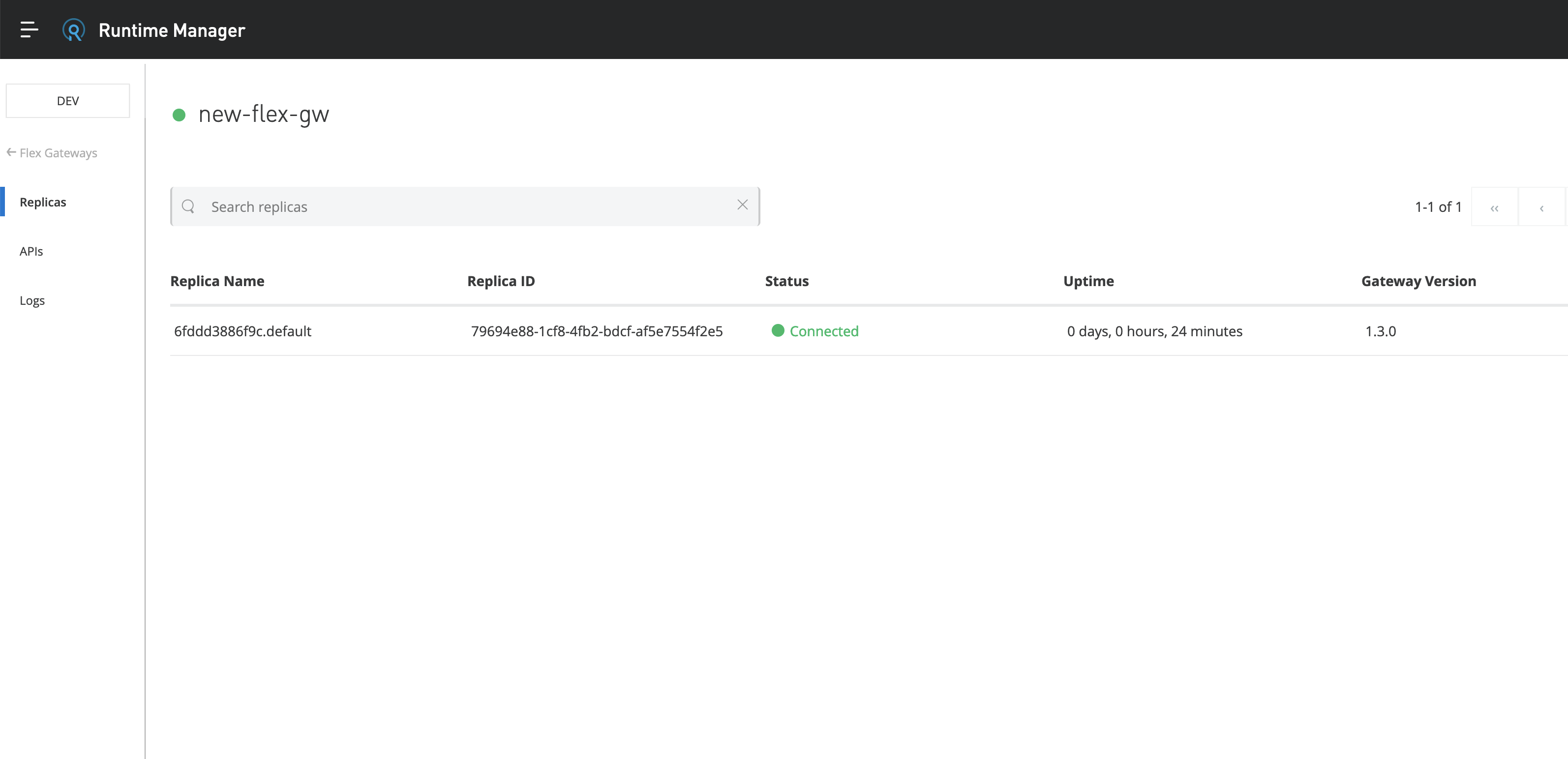
8. Check and confirm in the Runtime Manager UI that the Flex Gateway is displayed and it is in a connected status;
9. Below you can find the sample commands from the lab environment:
vagrant@ubuntu:~$ mkdir gateway-dir
vagrant@ubuntu:~$ cd gateway-dir/
vagrant@ubuntu:~/gateway-dir$ docker pull mulesoft/flex-gateway
Using default tag: latest
latest: Pulling from mulesoft/flex-gateway
Digest: sha256:9871aed5bcacc9cd5e8babac61ecf1bf22257cf623b01e200d15cecfd2609bab
Status: Image is up to date for mulesoft/flex-gateway:latest
docker.io/mulesoft/flex-gateway:latest
vagrant@ubuntu:~/gateway-dir$ docker run --entrypoint flexctl -u $UID \
>   -v "$(pwd)":/registration mulesoft/flex-gateway \
>   register --organization=ag1f0e72-159f-4293-b3bc-e579367f95a8 \
>   --token=9cd02edf-eg24-4516-bad4-618bc3h5b46f \
>   --output-directory=/registration \
>   --connected=true \
>   new-flex-gw
Starting registration, please be patient.
Registration completed, the configuration files were written in directory "/registration". For security, modify the file permissions to restrict production scenario access to the user running flex.
vagrant@ubuntu:~/gateway-dir$ ls
registration.yaml
vagrant@ubuntu:~/gateway-dir$ docker run --rm \
>   -v "$(pwd)":/usr/local/share/mulesoft/flex-gateway/conf.d \
>   -p 8081:8081 \
>   mulesoft/flex-gateway
[flex-gateway-init][info] Starting
[flex-gateway-init][info] Creating /var/tmp/mulesoft/flex-gateway/log
[flex-gateway-init][info] Linking /etc/services.d to /var/tmp/mulesoft/flex-gateway/etc/services.d
Numéro d’article de la base de connaissances
001119852
Cet article a-t-il résolu votre problème ?
Dites-nous ce que nous pouvons améliorer !
