Välj en organisation
How to Start/Stop/Delete Applications in On-Prem servers using Rest API with Connected app
Publiceringsdatum: Jul 21, 2025
Lösning
QUESTION
How to Start/Stop/Delete Applications in On-Prem servers using Rest API with Connected app credentials
ANSWER
1. Refer to KB "Creating connected app and getting the bearer token example" to create a connected app with minimum scopes required for Runtime Manager REST API.
The minimum scopes required for the connected app to stop/start the applications are as follows.
RUNTIME MANAGER
Create Applications
Manage Application Data
Read Applications
Read Servers
2. Get the bearer token from the connected app's client ID and client secret.
curl --location --request POST https://anypoint.mulesoft.com/accounts/api/v2/oauth2/token \
--header 'Content-Type: application/x-www-form-urlencoded' \
--data-urlencode 'client_id=<CLIENT ID from step 1>' \
--data-urlencode 'client_secret=<CLIENT SECRET from step 1>' \
--data-urlencode 'grant_type=client_credentials'
3. To find the applicationID, you can either grab the applicationID from the Runtime Manager UI or use the curl command below.
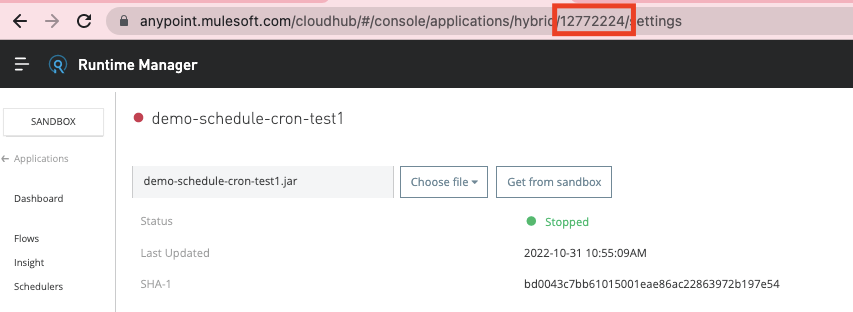
curl --location --request GET 'https://anypoint.mulesoft.com/hybrid/api/v1/applications' \
--header 'X-ANYPNT-ORG-ID: <organizationID>' \
--header 'X-ANYPNT-ENV-ID: <enviromentID>' \
--header 'Authorization: Bearer <token>'
4. Invoke the following curl commands to start or stop the applications in on-prem servers
- To stop an application
curl --location --request PATCH 'https://anypoint.mulesoft.com/hybrid/api/v1/applications/<applicationID>' \
--header 'X-ANYPNT-ORG-ID: <organizationID>' \
--header 'X-ANYPNT-ENV-ID: <enviromentID' \
--header 'Content-Type: application/json' \
--header 'Authorization: Bearer <token>' \
--data-raw '{"desiredStatus":"STOPPED"}'
- To start an application
curl --location --request PATCH 'https://anypoint.mulesoft.com/hybrid/api/v1/applications/<applicationID>' \
--header 'X-ANYPNT-ORG-ID: <organizationID>' \
--header 'X-ANYPNT-ENV-ID: <enviromentID' \
--header 'Content-Type: application/json' \
--header 'Authorization: Bearer <token>' \
--data-raw '{"desiredStatus":"STARTED"}'
- To check the application status
curl --location --request GET 'https://anypoint.mulesoft.com/hybrid/api/v1/applications/<applicationID>' \
--header 'X-ANYPNT-ORG-ID: <organizationID>' \
--header 'X-ANYPNT-ENV-ID: <enviromentID>' \
--header 'Authorization: Bearer <token>'
- To delete an application
curl --location --request DELETE 'https://anypoint.mulesoft.com/hybrid/api/v1/applications/<applicationID>' \
--header 'X-ANYPNT-ORG-ID: <organizationID>' \
--header 'X-ANYPNT-ENV-ID: <enviromentID>' \
--header 'Authorization: Bearer <token>'
ADDITIONAL DOCUMENTS
Creating connected app and getting the bearer token example
Minimum permission for hybrid deployment using Runtime Manager UI or Mule Maven Plugin
Runtime Manager REST Services
Knowledge-artikelnummer
001119911
Löste denna artikel ditt problem?
Berätta för oss vad vi kan förbättra!
