Выбрать организацию
Azure Service Bus Connector Receive Batch operation times out when there are no records in the topic
Дата публикации: Jul 25, 2025
Решение
SYMPTOM
The Azure Service Bus connector receives a timeout when no messages are received from the topic during the specified response timeout value.INFO 2022-04-29 11:17:01,555 [pool-14-thread-14] [processor: ; event: ] com.microsoft.azure.servicebus.primitives.CoreMessageReceiver: No messages received from 'test-topic/Subscriptions/test-subscription'. Pending receive request timed out. Returning null to the client. ERROR 2022-04-29 11:17:01,569 [[MuleRuntime].uber.15: [00327583-azure-batch].azure-batchFlow1.BLOCKING @4d344f2a] [processor: azure-batchFlow1/processors/0/processors/0; event: 704e1760-c7a5-11ec-bfeb-88665a052364] org.mule.runtime.core.internal.exception.OnErrorContinueHandler: ******************************************************************************** Message : Operation timed out Element : azure-batchFlow1/processors/0/processors/0 @ 00327583-azure-batch:azure-batch.xml:18 (Receive Batch) Element DSL : <azure-service-bus-messaging:receive-batch doc:name="Receive Batch" doc:id="e0eb2d8f-d5be-40db-b09c-f09fcb482c20" config-ref="Azure_Service_Bus_Messaging_Connector_Config" destinationName="test-topic" maxMessageCount="10" subscriptionName="test-subscription"></azure-service-bus-messaging:receive-batch> Error type : AZURE-SERVICE-BUS-MESSAGING:OPERATION_TIMEOUT FlowStack : at azure-batchFlow1(azure-batchFlow1/processors/0/processors/0 @ 00327583-azure-batch:azure-batch.xml:18 (Receive Batch)) (set debug level logging or '-Dmule.verbose.exceptions=true' for everything) ********************************************************************************
CAUSE
This is expected and is a result of the behavior of the Azure Service Bus library. The request will wait for the time specified in the 'response timeout' field in the connector configuration and if no messages are received during this time, null will be returned to the client ad the request will time out.SOLUTION
As this behavior comes from the Azure Service Bus library, we must handle the timeout error in order to continue processing in the flow (if desired). Please see an example of how this can be achieved below: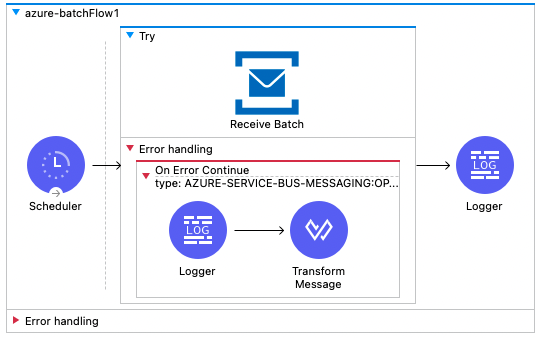
<try doc:name="Try" doc:id="815cfc57-414b-4cbd-ac7b-6126b4279051" >
			<azure-service-bus-messaging:receive-batch doc:name="Receive Batch" doc:id="e0eb2d8f-d5be-40db-b09c-f09fcb482c20" config-ref="Azure_Service_Bus_Messaging_Connector_Config" destinationName="test-topic" maxMessageCount="10" subscriptionName="test-subscription" />
			<error-handler >
				<on-error-continue enableNotifications="true" logException="true" doc:name="On Error Continue" doc:id="1ee60880-a0cc-4529-bf32-1d51d3e547fe" type="AZURE-SERVICE-BUS-MESSAGING:OPERATION_TIMEOUT">
					<logger level="INFO" doc:name="Logger" doc:id="45df0d29-3cc4-4aed-8a5a-17fc46ae94c8" message="No Messages Found"/>
					<ee:transform doc:name="Transform Message" doc:id="bbd76f2a-c352-4d2d-abea-ed154eaee00b" >
						<ee:message >
							<ee:set-payload ><![CDATA[%dw 2.0
output application/java
---
[]]]></ee:set-payload>
						</ee:message>
					</ee:transform>
				</on-error-continue>
			</error-handler>
		</try>
Номер статьи базы знаний
001120091
Эта статья решила вашу проблему?
Оставьте свой отзыв, чтобы мы могли стать лучше!
