Sélectionner une organisation
CloudHub Persistent Queues Explained
Date de publication: Jul 1, 2025
Résolution
What is CloudHub Persistent Queues?
CloudHub Persistent Queues is a Cloud Service that allows messages that are published to VM queues to be stored externally to the application. This feature is directly tied into the CloudHub Fabric (Multi-worker) feature and is part of CloudHub's high availability infrastructure. When CloudHub Persistent Queues is enabled, it allows a developer to design VM queues in such a way that payloads can be shared across different workers, for the purposes of load distribution. In the case of a failure of one of the workers in a multi-worker deployment, messages on the queues are able to be consumed by other working workers, ensuring continuity of service.
Note: When the "Persistent Queues" option is enabled for a CloudHub application, a persistent queue is always provisioned in the backend cloud service, regardless of whether the VM queue type is configured as transient or persistent.
How to enable CloudHub Persistent Queues?
CloudHub Persistent queues can be enabled on a per application basis, and the option is found in Runtime Manager --> Application --> Settings page. If your organisation has the entitlement you may also choose to encrypt the persistent queues for added security. This feature is only available for customers who have Platinum and above subscriptions. For customers on lower subscriptions, you will not be able to enable this feature.
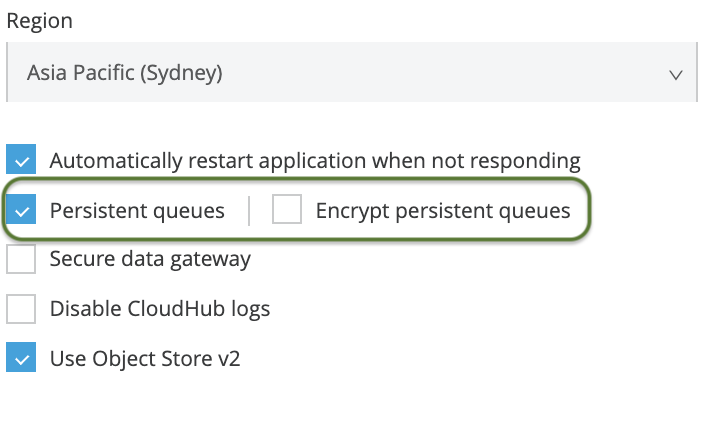
Use Cases for CloudHub Persistent Queues
CloudHub Persistent Queues is a specific feature for a specific task. It's design is solely to enable the capability to share payloads across multi-worker application deployments. It should only be used for this purpose. Enabled for this use-case, CloudHub Persistent Queues will improve HA resiliency and performance due to the load distribution and sharing capabilities.
Use Cases Not Suitable for CloudHub Persistent Queues
Reliability Patterns. CloudHub Persistent Queues should not be confused with traditional Mule Persistent VM queues. While Mule Persistent VM queues were intended to be part of a reliability pattern solution, this was never the intention for CloudHub Persistent Queues. The strong recommendation is that CloudHub Persistent Queues should not be considered as the feature to use when designing a Reliability pattern in CloudHub. With that said, CloudHub Persistent queues should never be enabled for single worker applications. For a true reliability pattern, the queues used should be an enterprise grade message broker, examples include Anypoint MQ, ActiveMQ, IBM MQ, or other equivalent JMS or AMQP broker.
Limitations of CloudHub Persistent Queues
Performance. Applications with CloudHub Persistent Queues will process messages up-to or more than 10x slower than not using CloudHub Persistent Queues. The performance is further significantly decreased if using the Encryption option. The reason for this is because CloudHub Persistent Queues uses a network attached store, which has both network latency and physical limitations in terms of read / write speed. When the "Persistent Queues" checkbox is unticked, VM queues will be stored either in-memory or local file system based on the VM config setting (TRANSIENT or PERSISTENT) and the Batch job will use local file system based Persistent Queues on the worker.
Mule 3 vs Mule 4. For Mule 3 deployed applications, enabling CloudHub Persistent Queues will persist both developer designed VM Queues and also Mule 3 internal SEDA queues. For this reason, the performance impact may be greater than anticipated. Mule 4 improved architecture avoids this.
One time only message delivery. One time only message delivery cannot be guaranteed with CloudHub Persistent Queues. Duplicate messages can be sent. If your solution requires strict one time only delivery, do not use CloudHub Persistent Queues.
Message retention. CloudHub Persistent Queues will retain messages for 4 days. This retention period is not customisable. Because of this CloudHub Persistent Queues should not be used for any long term storage.
Batch Jobs. Mule Batch Jobs internally make use of queues. When CloudHub Persistent Queues is enabled for an application with Batch processors, severe performance degradation will occur. Batch also has its own set of limitations incurred if using CloudHub Persistent Queues. The significant one being that message reliability is not guaranteed. Message loss can still occur in the case of application restart (intentional or unintentional restarts). This limitation means there is no benefit from having CloudHub Persistent Queues enabled for a batch application. CloudHub Persistent Queues should not be enabled if the application has batch processors. Mule Batch Process and CloudHub Persistent Queues
XA Transactions. In specific situations there are chances that a XA transaction will fail to be successfully rolled back. Please refer to the reference documentation below if considering using VM Queues + CloudHub Persistent Queues + XA transactions.
Reference Documentation:
https://docs.mulesoft.com/runtime-manager/cloudhub-fabric#persistent-queues
Numéro d’article de la base de connaissances
001120515
Cet article a-t-il résolu votre problème ?
Dites-nous ce que nous pouvons améliorer !
